
PDF.js 深入浅出 6: initDocument
2026年10月25日 · StreamPDF Team
前言
initDocument 会开始解析 PDF 的一些数据, 所以本篇文章将触及到 PDF 的二进制流数据, 本文不仅仅涉及到 PDF.js, 还会涉及到了 PDF 的文件格式规范.
该方法的调用链请参考本系列的第二篇文章, 其在 https://streampdf.com/blog/pdfjs-deep-dive-2-get_document-get_page#:~:text=Entering%20Worker%3A%20on%20Ready%20%E2%86%92%20pdfManagerReady%20%E2%86%92%20loadDocument 章节调用到这里.
initDocument
async initDocument(recoveryMode) {
  await this.ensureDoc("checkHeader");
  await this.ensureDoc("parseStartXRef");
  await this.ensureDoc("parse", [recoveryMode]);

  // Check that at least the first page can be successfully loaded,
  // since otherwise the XRef table is definitely not valid.
  await this.ensureDoc("checkFirstPage", [recoveryMode]);
  // Check that the last page can be successfully loaded, to ensure that
  // `numPages` is correct, and fallback to walking the entire /Pages-tree.
  await this.ensureDoc("checkLastPage", [recoveryMode]);
}
checkHeader
进入 initDocument -> PDFDocument.checkHeader
// Find the header, get the PDF format version and setup the
// stream to start from the header.
checkHeader() {
  const stream = this.stream;
  stream.reset();

  if (!find(stream, PDF_HEADER_SIGNATURE)) {
    // May not be a PDF file, but don't throw an error and let
    // parsing continue.
    return;
  }
  stream.moveStart();

  // Skip over the "%PDF-" prefix, since it was found above.
  stream.skip(PDF_HEADER_SIGNATURE.length);
  // Read the PDF format version.
  let version = "",
    ch;
  while (
    (ch = stream.getByte()) > /* Space = */ 0x20 &&
    version.length < /* MAX_PDF_VERSION_LENGTH = */ 7
  ) {
    version += String.fromCharCode(ch);
  }

  if (PDF_VERSION_REGEXP.test(version)) {
    this.#version = version;
  } else {
    warn(`Invalid PDF header version: ${version}`);
  }
}
一个 PDF 文件会有一个 PDF 头, 用于标识 PDF 文件的开始, 并且会包含 PDF 文件的版本信息.
空口无凭, 我们手工构造一个最简单但完全合法的 PDF 文件. 它只有一页, 且这一页什么都不画, 全部 329 字节, 用文本编辑器就能写出来:
%PDF-1.4
1 0 obj
<< /Type /Catalog /Pages 2 0 R >>
endobj
2 0 obj
<< /Type /Pages /Kids [3 0 R] /Count 1 >>
endobj
3 0 obj
<< /Type /Page /Parent 2 0 R /MediaBox [0 0 612 792] >>
endobj
xref
0 4
0000000000 65535 f
0000000009 00000 n
0000000058 00000 n
0000000115 00000 n
trailer
<< /Size 4 /Root 1 0 R >>
startxref
186
%%EOF
把这份文件喂给 PDF.js, 它能正常解析: numPages 为 1, 页面尺寸 612 x 792 (单位是 pt, 72 pt = 1 英寸, 也就是 US Letter 纸张大小), 报告的版本为 1.4.
header
文件的前 9 个字节就是上文 checkHeader 要找的东西. 用十六进制查看:
25 50 44 46 2d 31 2e 34 0a %PDF-1.4\nfind(stream, PDF_HEADER_SIGNATURE) 会在文件开头 (默认前 1024 字节) 内扫描这 5 个字节的签名 25 50 44 46 2d, 即 %PDF-. 找到签名后, 跳过 %PDF- 前缀, 继续读出 1.4 存入 this.#version. 版本号声明了该文件遵循哪个版本的规范, 阅读器据此决定可以启用哪些特性.
%PDF- 头部由 PDF 规范的文件结构章节定义: ISO 32000-1:2008 的 7.5.2 "File Header" (印刷页 39) 规定 "The first line of a PDF file shall be a header consisting of the 5 characters %PDF- followed by a version number of the form 1.N". 不过规范说的是 "第一行", 而 Adobe 的 PDF Reference 在附录 H 的实现注释 13 (印刷页 1102, 注解 3.4.1 "File Header" 一节) 里补充了实现层面的宽容: "Acrobat viewers require only that the header appear somewhere within the first 1024 bytes of the file" —— 因为一些工具会在文件最前面拼接自己的内容. find 的 1024 字节扫描限制正是沿袭了 Acrobat 的这一行为.
parseStartXRef
get startXRef() {
  const stream = this.stream;
  let startXRef = 0;

  if (this.linearization) {
    // Find the end of the first object.
    stream.reset();
    if (find(stream, ENDOBJ_SIGNATURE)) {
      stream.skip(6);

      let ch = stream.peekByte();
      while (isWhiteSpace(ch)) {
        stream.pos++;
        ch = stream.peekByte();
      }
      startXRef = stream.pos - stream.start;
    }
  } else {
    // Find `startxref` by checking backwards from the end of the file.
    const step = 1024;
    const startXRefLength = STARTXREF_SIGNATURE.length;
    let found = false,
      pos = stream.end;

    while (!found && pos > 0) {
      pos -= step - startXRefLength;
      if (pos < 0) {
        pos = 0;
      }
      stream.pos = pos;
      found = find(stream, STARTXREF_SIGNATURE, step, true);
    }

    if (found) {
      stream.skip(9);
      let ch;
      do {
        ch = stream.getByte();
      } while (isWhiteSpace(ch));
      let str = "";
      while (ch >= /* Space = */ 0x20 && ch <= /* '9' = */ 0x39) {
        str += String.fromCharCode(ch);
        ch = stream.getByte();
      }
      startXRef = parseInt(str, 10);
      if (isNaN(startXRef)) {
        startXRef = 0;
      }
    }
  }
  return shadow(this, "startXRef", startXRef);
}
parseStartXRef 方法本身只有一行, 真正的逻辑都在上面的 startXRef getter 里 —— 它的任务是回答一个问题: 从哪个偏移开始解析 xref.
// Source: src/core/document.js
parseStartXRef() {
  this.xref.setStartXRef(this.startXRef);
}
为什么要从文件尾部找
PDF 支持增量更新: 每次更新都把新的 xref 和 trailer 追加到文件尾部, 因此最后一个 startxref 指向的才是最新状态. ISO 32000-1:2008 的 7.5.5 "File Trailer" (印刷页 42) 甚至明说了阅读器的正确姿势: "Conforming readers should read a PDF file from its end."
倒序窗口扫描
看非线化分支的扫描循环: step = 1024, STARTXREF_SIGNATURE 是 9 个字节的 startxref (73 74 61 72 74 78 72 65 66). 每轮 pos -= step - startXRefLength, 即窗口每次向左挪 1015 字节, 相邻窗口重叠 9 字节 —— 恰好是签名的长度. 这是为了防止 startxref 恰好横跨两个窗口时被漏掉: 无论签名卡在哪个位置, 必有某个完整窗口包含它. find 的第四个参数 backwards = true 表示从窗口右端往左找, 找到后把 stream.pos 定位到签名起始处.
随后 stream.skip(9) 跳过签名, 跳过空白符, 把后续字节收集进 str (条件 ch >= 0x20 && ch <= 0x39 覆盖空白和数字), 最后 parseInt 得到偏移. 若文件尾部没有合法的 startxref, 返回 0 —— 偏移 0 处是文件头而非 xref, 下一节 parse 必然失败, 从而触发系列第二篇讲过的 recoveryMode 全文件重建索引.
拿我们 329 字节的最小 PDF 对一遍账: 文件一轮扫描就命中, startxref 关键字位于偏移 309, 读出的整数是 186, 正是上一节手工排布的 xref 表偏移:
偏移:  186     275       309         319  323
       xref    trailer   startxref   186  %%EOF
       ^                             |
       └───────── 186 指回这里 ──────┘
线性化分支
this.linearization 由 Linearization.create 计算: 在文件头原位解析前几个 token, 若恰好构成 N G obj << /Linearized 1 /L 文件总长 ... >> 且 /L 等于文件实际长度, 则认定这是一个线性化 PDF (Linearized PDF, 俗称"快速 Web 视图"), 否则返回 null.
线性化是 PDF 规范为网络场景设计的文件布局 (ISO 32000-1:2008 Annex F): 第一页所需的数据被搬到文件最前面, 线性化参数字典就是文件里的第一个对象, 紧跟其后的就是 first-page xref. 所以线性化文件无需去尾部找起点 —— 找到第一个 endobj (ENDOBJ_SIGNATURE, 6 字节, 仍在前 1024 字节内), 跳过它和空白, 当前位置就是 first-page xref 的偏移. 阅读器只需下载文件头部就能渲染第一页, 这也是 StreamPDF 流式加载最理想面对的文件形态.
shadow: 只算一次
最后 return shadow(this, "startXRef", startXRef). shadow 是 util.js 里的工具函数, 用 Object.defineProperty 把计算结果固化为实例自身的同名属性, 后续访问直接命中属性而不再进入 getter. 扫描文件尾部是有成本的, 而偏移不会变, 缓存一次即可. PDF.js 的惰性解析几乎都靠这个函数, 前文的 linearization getter 也是同样写法.
parse
parse(recoveryMode) {
  this.xref.parse(recoveryMode);
  this.catalog = new Catalog(this.pdfManager, this.xref);
}
PDFDocument.parse 做两件事: 让 XRef 解析交叉引用表, 然后基于它构建 Catalog. 重头戏在 XRef.parse (src/core/xref.js):
parse(recoveryMode = false) {
  this.#parsedWithRecovery = recoveryMode;
  let trailerDict;
  if (!recoveryMode) {
    trailerDict = this.readXRef();
  } else {
    warn("Indexing all PDF objects");
    trailerDict = this.indexObjects();
  }
  trailerDict.assignXref(this);
  this.trailer = trailerDict;

  // ... 检查 "Encrypt" → 构建 CipherTransformFactory ...

  // ... 检查 "Root" → 必须能读到 /Pages 才算通过 ...
  if (!recoveryMode) {
    throw new XRefParseException();
  }
  throw new XRefParseException("Invalid PDF structure");
}
readXRef: 沿 /Prev 链回溯
parseStartXRef 往 startXRefQueue 里放了一个偏移 (最后一个 startxref), readXRef 就是消费这个队列的循环 (src/core/xref.js#L732):
- 跳到偏移处开始解析: 如果读到
xref关键字, 按经典的 xref 表处理 (我们手工构造的例子就是这种); 如果读到整数, 按 PDF 1.5 引入的交叉引用流 (xref stream) 处理, 它本质上是个压缩的对象流; - 解析完当前 section 后, 把 trailer 字典里的
/Prev(上一代更新的 xref 偏移) 压回队列, 继续循环 —— 这样就从最新的 xref 一路回溯到文件最初的状态; 顺便还兼容了不合规的/Prev NNN 0 R写法, 以及混合引用文件的/XRefStm; - 已解析过的偏移会记入缓存, 防止损坏文件的
/Prev成环导致死循环; - 最终返回最顶层的 (最新的) trailer 字典.
收尾: Encrypt 与 Root
拿到 trailer 字典后, XRef.parse 做两个关键检查:
/Encrypt: 存在则用文件/ID和用户密码构建CipherTransformFactory, 后续所有字符串和流都要经它解密;/Root: 取出 Catalog 字典, 且必须能从中读到/Pages—— 页面树是文档的命脉, 读不到就等于文档结构无效.
任一检查失败且当前不是 recoveryMode, 就抛出 XRefParseException. 这个异常会沿着调用链一路抛回 Worker 层的 loadDocument, 也就是系列第二篇讲过的: 请求缺失数据、以 recoveryMode = true 重试, indexObjects() 放弃 xref 索引、从头到尾扫描整个文件把每个 N G obj ... endobj 都编上号. 换句话说, xref 表只是加速结构, 丢了也能重建, 这正是 PDF.js 容错能力的基础.
Catalog
回到 PDFDocument.parse, xref 解析成功后 new Catalog(this.pdfManager, this.xref) 只是包住了 xref 引用, 并不立刻遍历页面树 —— /Pages 的展开是惰性的, 推迟到 getPage 时才发生. 而下一节的 checkFirstPage 会在初始化阶段就验证第一页真的能加载出来.
checkFirstPage
async checkFirstPage(recoveryMode = false) {
  if (recoveryMode) {
    return;
  }
  try {
    await this.getPage(0);
  } catch (reason) {
    if (reason instanceof XRefEntryException) {
      // Clear out the various caches to ensure that we haven't stored any
      // inconsistent and/or incorrect state, since that could easily break
      // subsequent `this.getPage` calls.
      this.#pagePromises.delete(0);
      await this.cleanup();

      throw new XRefParseException();
    }
  }
}
XRef.parse 的成功只代表 xref 表自洽, 不代表它正确. checkFirstPage 的存在来自一个朴素的洞察: 有些损坏的 PDF, xref 表看起来完全合法, parse 一路绿灯, 直到真正去取对象时才爆雷. 这个检查由 commit 60bcce184 (2018, 修复 issue 7496 和 10326) 引入, 当时的两种踩雷案例:
- 编辑器修改了文件却没有同步更新 xref 表 (issue 7496);
- 生成器按偏移而不是按对象号给 xref 表排序, 条目全错位 (issue 10326).
与其等用户渲染时崩溃, 不如加载阶段就拿第一页当试金石. 选第一页的理由 commit 里写得很直白: 查看器的默认场景下, 第一页加载不出来等于什么都干不了 (BaseViewer.setDocument 完全依赖第一页), 而盲目挑一个没有语义的对象来验证没有意义. 就算第一页通过了也不能保证整个 xref 有效, 但连第一页都过不了, 基本可以断定文档无效.
代码走读
async checkFirstPage(recoveryMode = false) {
  if (recoveryMode) {
    return; // 已经全文件重建过索引, 无需再验证
  }
  try {
    await this.getPage(0); // 注意: Worker 层用 0 起始的 pageIndex, API 层才是从 1 开始的 pageNumber
  } catch (reason) {
    if (reason instanceof XRefEntryException) {
      // Clear out the various caches to ensure that we haven't stored any
      // inconsistent and/or incorrect state, since that could easily break
      // subsequent `this.getPage` calls.
      this.#pagePromises.delete(0);
      await this.cleanup();

      throw new XRefParseException();
    }
  }
}
this.getPage(0) 与用户调用走完全相同的链路: 查 #pagePromises 缓存 → 线性化文件走 #getLinearizationPage, 否则 catalog.getPageDict(0) 沿页面树逐层查找 → new Page(...). 这条链路会按 xref 条目真实地 fetch 对象, 正是验证目的所在.
XRefEntryException 由 xref 的取对象阶段抛出, 典型场景 (src/core/xref.js):
- 条目里的代数与请求的代数不一致 (L914, 之前还有一个
_generationFallback机制会先尝试回退到旧代数); - seek 到条目偏移处, 读到的不是
num gen obj三元组 (L928) —— 上述两个 issue 就是这种; - 压缩 xref 流里的条目损坏 (L1037).
为什么失败后要先清缓存
细节在 getPage 的实现里: promise 在进入回调前就已写入 #pagePromises (L1720), 失败后这个 rejected promise 会一直留在缓存里 —— 不删掉的话, recoveryMode 重建索引后再次调用 getPage(0) 会永远命中同一次失败. 所以先 #pagePromises.delete(0), 再 cleanup() 清掉 catalog 层及各全局缓存, 避免半解析状态污染后续调用. 最后升级成 XRefParseException 抛出, 接回系列第二篇讲过的 recoveryMode 重试链路.
另外注意 catch 只拦截 XRefEntryException, 其他异常 (例如流式加载时数据尚未就绪) 在这里被直接忽略 —— 这个方法只回答一个问题: xref 条目可信吗.
成本方面, commit 的测算结论是: 几乎没有额外解析 (最多遍历一部分页面树), 但会提前拉取更多数据, 略微推迟 getDocument 完成的时机; 而由于 getPage 的结果已缓存, 用户随后真正的第一次 getPage(0) 是免费的.
checkLastPage
async checkLastPage(recoveryMode = false) {
  const { catalog, pdfManager } = this;

  catalog.setActualNumPages(); // Ensure that it's always reset.
  let numPages;

  try {
    await Promise.all([
      pdfManager.ensureDoc("xfaFactory"),
      pdfManager.ensureDoc("linearization"),
      pdfManager.ensureCatalog("numPages"),
    ]);

    if (this.xfaFactory) {
      return; // The Page count is always calculated for XFA-documents.
    } else if (this.linearization) {
      numPages = this.linearization.numPages;
    } else {
      numPages = catalog.numPages;
    }

    if (!Number.isInteger(numPages)) {
      throw new FormatError("Page count is not an integer.");
    } else if (numPages <= 1) {
      return;
    }
    await this.getPage(numPages - 1);
  } catch (reason) {
    // Clear out the various caches to ensure that we haven't stored any
    // inconsistent and/or incorrect state, since that could easily break
    // subsequent `this.getPage` calls.
    this.#pagePromises.delete(numPages - 1);
    await this.cleanup();

    if (reason instanceof XRefEntryException && !recoveryMode) {
      throw new XRefParseException();
    }
    warn(`checkLastPage - invalid /Pages tree /Count: ${numPages}.`);

    let pagesTree;
    try {
      pagesTree = await catalog.getAllPageDicts(recoveryMode);
    } catch (reasonAll) {
      if (reasonAll instanceof XRefEntryException && !recoveryMode) {
        throw new XRefParseException();
      }
      catalog.setActualNumPages(1);
      return;
    }

    for (const [pageIndex, [pageDict, ref]] of pagesTree) {
      let promise;
      if (pageDict instanceof Error) {
        promise = Promise.reject(pageDict);

        // Prevent "uncaught exception: Object"-messages in the console.
        promise.catch(() => {});
      } else {
        promise = Promise.resolve(
          new Page({
            pdfManager,
            xref: this.xref,
            pageIndex,
            pageDict,
            ref,
            globalIdFactory: this._globalIdFactory,
            fontCache: catalog.fontCache,
            builtInCMapCache: catalog.builtInCMapCache,
            standardFontDataCache: catalog.standardFontDataCache,
            globalColorSpaceCache: this.globalColorSpaceCache,
            globalImageCache: catalog.globalImageCache,
            systemFontCache: catalog.systemFontCache,
            nonBlendModesSet: catalog.nonBlendModesSet,
            xfaFactory: null,
          })
        );
      }

      this.#pagePromises.set(pageIndex, promise);
    }
    catalog.setActualNumPages(pagesTree.size);
  }
}
checkLastPage 是 initDocument 的最后一步, 故事线与 checkFirstPage 一脉相承 —— 它正是 commit d0c4bbd82 (2021, 修复 issue 14303) 引入的, commit message 开头就自我介绍: "This patch basically extends the approach from PR 10392, by also checking the last page" (PR 10392 就是上一节的 checkFirstPage).
要验的东西不同: checkFirstPage 验的是 xref 条目, checkLastPage 验的是页面树根节点的 /Count. catalog.numPages 长期以来无条件信任它 (src/core/catalog.js#L753):
get numPages() {
  return this.#actualNumPages ?? this._pagesCount; // _pagesCount 就是 /Count
}
但 issue 14303 的样本证明 /Count 可以完全错误 —— 页面树里根本没有那么多页. 错误的 numPages 会让后续解析在 Worker 线程里崩坏甚至挂死浏览器. 而验证它的办法 commit 里也写得明白: "parse the entire /Pages-tree and essentially counting the pages" —— 没有捷径, 只能数.
happy path: 相信 /Count 的前提下
catalog.setActualNumPages(); // Ensure that it's always reset.开头先重置 #actualNumPages —— 因为 recoveryMode 重试会再跑一次 checkLastPage, 上一次失败留下的真实页数必须先清掉.
随后三路并行拉取 xfaFactory、linearization、numPages (ensureDoc/ensureCatalog 负责处理 MissingDataException, 也就是系列第二篇的 range request 重试), 然后按优先级取页数:
- XFA 文档: 页数由 XFA 表单机制计算,
/Count不作数, 直接 return; - 线性化文件: 线性化参数字典自带页数提示, 信它, 免得动页面树;
- 其余: 用
catalog.numPages(即/Count).
numPages <= 1 时直接 return —— 唯一的那一页已经在前一步被 checkFirstPage 真实验证过了. 页数大于 1, 就 await this.getPage(numPages - 1), 把最后一页真实加载一次: 页面树是逐层展开的, 树里任何一环损坏都会在这条链路上爆出来.
catch: /Count 撒谎之后
catch 里的逻辑分两层. 第一层和 checkFirstPage 相同: 清缓存 (#pagePromises.delete(numPages - 1) + cleanup()), 遇到 XRefEntryException 且非 recoveryMode 就升级成 XRefParseException —— 条目级损坏可能意味着 xref 表整体不可信.
第二层是真正的兜底: 若失败原因是 /Count 本身不可靠 (FormatError("Page count is not an integer.") 或按 /Count 走不到最后一页), warn 之后干脆放弃 /Count, 改为数页面树:
pagesTree = await catalog.getAllPageDicts(recoveryMode);getAllPageDicts: 把整棵页面树数一遍
catalog.js#L1441 的 getAllPageDicts 用一个显式栈 (queue + posInKids) 深度遍历整棵 /Pages 树, visitedNodes 记录访问过的节点引用防环, 产出一个 Map: pageIndex → [pageDict, pageRef]. 两个细节值得注意:
- 单页损坏不拖垮全树:
addPageError把出错的条目作为[error, null]存进 Map, 而不是中断遍历; 唯独XRefEntryException且非 recoveryMode 时才向上抛 (交给外层升级成 XRefParseException). recoveryMode + ignoreErrors 时第一页出错甚至会被替换成空字典, 保证 viewer 无论如何都能打开 (issue15590.pdf); - 顺带做索引: 填充
pageIndexCache(Ref → pageIndex), 后续getPageIndex这类反向查询可以直接命中.
如果连全树遍历都失败且非 recoveryMode, 同样升级为 XRefParseException; 否则 setActualNumPages(1) —— 极端损坏时摆烂, 就当文档只有一页.
预热: 从惰性到一次性展开
遍历成功的收尾是把结果预热进缓存:
for (const [pageIndex, [pageDict, ref]] of pagesTree) {
  let promise;
  if (pageDict instanceof Error) {
    promise = Promise.reject(pageDict);
    promise.catch(() => {}); // 防 unhandled rejection 警告
  } else {
    promise = Promise.resolve(
      new Page({
        /* ... */
      }),
    );
  }
  this.#pagePromises.set(pageIndex, promise);
}
catalog.setActualNumPages(pagesTree.size);
所有页面 (包括失败的, 以 rejected promise 的形式) 一次性填进 #pagePromises, 并以真实清点结果 pagesTree.size 覆盖页数. 回看上面的 numPages getter —— #actualNumPages ?? _pagesCount, 从此 numPages 返回的是数出来的真话, 而 document.numPages 会优先采用它. 有趣的对比: 正常 PDF 的页面树全程惰性 (目录树按需展开), 只有 /Count 撒谎的坏文件才会被一次性展开预热 —— 健康时懒惰, 生病时体检.
至此 initDocument 五步走完: 版本号就位、xref 起点锁定、交叉引用解析、第一页试金石、页数可信. 文档结构就绪, GetDocRequest 可以返回给主线程了.
总结
本篇我们逐一走完了 initDocument 的五个步骤(完整流程图如下):
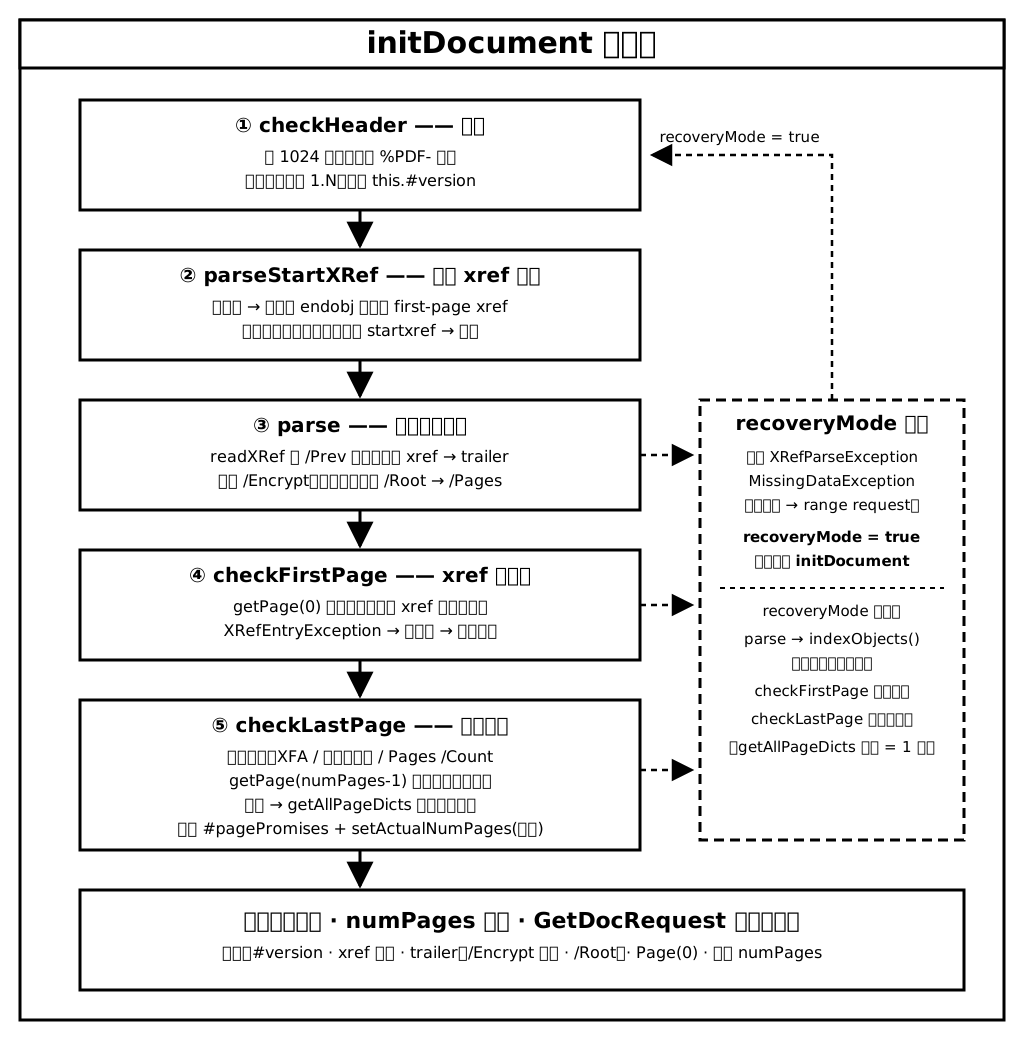
- checkHeader → 前 1024 字节内找到
%PDF-签名,读出1.N版本号存入#version(ISO 32000-1 §7.5.2,1024 字节的宽容来自 Adobe 实现注释 13)。 - parseStartXRef → 线性化文件从第一个
endobj之后取 first-page xref;普通文件从文件尾倒序扫描startxref。增量更新决定了必须从尾部读(§7.5.5)。 - parse →
readXRef沿/Prev链回溯各代 xref 得到 trailer,检查/Encrypt与/Root → /Pages;失败则 recoveryMode 下indexObjects()全文件重建索引。 - checkFirstPage →
getPage(0)当试金石,验证 xref 条目真实可用(commit 60bcce184)。 - checkLastPage → 验证最后一页;
/Count撒谎就用getAllPageDicts数整棵树,以真实页数覆盖numPages(commit d0c4bbd82)。
五步背后是三条一以贯之的设计原则:
- 从尾部读。增量更新把最新状态追加在文件尾,xref 起点、trailer、页数的权威来源都在尾部,所以整条初始化链路是「从尾向头」的。
- 信任但验证。xref 表自洽不代表正确,
/Count是整数不代表页数对。两道 check 都用同一个笨办法——真实取一次对象——来验证声明,宁可初始化多花一点时间,也不把坏状态留给渲染阶段。 - 永远有 Plan B。xref 表可以全文件扫描重建(
indexObjects),页数可以整树数出来(getAllPageDicts),极端情况下甚至把文档当作只有一页。健康的文件走快路,损坏的文件走慢路,但总能打开。
回到 StreamPDF 关心的流式场景:线性化文件是理想形态——读完文件头部就能渲染第一页;而普通文件至少要等尾部字节到位才能锁定 xref 起点,这正是上一篇 range request 分段加载如此重要的原因。
下一篇,我们深入 parse 留下的细节:xref 表与 xref stream 的两种形态。