
PDF.js Deep Dive 2: getDocument & getPage
October 19, 2026 · StreamPDF Team
Introduction
This is the second article in the PDF.js Deep Dive series, continuing from the architecture overview in article 1. We'll dive into the Display layer and trace the execution paths of getDocument and getPage. All code snippets in this article are based on PDF.js v6.3.289.
The getDocument Method
Step 1: Create the loading task and global ID generator
// Source: src/display/api.js
const task = new PDFDocumentLoadingTask();
const { docId } = task;
PDFDocumentLoadingTask also doubles as PDF.js's global ID generator — the docId it produces is used to identify this document throughout the worker.
Step 2: Process user parameters
const url = src.url ? getUrlProp(src.url) : null;
const data = src.data ? getDataProp(src.data) : null;
const httpHeaders = src.httpHeaders || null;
const withCredentials = src.withCredentials === true;
const password = src.password ?? null;
// ...
const transportFactory = {
  canvasFactory: new CanvasFactory({ ownerDocument, enableHWA }),
  filterFactory: new FilterFactory({ docId, ownerDocument }),
  binaryDataFactory:
    (typeof PDFJSDev !== 'undefined' && PDFJSDev.test('MOZCENTRAL')) || useWorkerFetch
      ? null
      : new BinaryDataFactory({ cMapUrl, standardFontDataUrl, wasmUrl }),
};
Step 3: Create the Worker
if (!worker) {
  // Worker was not provided -- creating and owning our own. If message port
  // is specified in global worker options, using it.
  worker = PDFWorker.create({
    verbosity,
    port: GlobalWorkerOptions.workerPort,
  });
  task._worker = worker;
}
Callers can pass in their own Worker instance, but in the common case PDF.js handles Worker creation internally.
PDFWorker is a class; we invoke its static create method.
Entering getDocument → PDFWorker.create
// Source: src/display/api.js
static create(params) {
  const cachedPort = this.#workerPorts.get(params?.port);
  if (cachedPort) {
    if (cachedPort._pendingDestroy) {
      throw new Error(
        "PDFWorker.create - the worker is being destroyed.\n" +
          "Please remember to await `PDFDocumentLoadingTask.destroy()`-calls."
      );
    }
    return cachedPort;
  }
  return new PDFWorker(params);
}
PDFWorker maintains a static #workerPorts Map keyed by port, which caches previously created Worker instances so the same port isn't instantiated twice. If a cached entry exists, it returns it directly; otherwise it constructs a fresh PDFWorker.
Entering getDocument → PDFWorker.create → PDFWorker
// Source: src/display/api.js
constructor({
  name = null,
  port = null,
  verbosity = getVerbosityLevel(),
} = {}) {
  this.name = name;
  this.destroyed = false;
  this.verbosity = verbosity;

  if (port) {
    if (PDFWorker.#workerPorts.has(port)) {
      throw new Error("Cannot use more than one PDFWorker per port.");
    }
    PDFWorker.#workerPorts.set(port, this);
    this.#initializeFromPort(port);
  } else {
    this.#initialize();
  }

  if (typeof PDFJSDev === "undefined" || PDFJSDev.test("TESTING")) {
    // For testing purposes.
    Object.defineProperty(this, "_webWorker", {
      get() {
        return this.#webWorker;
      },
    });
  }
}
Since we don't pass a port, the constructor calls #initialize.
Entering getDocument → PDFWorker.create → PDFWorker → #initialize
if (PDFWorker.#isWorkerDisabled || PDFWorker.#mainThreadWorkerMessageHandler) {
  this.#setupFakeWorker();
  return;
}
let { workerSrc } = PDFWorker;
// ...
if (
  typeof PDFJSDev !== 'undefined' &&
  PDFJSDev.test('GENERIC') &&
  !PDFWorker._isSameOrigin(window.location, workerSrc)
) {
  workerSrc = PDFWorker._createCDNWrapper(new URL(workerSrc, window.location).href);
}
const worker = new Worker(workerSrc, { type: 'module' });
const messageHandler = new MessageHandler('main', 'worker', worker);
// ...
First it checks whether to fall back to a "fake worker" (run PDF parsing on the main thread). In our case we take the normal path, skip the fake-worker branch, and read workerSrc from a static getter.
Entering getDocument → PDFWorker.create → PDFWorker → #initialize → workerSrc
static get workerSrc() {
  if (GlobalWorkerOptions.workerSrc) {
    return GlobalWorkerOptions.workerSrc;
  }
  throw new Error('No "GlobalWorkerOptions.workerSrc" specified.');
}
This is the option we set at startup:
pdfjsLib.GlobalWorkerOptions.workerSrc =
  'https://cdn.jsdelivr.net/npm/pdfjs-dist@6.3.289/build/pdf.worker.min.mjs';
Back to getDocument → PDFWorker.create → PDFWorker → #initialize
Next, PDF.js handles a potential cross-origin issue: if workerSrc and the current page are on different origins, it wraps the URL in a Blob to bypass the Worker origin check. In our demo the worker is same-origin, so we skip this branch.
What is the Worker cross-origin issue?
The browser's native
new Worker(url)only accepts same-origin script URLs. IfworkerSrcpoints to a CDN (e.g.https://cdn.jsdelivr.net/...) that differs from your page's origin, the browser rejects Worker creation outright withFailed to construct 'Worker'.PDF.js's fix is
_createCDNWrapper: it generates a tiny snippet of JS —await import("${url}");— wraps it in aBlob, then callsURL.createObjectURLto produce a blob URL. A blob URL inherits the origin of the page that created it, sonew Worker(blobUrl)looks same-origin to the browser. The wrapper'simportcall itself can load ES modules cross-origin, which gives PDF.js an indirect way around the restriction.In our demo the worker script is same-origin, so
_isSameOriginreturnstrueand this wrapper path is never triggered.
A few lines later the Worker is instantiated as an ES Module:
const worker = new Worker(workerSrc, { type: 'module' });and the main-to-worker communication channel is created:
const messageHandler = new MessageHandler('main', 'worker', worker);MessageHandler is an abstraction that wraps the underlying postMessage-based communication between the main thread and the Worker.
Worker ↔ main handshake
PDF.js then performs a short handshake between the two threads:
const terminateEarly = () => {
  ac.abort();
  messageHandler.destroy();
  worker.terminate();
  if (this.destroyed) {
    this.#capability.reject(new Error('Worker was destroyed'));
  } else {
    // Fall back to fake worker if the termination is caused by an
    // error (e.g. NetworkError / SecurityError).
    this.#setupFakeWorker();
  }
};

const ac = new AbortController();
worker.addEventListener(
  'error',
  () => {
    if (!this.#webWorker) {
      // Worker failed to initialize due to an error. Clean up and fall
      // back to the fake worker.
      terminateEarly();
    }
  },
  { signal: ac.signal },
);

messageHandler.on('test', data => {
  ac.abort();
  if (this.destroyed || !data) {
    terminateEarly();
    return;
  }
  this.#messageHandler = messageHandler;
  this.#port = worker;
  this.#webWorker = worker;

  this.#resolve();
});

messageHandler.on('ready', data => {
  ac.abort();
  if (this.destroyed) {
    terminateEarly();
    return;
  }
  try {
    sendTest();
  } catch {
    // We need fallback to a faked worker.
    this.#setupFakeWorker();
  }
});

const sendTest = () => {
  const testObj = new Uint8Array();
  // Ensure that we can use `postMessage` transfers.
  messageHandler.send('test', testObj, [testObj.buffer]);
};

// It might take time for the worker to initialize. We will try to send
// the "test" message immediately, and once the "ready" message arrives.
// The worker shall process only the first received "test" message.
sendTest();
It listens for error, ready, and test, then calls sendTest immediately to probe the channel.
Let's look at what happens on the Worker side when new Worker(...) is called.
Entering main → new Worker
// Source: src/core/worker.js
static {
  // Worker thread (and not Node.js)?
  if (
    typeof window === "undefined" &&
    !isNodeJS &&
    typeof self !== "undefined" &&
    /* isMessagePort = */
    typeof self.postMessage === "function" &&
    "onmessage" in self
  ) {
    this.initializeFromPort(self);
  }
}
The Worker's entry point is a static block inside WorkerMessageHandler. It detects that it's running in a Worker environment and calls initializeFromPort.
Entering main → new Worker → initializeFromPort
static initializeFromPort(port) {
  const handler = new MessageHandler("worker", "main", port);
  this.setup(handler, port);
  handler.send("ready", null);
}
It creates a MessageHandler for the worker→main direction, calls setup, and then signals ready back to main.
Entering main → new Worker → initializeFromPort → setup
// Source: src/core/worker.js (WorkerMessageHandler.setup)
static setup(handler, port) {
  let testMessageProcessed = false;
  handler.on("test", data => {
    if (testMessageProcessed) {
      return; // we already processed 'test' message once
    }
    testMessageProcessed = true;

    // Ensure that `TypedArray`s can be sent to the worker.
    handler.send("test", data instanceof Uint8Array);
  });

  handler.on("configure", data => {
    setVerbosityLevel(data.verbosity);
  });

  handler.on("GetDocRequest", data => this.createDocumentHandler(data, port));

  if (typeof PDFJSDev === "undefined" || PDFJSDev.test("TESTING")) {
    handler.on("GetWorkerCoverage", function () {
      return globalThis.__coverage__ ?? {};
    });
  }
}
The worker registers handlers for three messages: test, configure, and GetDocRequest. The test handler is one-shot — it sets testMessageProcessed to true and echoes back.
Now back to the main thread: when the Worker's ready arrives, main resends test. But the Worker's testMessageProcessed flag is already true, so the retry is silently discarded. Only the very first test message gets a response. Once main receives that acknowledgement, it calls #resolve(), marking worker.promise as complete.
Here's the full handshake visualized:
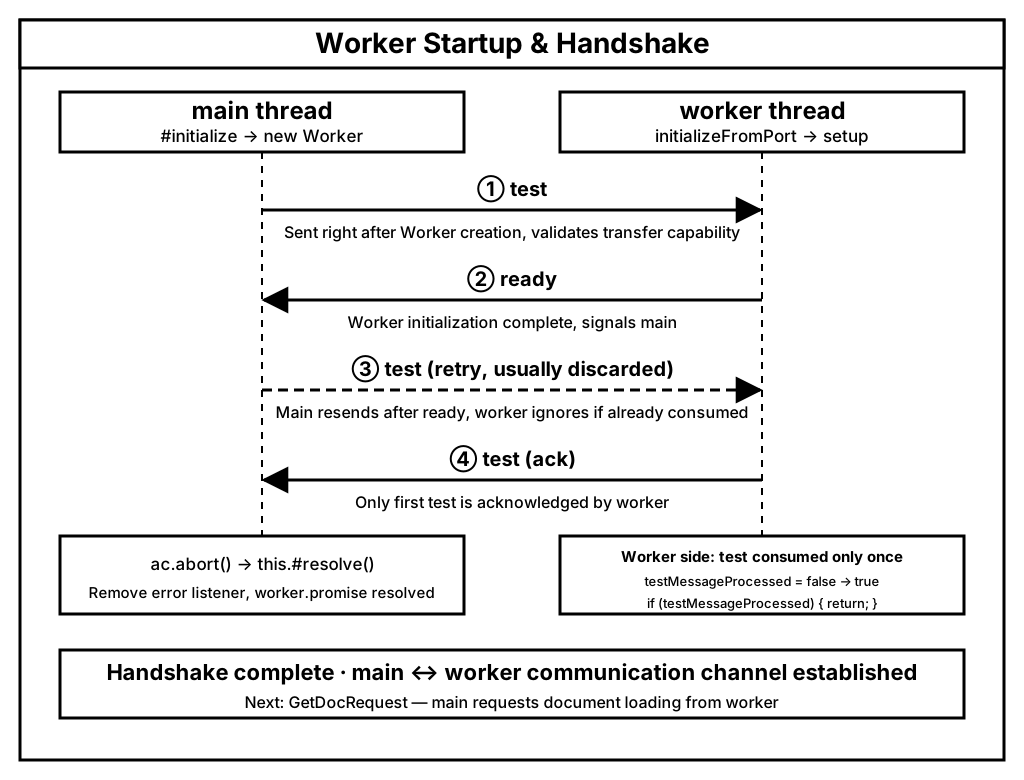
The two vertical lanes represent main (left) and worker (right), with time flowing downward.
① Right after new Worker, main sends a test probe that validates postMessage transfer semantics;
② After finishing initializeFromPort, the worker replies with ready, telling main it is now ready;
③ Main resends test after receiving ready, but the worker only processes the first one — testMessageProcessed is a one-shot switch. This retry (dashed in the diagram) is dropped at if (testMessageProcessed) { return; };
④ The worker responds only to the first test. Main then removes its error listener and calls #resolve(), completing worker.promise.
Q: Which
testmessage is actually consumed, and why is the retry sent? A: The first one is always consumed — the ① probe fired right afternew Worker. On the worker side,testMessageProcessedis a one-shot switch: when the first message arrives, the flag isfalse, so it flips totrueand echoes back atestack. Every subsequenttest(the ③ retry in the diagram) hitsif (testMessageProcessed) { return; }and is silently dropped.Why can we be sure it's the first? Main and worker share a single ordered
MessagePort. The firstsendTest()(right after Worker creation) is guaranteed to be enqueued before the retry triggered byready. The worker only starts dispatching the message queue after its initial script runs andsetup()registers thetesthandler, so that first message is never "missed" — it always hits the one-shot switch.Then why retry at all? The source code comment spells it out: "It might take time for the worker to initialize." The worker starts slower than the caller, and main doesn't know whether it's ready. PDF.js uses a "probe optimistically first + retry after ready" strategy. In the rare case where the first
testisn't dispatched before the switch flips, the retry acts as a fallback. ThetestMessageProcessedflag ensures the retry can't produce a duplicate ack — keeping the whole process idempotent.On top of that,
try { sendTest(); } catch { this.#setupFakeWorker(); }in thereadycallback also acts as a channel health check: if the message can't even be sent, the Worker channel is dead and PDF.js falls back to the fake worker. So the retry is fundamentally about handshake robustness, not about "the second try being the one that works."
Milestone ✅ Worker handshake complete: main creates the Worker thread, confirms the channel works through the
test/ready/testexchange, and the Worker instance is ready.
main → Worker: GetDocRequest
Once the handshake is done, main waits for both the Worker and GPU to be ready — the GPU check (gpuPromise) determines whether certain rendering paths can use hardware acceleration later.
Promise.all([worker.promise, gpuPromise])
  .then(function ([, hasGPU]) {
    if (worker.destroyed) {
      throw new Error("Worker was destroyed");
    }

    docParams.evaluatorOptions.hasGPU = hasGPU;

    const workerIdPromise = worker.messageHandler.sendWithPromise(
      "GetDocRequest",
      docParams,
      data ? [data.buffer] : null
    );
Main sends a GetDocRequest message through the Worker-level messageHandler.
The Worker's handler is registered in setup:
Worker: on GetDocRequest
handler.on('GetDocRequest', data => this.createDocumentHandler(data, port));This triggers createDocumentHandler:
Worker: on GetDocRequest → createDocumentHandler
const workerHandlerName = docId + '_worker';
let handler = new MessageHandler(workerHandlerName, docId, port);
After validating the parameters, it creates a document-specific MessageHandler between main and this document on the worker, registers a long list of message handlers (GetPage, GetDestinations, GetMetadata, GetOutline, Terminate, etc.), and returns workerHandlerName back to main.
Back in getDocument:
} else if (url) {
  if (typeof PDFJSDev !== "undefined" && PDFJSDev.test("MOZCENTRAL")) {
    throw new Error("Not implemented: NetworkStream");
  }
  const NetworkStream = getNetworkStream(url);

  networkStream = new NetworkStream({
    url,
    httpHeaders,
    withCredentials,
    rangeChunkSize,
    disableRange,
    disableStream,
  });
} else {
Since we provided a url, PDF.js instantiates a NetworkStream. It then waits for workerIdPromise to resolve:
return workerIdPromise.then(workerId => {
  if (worker.destroyed) {
    throw new Error('Worker was destroyed');
  }

  const messageHandler = new MessageHandler(docId, workerId, worker.port);
  const transport = new WorkerTransport(
    messageHandler,
    task,
    networkStream,
    transportParams,
    transportFactory,
    pagesMapper,
  );
  task._transport = transport;

  if (task.destroyed) {
    // `destroy()` was called during the worker handshake; the orderly
    // shutdown (including the "Terminate" message) will be issued
    // through the transport once destroy resumes.
    throw new Error('Loading aborted');
  }
  messageHandler.send('Ready', null);
});
Main creates the document-level MessageHandler and a WorkerTransport — the central object that manages this document's lifecycle. Finally it sends the Ready message to kick off actual loading.
Milestone ✅
GetDocRequestcomplete: Worker registers an independent message-processing chain for this document and returnsworkerHandlerName; main createsWorkerTransportand sendsReadyto begin loading.
main → Worker: Ready
Entering Worker: on Ready → setupDoc
// Source: src/core/worker.js
handler.on('Ready', function () {
  setupDoc(docParams);
  docParams = null; // we don't need docParams anymore -- saving memory.
});
setupDoc is the core setup function. It defines three helpers — onSuccess, onFailure, and pdfManagerReady — then calls getPdfManager:
Entering Worker: on Ready → setupDoc → getPdfManager
const pdfManagerArgs = {
  source: null,
  disableAutoFetch,
  docBaseUrl,
  docId,
  enableXfa,
  evaluatorOptions,
  handler,
  length: 0,
  password,
  rangeChunkSize,
};

if (data) {
  pdfManagerArgs.source = data;

  return new LocalPdfManager(pdfManagerArgs);
}
const pdfStream = new PDFWorkerStream({ msgHandler: handler }),
  fullReader = pdfStream.getFullReader();
When raw data bytes are provided, PDF.js uses LocalPdfManager. For URL-based loading it creates a PDFWorkerStream to read data incrementally.
Entering Worker: on Ready → setupDoc → getPdfManager → PDFWorkerStream
class PDFWorkerStream extends BasePDFStream {
  constructor(source) {
    super(source, PDFWorkerStreamReader, PDFWorkerStreamRangeReader);
  }
}
PDFWorkerStream subclasses BasePDFStream and wires in two reader implementations.
Back to Worker: on Ready → setupDoc → getPdfManager
fullReader = pdfStream.getFullReader();getFullReader is inherited from BasePDFStream:
getFullReader() {
  assert(
    !this._fullReader,
    "BasePDFStream.getFullReader can only be called once."
  );
  return (this._fullReader = new this.#PDFStreamReader(this));
}
It instantiates PDFWorkerStreamReader, which — crucially — sends a GetReader message back to main over the msgHandler:
class PDFWorkerStreamReader extends BasePDFStreamReader {
  _reader = null;

  constructor(stream) {
    super(stream);
    const { msgHandler } = stream._source;

    const readableStream = msgHandler.sendWithStream('GetReader');
    this._reader = readableStream.getReader();

    msgHandler.sendWithPromise('ReaderHeadersReady').then(data => {
      this._contentLength = data.contentLength;
      this._isStreamingSupported = data.isStreamingSupported;
      this._isRangeSupported = data.isRangeSupported;

      this._headersCapability.resolve();
    }, this._headersCapability.reject);
  }
  // ...
}
On the main side, WorkerTransport handles the GetReader message by calling networkStream.getFullReader(), which eventually issues the first actual HTTP request — the fetch call for the PDF itself:
constructor(stream) {
  super(stream);
  const {
    disableRange,
    disableStream,
    rangeChunkSize,
    url,
    withCredentials,
  } = stream._source;

  this._isStreamingSupported = !disableStream;
  const headers = new Headers(stream.headers);

  fetchUrl(url, headers, withCredentials, this._abortController)
    .then(response => {
      stream._responseOrigin = getResponseOrigin(response.url);
      ensureResponseStatus(response.status, url);
      this._reader = response.body.getReader();

      const responseHeaders = response.headers;
      const { contentLength, isRangeSupported } =
        validateRangeRequestCapabilities({
          responseHeaders,
          isHttp: true,
          rangeChunkSize,
          disableRange,
        });
      this._contentLength = contentLength;
      this._isRangeSupported = isRangeSupported;
      this._filename = extractFilenameFromHeader(responseHeaders);

      // We need to stop reading when range is supported and streaming is
      // disabled.
      if (!this._isStreamingSupported && this._isRangeSupported) {
        this.cancel(new AbortException("Streaming is disabled."));
      }

      this._headersCapability.resolve();
    })
    .catch(this._headersCapability.reject);
}
This is where the first network request happens. PDF.js fetches the URL and inspects response headers — content-length, Accept-Ranges, Content-Disposition, etc.
One important detail:
// We need to stop reading when range is supported and streaming is
// disabled.
if (!this._isStreamingSupported && this._isRangeSupported) {
  this.cancel(new AbortException('Streaming is disabled.'));
}
If range requests are available but streaming is off, PDF.js deliberately aborts this initial fetch. You may see the request fire and then immediately cancel — that's not a bug, it's intentional: the probe request only exists to determine whether range is supported. Once that decision is made, PDF.js either switches to NetworkPdfManager (range-capable, reads on-demand) or LocalPdfManager (downloads everything).
This is one of the optimizations built into StreamPDF: our backend guarantees that OSS always supports range requests, eliminating the need for this probe request and moving straight to the next phase.
Back in getPdfManager, once headers are known:
fullReader.headersReady.then(() => {
  if (!fullReader.isRangeSupported) {
    return;
  }
  pdfManagerArgs.source = pdfStream;
  pdfManagerArgs.length = fullReader.contentLength;
  pdfManagerArgs.disableAutoFetch ||= fullReader.isStreamingSupported;

  newPdfManager = new NetworkPdfManager(pdfManagerArgs);
  // ...
  resolve(newPdfManager);
});
If range is supported → NetworkPdfManager (reads data incrementally over the network). If not → the probe request finishes normally, all bytes are buffered, and LocalPdfManager is used instead.
async function readData() {
  let loaded = 0;
  while (true) {
    const { value, done } = await fullReader.read();
    ensureNotTerminated();
    if (done) break;
    // ...
    if (!fullReader.isStreamingSupported) {
      handler.send('DocProgress', { loaded, total: fullReader.contentLength });
    }
    if (newPdfManager) {
      newPdfManager.sendProgressiveData(value);
    } else {
      cachedChunks.push(value);
    }
  }
  if (!newPdfManager) {
    pdfManagerArgs.source = arrayBuffersToBytes(cachedChunks);
    newPdfManager = new LocalPdfManager(pdfManagerArgs);
    resolve(newPdfManager);
  }
}
readData();
Q: Why "LocalPdfManager"? Because once all bytes are in memory, the code path is identical to handling a locally-provided PDF — "local" means the data is fully available, not that it came from disk.
Once getPdfManager resolves, setupDoc continues:
getPdfManager(data)
  .then(function (newPdfManager) {
    // ...
    pdfManager = newPdfManager;

    pdfManager.requestLoadedStream(/* noFetch = */ true).then(
      stream => {
        handler.send('DataLoaded', { length: stream.bytes.byteLength });
      },
      () => {
        /* avoid errors if terminated */
      },
    );
  })
  .then(pdfManagerReady, onFailure);
Then pdfManagerReady → loadDocument:
Entering Worker: on Ready → pdfManagerReady → loadDocument
// Source: src/core/worker.js (closure inside createDocumentHandler)
async function loadDocument(recoveryMode) {
  await pdfManager.initDocument(recoveryMode);

  const isPureXfa = await pdfManager.ensureDoc('isPureXfa');
  if (isPureXfa) {
    const task = new WorkerTask('loadXfaResources');
    startWorkerTask(task);
    await pdfManager.ensureDoc('loadXfaResources', [handler, task]);
    finishWorkerTask(task);
  }

  const [numPages, fingerprints] = await Promise.all([
    pdfManager.ensureDoc('numPages'),
    pdfManager.ensureDoc('fingerprints'),
  ]);

  const htmlForXfa = isPureXfa ? await pdfManager.ensureDoc('htmlForXfa') : null;

  return { numPages, fingerprints, htmlForXfa };
}
Inside initDocument (inherited from BasePdfManager), PDF.js performs a series of integrity checks — parse the header, parse the cross-reference table, parse the document, verify the first and last page load correctly. We won't go into the details here; that will be the topic of a future article.
Once all checks pass, onSuccess is called, which sends the document metadata back to main:
function onSuccess(doc) {
  ensureNotTerminated();
  handler.send('GetDoc', { pdfInfo: doc });
}
Milestone ✅
Readycomplete: Worker initializes the PdfManager, probes network capabilities (range / streaming) via fetch, creates eitherNetworkPdfManagerorLocalPdfManager, runs document integrity checks, and sends document metadata back to main with theGetDocmessage.
Worker → main: GetDoc
Entering main: on GetDoc
messageHandler.on('GetDoc', ({ pdfInfo }) => {
  this.pagesMapper.pagesNumber = pdfInfo.numPages;
  this._numPages = pdfInfo.numPages;
  this._htmlForXfa = pdfInfo.htmlForXfa;
  delete pdfInfo.htmlForXfa;
  loadingTask._capability.resolve(new PDFDocumentProxy(pdfInfo, this));
});
Main stores the document metadata, creates a PDFDocumentProxy — the Display-layer facade for the document — and resolves loadingTask.promise.
Milestone ✅
GetDoccomplete: main receives document metadata, createsPDFDocumentProxyand resolvesloadingTask.promise. ThegetDocumentcall chain is fully resolved.
At this point getDocument returns, and the caller receives a PDFDocumentProxy.
The getPage Method
From our demo code:
const loadingTask = pdfjsLib.getDocument({ url: '...' });
const pdf = await loadingTask.promise;
const page = await pdf.getPage(1);
pdf is a PDFDocumentProxy instance, so pdf.getPage(1) calls PDFDocumentProxy.getPage.
Entering main: PDFDocumentProxy.getPage
// Source: src/display/api.js
getPage(pageNumber) {
  return this._transport.getPage(pageNumber);
}
It delegates to WorkerTransport.getPage:
Entering main: PDFDocumentProxy.getPage → WorkerTransport.getPage
// Source: src/display/api.js
getPage(pageNumber) {
  if (
    !Number.isInteger(pageNumber) ||
    pageNumber <= 0 ||
    pageNumber > this.pagesMapper.pagesNumber
  ) {
    return Promise.reject(new Error("Invalid page request."));
  }
  const pageIndex = pageNumber - 1;
  const newPageIndex = this.pagesMapper.getPageId(pageNumber) - 1;

  const cachedPromise = this.#pagePromises.get(pageIndex);
  if (cachedPromise) {
    return cachedPromise;
  }
  const promise = this.messageHandler
    .sendWithPromise("GetPage", { pageIndex: newPageIndex })
    .then(pageInfo => {
      if (this.destroyed) { throw new Error("Transport destroyed"); }
      if (pageInfo.refStr) {
        this.#pageRefCache.set(pageInfo.refStr, newPageIndex);
      }

      const page = new PDFPageProxy(
        pageIndex, pageInfo, this, this.pagesMapper, this._params.pdfBug
      );
      this.#pageCache.set(pageIndex, page);
      return page;
    });
  this.#pagePromises.set(pageIndex, promise);
  return promise;
}
After validating the page number and checking an in-flight promise cache, main sends the GetPage message to the worker.
main → Worker: GetPage
Entering Worker: on GetPage
handler.on('GetPage', async function ({ pageIndex }) {
  const page = await pdfManager.getPage(pageIndex);

  const [rotate, ref, userUnit, view] = await Promise.all([
    pdfManager.ensure(page, 'rotate'),
    pdfManager.ensure(page, 'ref'),
    pdfManager.ensure(page, 'userUnit'),
    pdfManager.ensure(page, 'view'),
  ]);
  return { rotate, ref, refStr: ref?.toString() ?? null, userUnit, view };
});
This calls pdfManager.getPage, which goes through BasePdfManager.getPage:
getPage(pageIndex) {
  return this.pdfDocument.getPage(pageIndex);
}
Which lands in PDFDocument.getPage:
Entering Worker: on GetPage → pdfManager.getPage → PDFDocument.getPage
// Source: src/core/document.js
getPage(pageIndex) {
  const cachedPromise = this.#pagePromises.get(pageIndex);
  if (cachedPromise) {
    return cachedPromise;
  }
  const { catalog, linearization, xfaFactory } = this;

  let promise;
  if (xfaFactory) {
    promise = Promise.resolve([Dict.empty, null]);
  } else if (linearization?.pageFirst === pageIndex) {
    promise = this.#getLinearizationPage(pageIndex);
  } else {
    promise = catalog.getPageDict(pageIndex);
  }
  promise = promise.then(
    ([pageDict, ref]) =>
      new Page({
        pdfManager: this.pdfManager,
        xref: this.xref,
        pageIndex,
        pageDict,
        ref,
        globalIdFactory: this._globalIdFactory,
        fontCache: catalog.fontCache,
        builtInCMapCache: catalog.builtInCMapCache,
        standardFontDataCache: catalog.standardFontDataCache,
        globalColorSpaceCache: catalog.globalColorSpaceCache,
        globalImageCache: catalog.globalImageCache,
        systemFontCache: catalog.systemFontCache,
        nonBlendModesSet: catalog.nonBlendModesSet,
        xfaFactory,
      })
  );

  this.#pagePromises.set(pageIndex, promise);
  return promise;
}
This is where PDF.js actually fetches and parses the PDF data for a given page, and constructs a Page instance. We won't go into the deep PDF parsing logic here — that will get its own article.
Back on the main side, WorkerTransport.getPage (code shown above) receives the pageInfo payload and wraps it in a PDFPageProxy, storing it in the page cache and returning it to the caller.
Milestone ✅
GetPagecomplete: main sendsGetPage→ Worker retrieves thePageinstance fromPDFDocumentand extractsrotate / view / ref / userUnit→ main receivespageInfo, wraps it inPDFPageProxy, and returns it.
Summary
In this article we traced the complete execution paths of getDocument and getPage:
getDocument→ creates aPDFDocumentLoadingTask, spins up a Worker and completes thetest/ready/testhandshake, sendsGetDocRequestto obtain a document-scoped message channel, sendsReadyto kick off loading. The Worker probes network capability via fetch, createsNetworkPdfManagerorLocalPdfManager, validates the document, and replies withGetDoc. Main receives metadata and resolves with aPDFDocumentProxy.getPage→ validates the page number, sendsGetPageto the Worker. The Worker resolves the page's PDF dictionary and constructs aPageinstance, extractingrotate / view / ref / userUnit. Main wraps the response in aPDFPageProxyand returns it.
At the end of both calls, our demo code has everything it needs:
const loadingTask = pdfjsLib.getDocument({
  url: 'https://assets.streampdf.com/PDF32000_2008.pdf',
});
const pdf = await loadingTask.promise;
const page = await pdf.getPage(1);
We end up holding a PDFPageProxy, which is the foundation for everything that comes next — viewport calculation, rendering to canvas, text extraction, annotations, and more.
Notice we've deliberately stayed at the top of the architecture. Before diving into PDF-level parsing (lexer, XRef table, page dictionary, operators), you need this high-level mental model of how data flows between main and Worker. If you stick with this series, you'll gain both a deep understanding of PDF.js internals and, by extension, a solid grasp of the PDF specification itself.
In the next article we'll move into viewport computation and rendering.