
PDF.js Deep Dive 1: The Architecture of PDF.js
October 16, 2026 · StreamPDF Team
Introduction
This is the first article in the PDF.js Deep Dive series, covering the architecture design of PDF.js.
The analysis in this series is based on the PDF.js v6.3.289 source code.
What is a PDF
Portable Document Format (PDF), standardized as ISO 32000, is a file format developed by Adobe in 1993 used to present documents, including text formatting and images, in a manner independent of application software, hardware, and operating systems. Based on the PostScript language, a PDF file encapsulates a complete description of a fixed-layout document, including the text, fonts, vector graphics, raster images and other information needed to display it.
PDF has its roots in "The Camelot Project" initiated by Adobe co-founder John Warnock in 1991. PDF was standardized as ISO 32000 in 2008. It is maintained by ISO TC 171 SC 2 WG8, of which the PDF Association is the committee manager. The last edition as ISO 32000-2:2020 was published in December 2020.
From Wikipedia: https://en.wikipedia.org/wiki/PDF
It is a file format that does not depend on any particular runtime implementation: a document can be displayed consistently in every environment. In practice, of course, it is the parser and renderer that absorb the differences between environments. It is similar to a high-level language such as Java — the same code runs anywhere, and the runtime translates it for each platform.
This is also the biggest difference from formats such as Word and HTML, which display differently in different environments. HTML in particular is designed to provide different experiences in different environments.
What is PDF.js
A general-purpose PDF parsing and rendering platform built on web standards.
It parses and executes the instructions inside a PDF file, then renders the result on the web.
This series goes deep inside PDF.js, and just as deep inside the PDF specification, ISO 32000. By the time you finish it, you will have both breadth and depth of understanding of the PDF file format.
The layered design of PDF.js
PDF.js divides the whole framework into three layers:
- Core layer — parses and interprets the binary PDF file. This layer is the foundation of everything above it. Its APIs are not covered by the versioning policy and may change at any time.
- Display layer (API) — sits on top of the core layer and provides easier-to-use APIs for rendering PDF pages and reading other information from the document. Version numbers are based on this layer.
- Viewer layer — built on top of the display layer: the default PDF viewer UI shipped with Firefox.
Let's look at a demo and trace how the code executes. Our demo is, in effect, a custom viewer layer.
First, import the PDF.js resources:
import * as pdfjsLib from 'https://cdn.jsdelivr.net/npm/pdfjs-dist@6.3.289/build/pdf.min.mjs';
pdfjsLib.GlobalWorkerOptions.workerSrc =
  'https://cdn.jsdelivr.net/npm/pdfjs-dist@6.3.289/build/pdf.worker.min.mjs';
Then call the exposed entry method with the URL of a file:
const loadingTask = pdfjsLib.getDocument({
  url: 'https://assets.streampdf.com/PDF32000_2008.pdf',
});
Stop — let's not render yet. First, look at the call chain of getDocument, which is a display-layer API:
- Validate the arguments
- Create a Worker
- Set up the communication channel between the Worker thread and the main thread
- Start fetching the file data, then send a Ready event over the main↔Worker communication channel
- After the Ready event, the Worker creates a
pdfManagerobject. This object belongs to the core layer and provides access to core PDF data such asstartxrefand the cross-reference (xref) table. - Return the task's Promise
Because this is an asynchronous method driven by a Promise, we generally wait for it to finish before continuing:
const pdf = await loadingTask.promise;When the promise resolves, the data is ready and the document can be rendered.
// Get the render data for the first page
const page = await pdf.getPage(1);
// Get the viewport for the first page
const viewport = page.getViewport({ scale: 0.5 });
// Grab the canvas we will render onto
const canvas = document.getElementById('canvas-id');
const context = canvas.getContext('2d');

// Size the canvas to match the PDF viewport
canvas.width = Math.floor(viewport.width);
canvas.height = Math.floor(viewport.height);
canvas.style.width = Math.floor(viewport.width) + 'px';
canvas.style.height = Math.floor(viewport.height) + 'px';

// Prepare the render parameters
const renderContext = {
  canvasContext: context,
  viewport,
};

// render returns a RenderTask (Promise); await it so the drawing completes
await page.render(renderContext);getPage, getViewport, and render above are all methods exposed by the display layer; underneath, they call into the core layer.
Note that we are not diving into these methods here — that is the subject of the next article in this series.
Live demo: https://streampdf.com/blog/demos/a-simple-pdf-render-demo.html
Q: Why is the design layered?
A: In one sentence: confine change to a single place. The PDF specification is enormous and the parsing implementation is bound to keep evolving, while the API exposed to users has to stay stable over the long term; layering puts a "stable contract" between the two — the upper layers depend only on the handful of methods the display layer exposes, so no matter how the code below is refactored, optimized, or even rewritten, nothing outside is affected.
Concretely in PDF.js, layering buys four things.
First, contract and versioning: the core layer's APIs are not covered by the versioning policy and may change at any time, and version numbers are defined by the display layer — the unstable implementation is confined to the bottom layer, while the
getDocument/getPage/renderthat users depend on live in the display layer, where the interface stays stable for the long term.Second, replaceability: each layer can be replaced on its own — the viewer layer can go from Firefox's built-in viewer to the hand-written calling code in our demo, and the core layer can move from a Worker to the fake worker (falling back to the main thread) or even Node, with the display layer's calling code completely unchanged.
Third, performance and isolation: the core layer runs in a Worker thread, so CPU-heavy parsing never blocks the main-thread UI; layering makes that thread boundary explicit — layers talk only by passing messages through
MessageHandler, which keeps the interface clean and the boundary clear.Fourth, testability: the core layer can be tested on its own, with no DOM and no canvas.
As the Java analogy earlier in this article suggests: Java uses a runtime to smooth over platform differences, and PDF.js uses layering to smooth over "the complexity of the specification" — you do not need to know the details of ISO 32000 to parse and render a PDF.
Architecture diagram
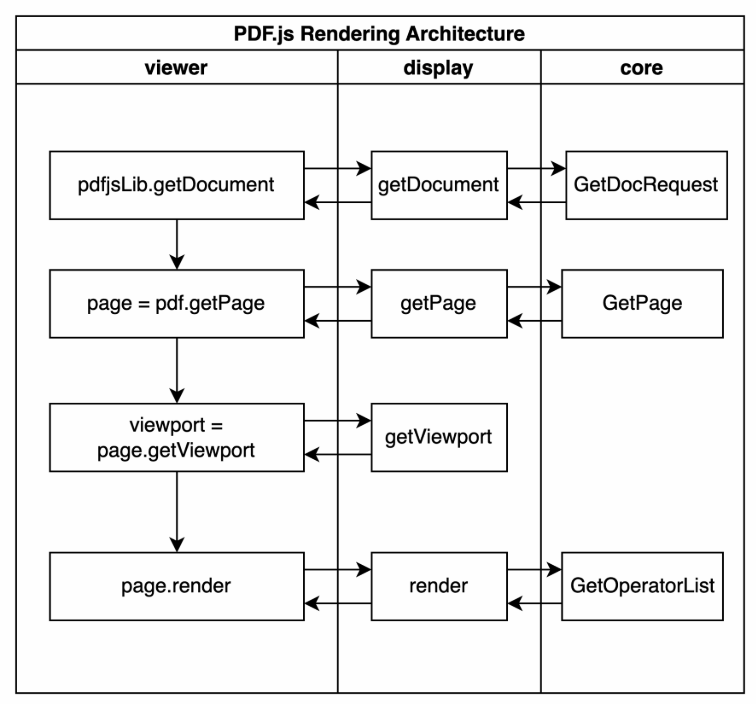
Each row in the diagram is one public API call from the demo: the viewer column is the code we write, the display column holds display-layer objects such as PDFDocumentProxy and PDFPageProxy, and the core column runs inside the Worker thread. The horizontal arrows are message round-trips between layers (via MessageHandler), and the vertical arrows show the call order. getViewport is a pure display-layer size calculation that never touches the Worker, so it has no core counterpart; render, on the other hand, needs the core layer to produce an operator list (GetOperatorList), which is why all three columns are present.
Summary
PDF.js opened up the possibility of rendering PDF files on the web, and it has since become the general-purpose tool for doing so. A deep study of PDF.js gives you a deeper understanding of the PDF specification — you get to read the spec through a working implementation, instead of grinding through the dry specification document directly.
PDF.js's distinctive three-layer design lets developers replace each layer independently. It also supports unique performance techniques such as streaming requests and range requests. I learned a great deal from PDF.js when founding the StreamPDF project — thanks to everyone who has participated in the project.
Next in the series: we will go deep into getDocument and getPage to see exactly what happens in the core layer. It will be a genuinely fascinating logical challenge. See you in the next article.