
PDF.js Deep Dive 6: initDocument
October 25, 2026 · StreamPDF Team

Introduction
initDocument starts parsing the actual data of a PDF, so this article touches the binary byte stream of the format. It covers not only PDF.js but also the PDF file format specification itself.
For the call chain leading into this method, refer to the second article in the series — it is invoked from the section https://streampdf.com/blog/pdfjs-deep-dive-2-get_document-get_page#:~:text=Entering%20Worker%3A%20on%20Ready%20%E2%86%92%20pdfManagerReady%20%E2%86%92%20loadDocument.
All code snippets in this article are based on PDF.js v6.3.289.
initDocument
async initDocument(recoveryMode) {
  await this.ensureDoc("checkHeader");
  await this.ensureDoc("parseStartXRef");
  await this.ensureDoc("parse", [recoveryMode]);

  // Check that at least the first page can be successfully loaded,
  // since otherwise the XRef table is definitely not valid.
  await this.ensureDoc("checkFirstPage", [recoveryMode]);
  // Check that the last page can be successfully loaded, to ensure that
  // `numPages` is correct, and fallback to walking the entire /Pages-tree.
  await this.ensureDoc("checkLastPage", [recoveryMode]);
}
checkHeader
Entering initDocument -> PDFDocument.checkHeader
// Find the header, get the PDF format version and setup the
// stream to start from the header.
checkHeader() {
  const stream = this.stream;
  stream.reset();

  if (!find(stream, PDF_HEADER_SIGNATURE)) {
    // May not be a PDF file, but don't throw an error and let
    // parsing continue.
    return;
  }
  stream.moveStart();

  // Skip over the "%PDF-" prefix, since it was found above.
  stream.skip(PDF_HEADER_SIGNATURE.length);
  // Read the PDF format version.
  let version = "",
    ch;
  while (
    (ch = stream.getByte()) > /* Space = */ 0x20 &&
    version.length < /* MAX_PDF_VERSION_LENGTH = */ 7
  ) {
    version += String.fromCharCode(ch);
  }

  if (PDF_VERSION_REGEXP.test(version)) {
    this.#version = version;
  } else {
    warn(`Invalid PDF header version: ${version}`);
  }
}
A PDF file starts with a header that marks the beginning of the file and carries its version information.
Talk is cheap — let's hand-craft the simplest possible, yet fully valid, PDF file. It has a single page that draws nothing at all: 329 bytes in total, small enough to type in a text editor:
%PDF-1.4
1 0 obj
<< /Type /Catalog /Pages 2 0 R >>
endobj
2 0 obj
<< /Type /Pages /Kids [3 0 R] /Count 1 >>
endobj
3 0 obj
<< /Type /Page /Parent 2 0 R /MediaBox [0 0 612 792] >>
endobj
xref
0 4
0000000000 65535 f
0000000009 00000 n
0000000058 00000 n
0000000115 00000 n
trailer
<< /Size 4 /Root 1 0 R >>
startxref
186
%%EOF
Feed this file to PDF.js and it parses just fine: numPages is 1, the page measures 612 x 792 (in pt, where 72 pt = 1 inch — US Letter), and the reported version is 1.4.
header
The first 9 bytes of the file are exactly what checkHeader above is looking for. In hex:
25 50 44 46 2d 31 2e 34 0a %PDF-1.4\nfind(stream, PDF_HEADER_SIGNATURE) scans the beginning of the file (the first 1024 bytes by default) for the 5-byte signature 25 50 44 46 2d, i.e. %PDF-. Once found, it skips the %PDF- prefix and keeps reading 1.4 into this.#version. The version declares which revision of the specification the file follows, and readers use it to decide which features may be enabled.
The %PDF- header is defined in the file-structure chapter of the PDF specification: ISO 32000-1:2008, clause 7.5.2 "File Header" (printed page 39) states "The first line of a PDF file shall be a header consisting of the 5 characters %PDF- followed by a version number of the form 1.N". Note that the spec says "first line", while Adobe's PDF Reference adds an implementation-level tolerance in implementation note 13 of Appendix H (printed page 1102, annotating section 3.4.1 "File Header"): "Acrobat viewers require only that the header appear somewhere within the first 1024 bytes of the file" — because some tools prepend their own content in front of the file. The 1024-byte scan limit in find inherits exactly this Acrobat behavior.
parseStartXRef
get startXRef() {
  const stream = this.stream;
  let startXRef = 0;

  if (this.linearization) {
    // Find the end of the first object.
    stream.reset();
    if (find(stream, ENDOBJ_SIGNATURE)) {
      stream.skip(6);

      let ch = stream.peekByte();
      while (isWhiteSpace(ch)) {
        stream.pos++;
        ch = stream.peekByte();
      }
      startXRef = stream.pos - stream.start;
    }
  } else {
    // Find `startxref` by checking backwards from the end of the file.
    const step = 1024;
    const startXRefLength = STARTXREF_SIGNATURE.length;
    let found = false,
      pos = stream.end;

    while (!found && pos > 0) {
      pos -= step - startXRefLength;
      if (pos < 0) {
        pos = 0;
      }
      stream.pos = pos;
      found = find(stream, STARTXREF_SIGNATURE, step, true);
    }

    if (found) {
      stream.skip(9);
      let ch;
      do {
        ch = stream.getByte();
      } while (isWhiteSpace(ch));
      let str = "";
      while (ch >= /* Space = */ 0x20 && ch <= /* '9' = */ 0x39) {
        str += String.fromCharCode(ch);
        ch = stream.getByte();
      }
      startXRef = parseInt(str, 10);
      if (isNaN(startXRef)) {
        startXRef = 0;
      }
    }
  }
  return shadow(this, "startXRef", startXRef);
}
The parseStartXRef method itself is a one-liner; all the logic lives in the startXRef getter above — its job is to answer a single question: at which offset should xref parsing begin?
// Source: src/core/document.js
parseStartXRef() {
  this.xref.setStartXRef(this.startXRef);
}
Why read from the end of the file
PDF supports incremental updates: every update appends a new xref and trailer to the end of the file, so the last startxref points to the most recent state. ISO 32000-1:2008, clause 7.5.5 "File Trailer" (printed page 42), spells out the correct reader behavior: "Conforming readers should read a PDF file from its end."
Backward window scanning
Look at the scanning loop in the non-linearized branch: step = 1024 and STARTXREF_SIGNATURE is the 9-byte startxref (73 74 61 72 74 78 72 65 66). Each iteration does pos -= step - startXRefLength, moving the window 1015 bytes to the left, so adjacent windows overlap by 9 bytes — exactly the signature length. This prevents missing a startxref that happens to straddle two windows: no matter where the signature sits, some full window contains it. The fourth argument of find, backwards = true, means the window is searched right-to-left, and after a hit stream.pos is positioned at the start of the signature.
Then stream.skip(9) jumps past the signature, whitespace is skipped, and the following bytes are collected into str (the condition ch >= 0x20 && ch <= 0x39 covers whitespace and digits); finally parseInt yields the offset. If the file tail contains no valid startxref, the getter returns 0 — offset 0 holds the file header, not an xref, so the next step, parse, is guaranteed to fail and trigger the full-file recoveryMode index rebuild described in the second article of the series.
Let's reconcile against our 329-byte minimal PDF: the very first scan window hits; the startxref keyword sits at offset 309 and the parsed integer is 186 — exactly the xref table offset we laid out by hand in the previous section:
offset:  186     275       309         319  323
         xref    trailer   startxref   186  %%EOF
         ^                             |
         └────────── 186 points here ──┘
The linearization branch
this.linearization is computed by Linearization.create: it parses the first few tokens in place at the head of the file, and if they happen to form N G obj << /Linearized 1 /L file-length ... >> with /L equal to the actual file length, the file is a linearized PDF (a.k.a. "Fast Web View"); otherwise it returns null.
Linearization is a file layout the PDF specification designed for network scenarios (ISO 32000-1:2008 Annex F): the data needed for the first page is moved to the front of the file, the linearization parameter dictionary is the first object in the file, immediately followed by the first-page xref. So a linearized file needs no trip to the tail — find the first endobj (ENDOBJ_SIGNATURE, 6 bytes, still within the first 1024 bytes), skip it and the whitespace, and the current position is the offset of the first-page xref. A reader can render page one after downloading only the head of the file — the ideal shape for StreamPDF's streaming loader to face.
shadow: compute once
Finally, return shadow(this, "startXRef", startXRef). shadow is a utility from util.js that uses Object.defineProperty to freeze the computed result onto the instance as a same-named property, so subsequent reads hit the property instead of re-entering the getter. Scanning the file tail costs real work and the offset never changes, so caching once is enough. Nearly all of PDF.js's lazy parsing relies on this function; the linearization getter earlier is written the same way.
parse
parse(recoveryMode) {
  this.xref.parse(recoveryMode);
  this.catalog = new Catalog(this.pdfManager, this.xref);
}
PDFDocument.parse does two things: have XRef parse the cross-reference data, then build a Catalog on top of it. The heavy lifting happens in XRef.parse (src/core/xref.js):
parse(recoveryMode = false) {
  this.#parsedWithRecovery = recoveryMode;
  let trailerDict;
  if (!recoveryMode) {
    trailerDict = this.readXRef();
  } else {
    warn("Indexing all PDF objects");
    trailerDict = this.indexObjects();
  }
  trailerDict.assignXref(this);
  this.trailer = trailerDict;

  // ... check "Encrypt" → build CipherTransformFactory ...

  // ... check "Root" → only pass if /Pages is readable ...
  if (!recoveryMode) {
    throw new XRefParseException();
  }
  throw new XRefParseException("Invalid PDF structure");
}
readXRef: walking the /Prev chain
parseStartXRef pushed one offset (the last startxref) into startXRefQueue; readXRef is the loop that consumes that queue (src/core/xref.js#L732):
- Jump to the offset and start parsing: reading the
xrefkeyword means a classic xref table (our hand-crafted example is one); reading an integer means a cross-reference stream introduced in PDF 1.5, which is essentially a compressed object stream; - After parsing the current section, push the trailer dictionary's
/Prev(the xref offset of the previous revision) back onto the queue and loop — walking from the newest xref all the way back to the file's original state. Along the way it also tolerates the non-conforming/Prev NNN 0 Rform and the/XRefStmof hybrid-reference files; - Already-visited offsets are recorded in a cache, preventing corrupted files whose
/Prevforms a cycle from looping forever; - The topmost (newest) trailer dictionary is returned in the end.
Final checks: Encrypt and Root
With the trailer dictionary in hand, XRef.parse performs two critical checks:
/Encrypt: if present, build aCipherTransformFactoryfrom the file's/IDand the user password; every subsequent string and stream must be decrypted through it;/Root: extract the Catalog dictionary, and it must yield a readable/Pages— the page tree is the document's lifeline; unreadable means an invalid document structure.
If either check fails and we're not in recoveryMode, an XRefParseException is thrown. The exception travels up the call chain to loadDocument in the Worker layer — the very mechanism covered in the second article: request the missing data, retry with recoveryMode = true, where indexObjects() abandons the xref index and scans the entire file, numbering every N G obj ... endobj. In other words, the xref table is only an accelerator — lose it and it can be rebuilt. This is the foundation of PDF.js's fault tolerance.
Catalog
Back in PDFDocument.parse, once the xref parses successfully, new Catalog(this.pdfManager, this.xref) merely wraps the xref reference — it does not walk the page tree right away. The /Pages expansion is lazy and deferred until getPage; the next section's checkFirstPage will verify at initialization time that the first page really does load.
checkFirstPage
async checkFirstPage(recoveryMode = false) {
  if (recoveryMode) {
    return;
  }
  try {
    await this.getPage(0);
  } catch (reason) {
    if (reason instanceof XRefEntryException) {
      // Clear out the various caches to ensure that we haven't stored any
      // inconsistent and/or incorrect state, since that could easily break
      // subsequent `this.getPage` calls.
      this.#pagePromises.delete(0);
      await this.cleanup();

      throw new XRefParseException();
    }
  }
}
The success of XRef.parse only proves the xref table is self-consistent, not that it is correct. checkFirstPage exists because of a plain observation: some corrupted PDFs carry xref tables that look perfectly legal, sail through parse, and only blow up when an object is actually fetched. This check was introduced by commit 60bcce184 (2018, fixing issues 7496 and 10326); the two real-world failure modes at the time:
- An editor modified the file without updating the xref table (issue 7496);
- A generator sorted the xref table by offset instead of by object number, shifting every entry (issue 10326).
Rather than crash at render time, better to use the first page as a litmus test during loading. The commit is blunt about why the first page: in the default viewer scenario, a first page that fails to load means nothing works at all (BaseViewer.setDocument depends entirely on it), and blindly picking some context-free object makes a meaningless check. Even if the first page passes, the whole xref isn't guaranteed valid — but if even the first page fails, the document is almost certainly broken.
Code walkthrough
async checkFirstPage(recoveryMode = false) {
  if (recoveryMode) {
    return; // the index was rebuilt from the full file already; nothing to verify
  }
  try {
    await this.getPage(0); // note: the Worker layer uses 0-based pageIndex; the API layer's pageNumber starts at 1
  } catch (reason) {
    if (reason instanceof XRefEntryException) {
      // Clear out the various caches to ensure that we haven't stored any
      // inconsistent and/or incorrect state, since that could easily break
      // subsequent `this.getPage` calls.
      this.#pagePromises.delete(0);
      await this.cleanup();

      throw new XRefParseException();
    }
  }
}
this.getPage(0) follows exactly the same path as a user call: check the #pagePromises cache → linearized files go through #getLinearizationPage, otherwise catalog.getPageDict(0) walks the page tree level by level → new Page(...). That path genuinely fetches objects according to the xref entries, which is precisely the point of the check.
XRefEntryException is thrown by the object-fetching stage of the xref; typical scenarios (src/core/xref.js):
- The entry's generation doesn't match the requested generation (L914; a
_generationFallbackmechanism first tries falling back to an older generation); - Seeking to the entry offset, the bytes read are not a
num gen objtriple (L928) — both issues above are this case; - An entry inside a compressed xref stream is corrupted (L1037).
Why caches are cleared on failure
The detail is in getPage: the promise is written into #pagePromises (L1720) before the callback runs, so after a failure that rejected promise stays in the cache forever — without deleting it, a later getPage(0) after the recoveryMode index rebuild would keep hitting the same failure. Hence first #pagePromises.delete(0), then cleanup() to clear the catalog-level and global caches, preventing half-parsed state from poisoning subsequent calls. Finally it escalates to an XRefParseException, rejoining the recoveryMode retry chain from the second article.
Note the catch only intercepts XRefEntryException; other exceptions (e.g. data not yet arrived during streaming) are silently ignored here — this method answers exactly one question: can the xref entries be trusted?
As for cost, the commit's own measurement: virtually no extra parsing (at most part of a page-tree walk), but more data gets pulled up front, slightly delaying getDocument completion; and since getPage caches its result, the user's first real getPage(0) is free afterwards.
checkLastPage
async checkLastPage(recoveryMode = false) {
  const { catalog, pdfManager } = this;

  catalog.setActualNumPages(); // Ensure that it's always reset.
  let numPages;

  try {
    await Promise.all([
      pdfManager.ensureDoc("xfaFactory"),
      pdfManager.ensureDoc("linearization"),
      pdfManager.ensureCatalog("numPages"),
    ]);

    if (this.xfaFactory) {
      return; // The Page count is always calculated for XFA-documents.
    } else if (this.linearization) {
      numPages = this.linearization.numPages;
    } else {
      numPages = catalog.numPages;
    }

    if (!Number.isInteger(numPages)) {
      throw new FormatError("Page count is not an integer.");
    } else if (numPages <= 1) {
      return;
    }
    await this.getPage(numPages - 1);
  } catch (reason) {
    // Clear out the various caches to ensure that we haven't stored any
    // inconsistent and/or incorrect state, since that could easily break
    // subsequent `this.getPage` calls.
    this.#pagePromises.delete(numPages - 1);
    await this.cleanup();

    if (reason instanceof XRefEntryException && !recoveryMode) {
      throw new XRefParseException();
    }
    warn(`checkLastPage - invalid /Pages tree /Count: ${numPages}.`);

    let pagesTree;
    try {
      pagesTree = await catalog.getAllPageDicts(recoveryMode);
    } catch (reasonAll) {
      if (reasonAll instanceof XRefEntryException && !recoveryMode) {
        throw new XRefParseException();
      }
      catalog.setActualNumPages(1);
      return;
    }

    for (const [pageIndex, [pageDict, ref]] of pagesTree) {
      let promise;
      if (pageDict instanceof Error) {
        promise = Promise.reject(pageDict);

        // Prevent "uncaught exception: Object"-messages in the console.
        promise.catch(() => {});
      } else {
        promise = Promise.resolve(
          new Page({
            pdfManager,
            xref: this.xref,
            pageIndex,
            pageDict,
            ref,
            globalIdFactory: this._globalIdFactory,
            fontCache: catalog.fontCache,
            builtInCMapCache: catalog.builtInCMapCache,
            standardFontDataCache: catalog.standardFontDataCache,
            globalColorSpaceCache: this.globalColorSpaceCache,
            globalImageCache: catalog.globalImageCache,
            systemFontCache: catalog.systemFontCache,
            nonBlendModesSet: catalog.nonBlendModesSet,
            xfaFactory: null,
          })
        );
      }

      this.#pagePromises.set(pageIndex, promise);
    }
    catalog.setActualNumPages(pagesTree.size);
  }
}
checkLastPage is the last step of initDocument, continuing the storyline of checkFirstPage — it was introduced by commit d0c4bbd82 (2021, fixing issue 14303), whose message opens with a self-introduction: "This patch basically extends the approach from PR 10392, by also checking the last page" (PR 10392 is the previous section's checkFirstPage).
What gets verified is different: checkFirstPage verifies xref entries, while checkLastPage verifies the /Count of the page tree's root node. catalog.numPages trusted it unconditionally for a long time (src/core/catalog.js#L753):
get numPages() {
  return this.#actualNumPages ?? this._pagesCount; // _pagesCount is /Count
}
But the sample from issue 14303 proves /Count can be outright wrong — the page tree simply doesn't contain that many pages. A wrong numPages makes subsequent parsing break down in the Worker thread or even hang the browser. And the way to verify it, the commit states plainly: "parse the entire /Pages-tree and essentially counting the pages" — no shortcut, you have to count.
Happy path: trusting /Count
catalog.setActualNumPages(); // Ensure that it's always reset.The opening resets #actualNumPages — because a recoveryMode retry runs checkLastPage again, and the real page count left behind by a previous failure must be cleared first.
It then pulls xfaFactory, linearization, and numPages in parallel (ensureDoc/ensureCatalog handle MissingDataException — the range-request retry from the second article), and picks the page count by priority:
- XFA documents: the page count is computed by the XFA form machinery,
/Countdoesn't count — return early; - Linearized files: the linearization parameter dictionary carries a page-count hint; trust it and avoid touching the page tree;
- Everything else:
catalog.numPages(i.e./Count).
When numPages <= 1, return immediately — the only page was already really verified by checkFirstPage in the previous step. With more than one page, await this.getPage(numPages - 1) really loads the last page: the page tree expands level by level, so damage to any link in the tree will surface on this path.
The catch: when /Count lies
The catch logic has two layers. The first matches checkFirstPage: clear caches (#pagePromises.delete(numPages - 1) + cleanup()), and on XRefEntryException outside recoveryMode escalate to XRefParseException — entry-level corruption may mean the xref table as a whole is untrustworthy.
The second layer is the real fallback: if the failure means /Count itself is unreliable (FormatError("Page count is not an integer.") or the last page is unreachable via /Count), warn and then simply give up on /Count — count the page tree instead:
pagesTree = await catalog.getAllPageDicts(recoveryMode);getAllPageDicts: counting the whole page tree
getAllPageDicts at catalog.js#L1441 walks the entire /Pages tree with an explicit stack (queue + posInKids) depth-first; visitedNodes records visited node references to prevent cycles, and it produces a Map: pageIndex → [pageDict, pageRef]. Two details worth noting:
- One broken page doesn't sink the whole tree:
addPageErrorstores the failing entry as[error, null]in the Map instead of aborting the walk; only anXRefEntryExceptionoutside recoveryMode is rethrown (for the outer layer to escalate into XRefParseException). Under recoveryMode + ignoreErrors, even a broken first page gets replaced with an empty dictionary so the viewer always opens (issue15590.pdf); - An index comes for free: it fills
pageIndexCache(Ref → pageIndex), so reverse queries likegetPageIndexhit directly afterwards.
If even the full-tree walk fails outside recoveryMode, it likewise escalates to XRefParseException; otherwise setActualNumPages(1) — the degenerate fallback for extreme corruption: pretend the document has one page.
Prewarming: from lazy to eager
The finish line of a successful walk is to prewarm the cache:
for (const [pageIndex, [pageDict, ref]] of pagesTree) {
  let promise;
  if (pageDict instanceof Error) {
    promise = Promise.reject(pageDict);
    promise.catch(() => {}); // silence unhandled rejection warnings
  } else {
    promise = Promise.resolve(
      new Page({
        /* ... */
      }),
    );
  }
  this.#pagePromises.set(pageIndex, promise);
}
catalog.setActualNumPages(pagesTree.size);
All pages (failures included, in the form of rejected promises) are loaded into #pagePromises in one shot, and the page count is overwritten with the true tally pagesTree.size. Recall the numPages getter above — #actualNumPages ?? _pagesCount; from now on numPages returns the counted truth, and document.numPages prefers it. A nice contrast: a healthy PDF's page tree stays lazy throughout (the tree expands on demand), and only files with a lying /Count get fully expanded and prewarmed — lazy when healthy, a full check-up when sick.
With this, all five steps of initDocument are complete: the version is in place, the xref starting point is locked, the cross-references are parsed, the first page passed the litmus test, and the page count is trustworthy. The document structure is ready and GetDocRequest can return to the main thread.
Summary
In this article we walked through the five steps of initDocument (full pipeline below):
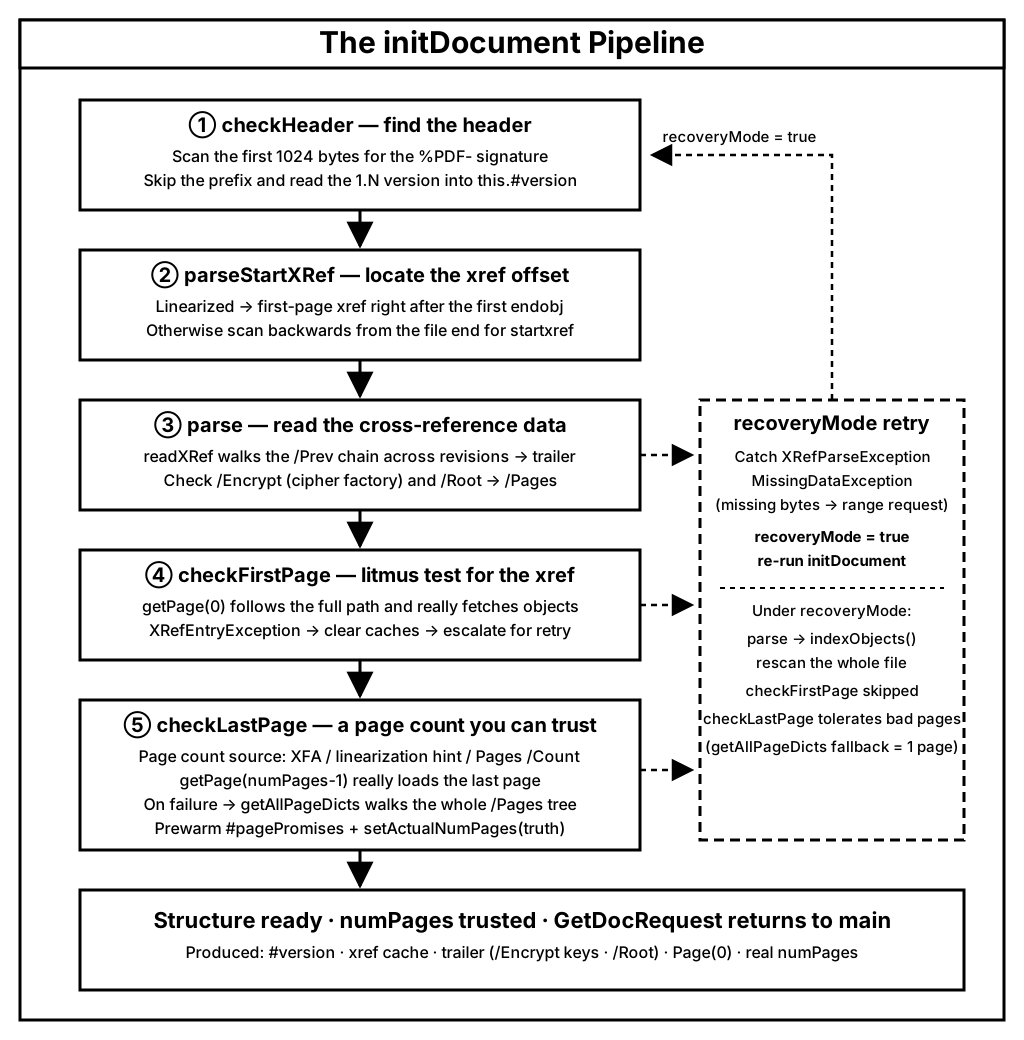
- checkHeader → find the
%PDF-signature within the first 1024 bytes and read the1.Nversion into#version(ISO 32000-1 §7.5.2; the 1024-byte tolerance comes from Adobe's implementation note 13). - parseStartXRef → linearized files take the first-page xref right after the first
endobj; regular files scan backwards from the file tail forstartxref. Incremental updates dictate reading from the end (§7.5.5). - parse →
readXRefwalks the/Prevchain across revisions to the trailer, then checks/Encryptand/Root → /Pages; on failure, recoveryMode rebuilds the index from the whole file viaindexObjects(). - checkFirstPage →
getPage(0)as a litmus test that xref entries are really usable (commit 60bcce184). - checkLastPage → verify the last page; if
/Countlies, count the whole tree withgetAllPageDictsand overwritenumPageswith the truth (commit d0c4bbd82).
Behind the five steps stand three consistent design principles:
- Read from the end. Incremental updates append the newest state at the file tail, so the authoritative sources for the xref starting point, the trailer, and the page count all live at the end — the whole initialization chain runs "tail toward head".
- Trust, but verify. A self-consistent xref table isn't necessarily correct, and an integer
/Countisn't necessarily the real page count. Both checks use the same blunt method — actually fetch an object once — to validate the claim, preferring to spend a little more time up front rather than leave broken state for the rendering stage. - Always have a Plan B. The xref table can be rebuilt by scanning the whole file (
indexObjects), the page count can be tallied tree-wide (getAllPageDicts), and in the extreme the document is treated as a single page. Healthy files take the fast path, broken files take the slow path, but everything opens.
Back to StreamPDF's streaming concerns: linearized files are the ideal shape — the first page renders once the file head arrives; regular files must wait for the tail bytes before the xref starting point can be locked, which is exactly why the range-request chunked loading from the previous article matters so much.
In the next article, we dig into the details parse left behind: the two shapes of the xref table and the xref stream.