Home of the worldwide PDF technical community, the PDF Association provides a vendor-neutral platform for developing open specifications and standards for PDF technology.
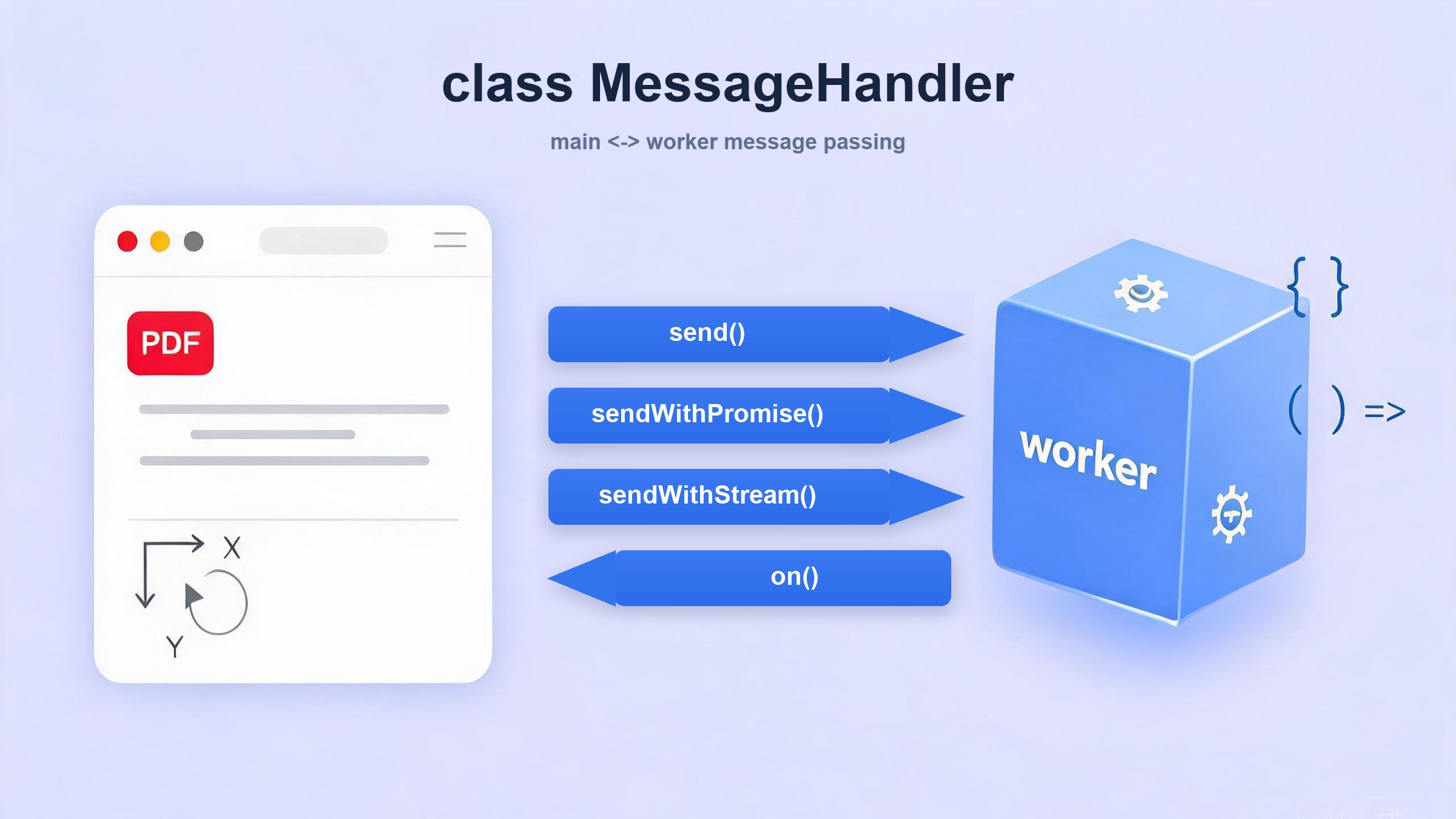
In the previous three articles, we covered PDF.js's rendering architecture and the basics of worker communication. This time we go deep into the communication layer itself — the MessageHandler class that sits on both sides of the main-worker boundary and coordinates every message that flows between them.
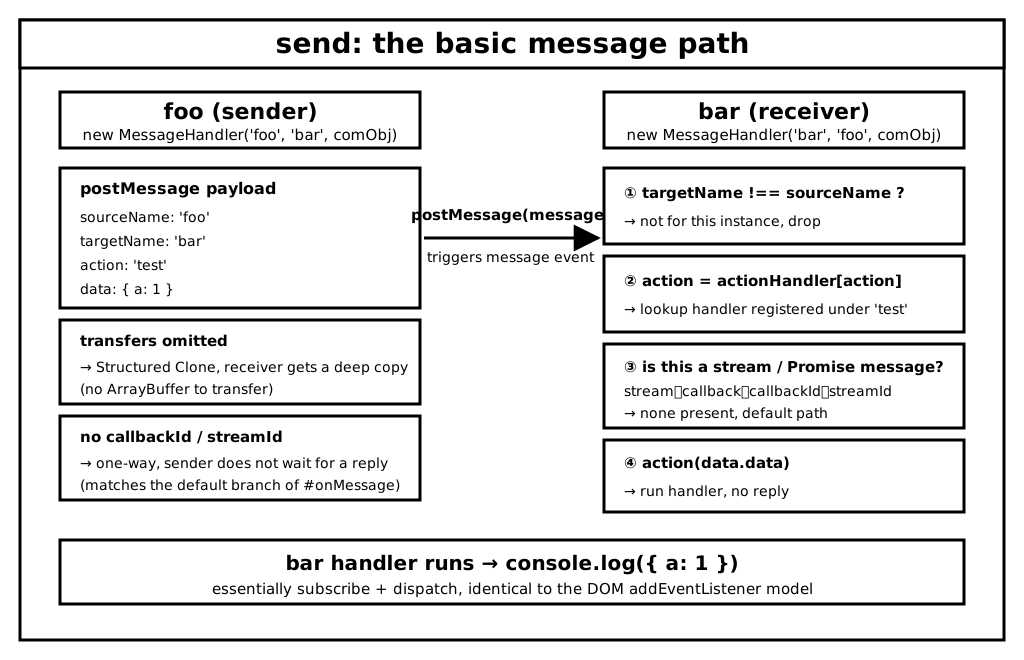
sourceName — name of this end (e.g. "main" or "worker"). Used for defensive dispatch: a message whose targetName doesn't match this.sourceName is simply dropped.
targetName — name of the remote end.
comObj — the communication channel. Usually a Worker or a MessagePort; both speak message / postMessage.
The signal option wires this listener into an AbortController so tearing down the MessageHandler cleanly removes the listener.
The class maintains three maps that back the three send methods:
Field
Backs
actionHandler
plain on / send (fire-and-forget)
callbackId + callbackCapabilities
sendWithPromise (request-response)
streamId + streamSinks + streamControllers
sendWithStream (streaming + backpressure — the most complex of the three)
#onMessage
#onMessage({ data }) { if (data.targetName !== this.sourceName) { return; } if (data.stream) { this.#processStreamMessage(data); return; } if (data.callback) { const callbackId = data.callbackId; const capability = this.callbackCapabilities[callbackId]; if (!capability) { throw new Error(`Cannot resolve callback ${callbackId}`); } delete this.callbackCapabilities[callbackId]; if (data.callback === CallbackKind.DATA) { capability.resolve(data.data); } else if (data.callback === CallbackKind.ERROR) { capability.reject(wrapReason(data.reason)); } else { throw new Error("Unexpected callback case"); } return; } const action = this.actionHandler[data.action]; if (!action) { throw new Error(`Unknown action from worker: ${data.action}`); } if (data.callbackId) { const sourceName = this.sourceName, targetName = data.sourceName, comObj = this.comObj; Promise.try(action, data.data).then( function (result) { comObj.postMessage({ sourceName, targetName, callback: CallbackKind.DATA, callbackId: data.callbackId, data: result, }); }, function (reason) { comObj.postMessage({ sourceName, targetName, callback: CallbackKind.ERROR, callbackId: data.callbackId, reason: wrapReason(reason), }); } ); return; } if (data.streamId) { this.#createStreamSink(data); return; } action(data.data);}
After the targetName defensive check, the dispatches fall into four categories — mirroring the four message shapes produced by the three send methods:
resolve / reject the waiting Promise in callbackCapabilities
data.callbackId
remote end receiving sendWithPromise
run the handler with Promise.try, post the result back
data.streamId
remote end receiving sendWithStream
create a streamSink via #createStreamSink
default
send
just action(data.data) — no reply expected
on
on(actionName, handler) { if (typeof PDFJSDev === "undefined" || PDFJSDev.test("TESTING")) { assert( typeof handler === "function", 'MessageHandler.on: Expected "handler" to be a function.' ); } const ah = this.actionHandler; if (ah[actionName]) { throw new Error(`There is already an actionName called "${actionName}"`); } ah[actionName] = handler;}
Registers a handler under an action name. Under sendWithStream, the handler also receives the streamSink as a second argument — not obvious from this method alone, but important for the streaming case.
The fire-and-forget primitive. One-way, no callback, no stream.
Q: What is transfers?
It's the second argument to postMessage — a list of Transferable Objects (ArrayBuffer, TypedArray, MessagePort, ImageBitmap, OffscreenCanvas, …). The name is misleading: it doesn't select what data to send — it selects whose ownership to hand over to the other side.
Without transfers, postMessage uses the Structured Clone algorithm: the receiver gets a deep copy, cost proportional to size. With transfers, the bytes travel untouched, the sender's ArrayBuffer is immediately detached (byteLength becomes 0, further access throws). So it's only for data the sender truly no longer needs.
PDF.js produces huge amounts of such data: worker-decoded image pixels (imgData.data.buffer / imgData.bitmap), path geometry (data.buffer, minMax.buffer), font export buffers (fontData.buffer), and operator-list chunks collected into _transfers before each flush. From core/evaluator.js:
Note data still references the sameArrayBuffer. The receiver dereferences it directly — zero-copy in action.
As a bonus, passing transfers also probes the runtime: if transferables aren't supported, postMessage throws DataCloneError. PDF.js pre-flights this in PDFWorker.#initialize with a dummy message and falls back to a fake worker if it fails.
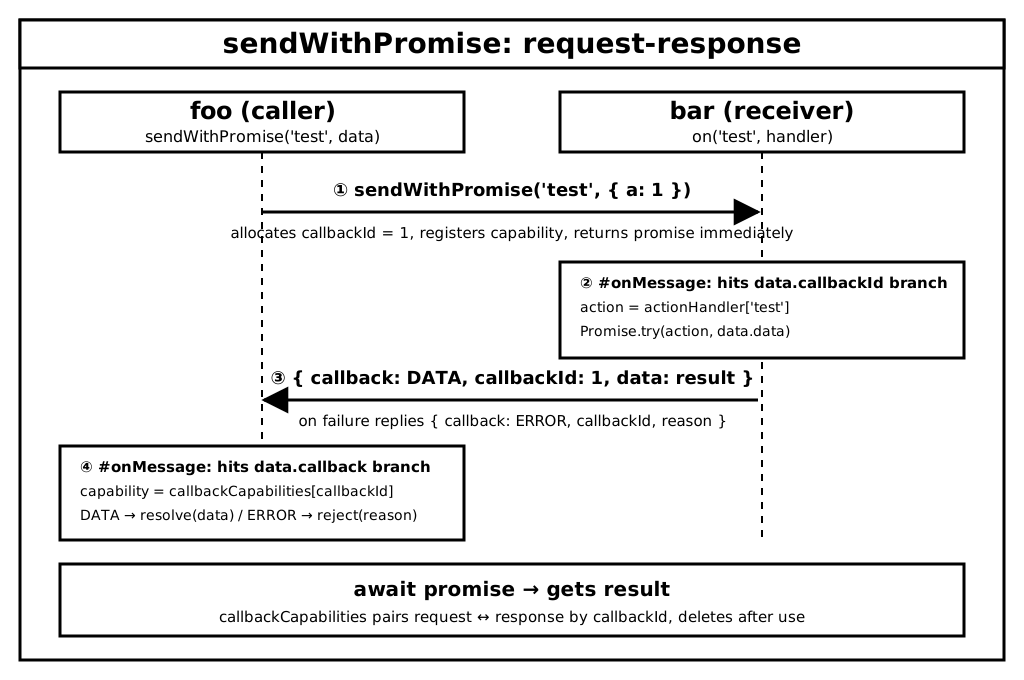
A send with a Promise attached. The trick is callbackId: each outgoing call gets a unique id, stored alongside a withResolvers() capability. The remote end runs the handler and posts back a message carrying callback: CallbackKind.DATA | ERROR plus the same callbackId. The sender's #onMessage finds the waiting capability, resolves or rejects it.
The message lifecycle:
Caller sends { action, callbackId, data }
Receiver: data.callbackId is truthy → Promise.try(action, data.data) → posts back { callback: DATA, callbackId, data }
Caller: data.callback is truthy → resolves the Promise stored under data.callbackId
Before we trace this method, let's recall what ReadableStream is and why PDF.js picks it here.
ReadableStream
Streams let you break a resource you want to fetch over the network into small chunks, then process those chunks. This is exactly how browsers handle video buffers and progressive image rendering.
— MDN
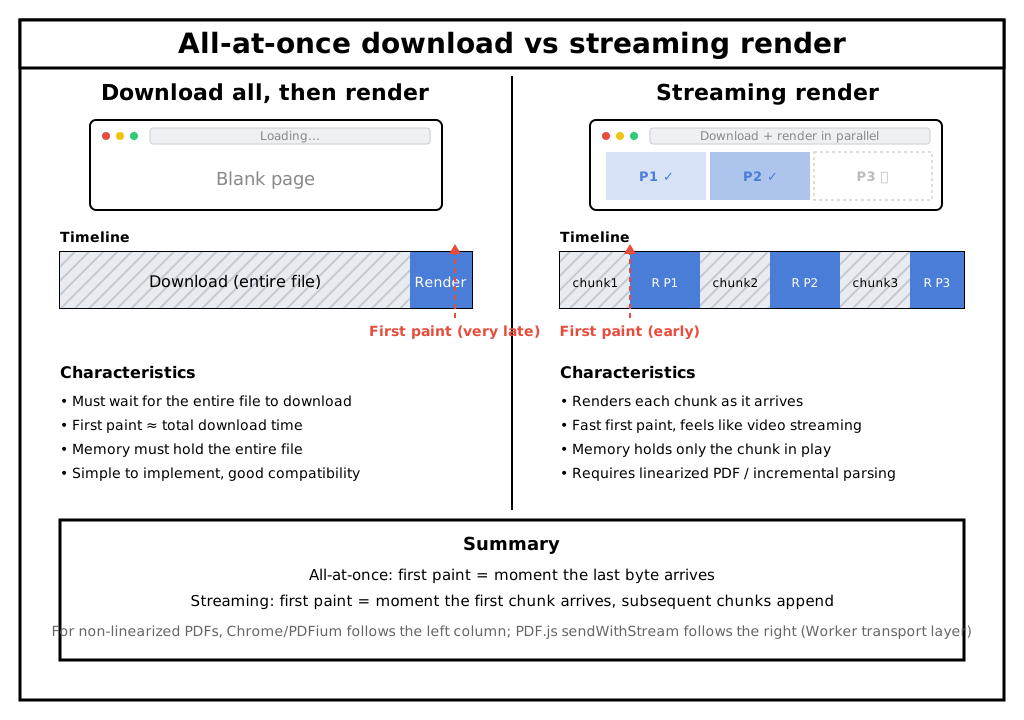
The old all-at-once download has two problems:
Memory — loading a multi-GB binary into a single buffer blows up the heap.
Latency — a 100-second video cannot begin playback until the download finishes. The same applies to PDFs: loading the entire file before rendering means the first paint waits for all bytes.
Note: Non-linearized PDFs (xref table at the end) force Chrome PDFium into full-download mode too. Only linearized ("Fast Web View") PDFs stream progressively.
ReadableStream takes a builder object with three callbacks:
Callback
When it fires
Responsibility
start(controller)
immediately on new
Initialize resources; do not produce data
pull(controller)
consumer calls read() and queue is empty
Produce a chunk or close the stream
cancel(reason)
stream is cancelled
Clean up resources
Three usage patterns:
Pattern
Producer role
When production happens
When pull fires
Typical use case
start-only
Active push
setInterval / onmessage shoves chunks in
Never (queue stays full)
WebSocket / SSE push
pull-only
Passive pull
Consumer-driven
Every read() when queue empty
Instantly-computable data, TransformStream readable side
start + pull
Warm-up + on-demand
start initializes, pull produces
Every read() when queue empty
fetch(), DB pagination, pipe pipelines
Key invariants: enqueue() never blocks — it always returns synchronously. The queue length (the negative of desiredSize) is a suggestion, not a hard gate. pull only fires when the queue is empty and the consumer calls read() — that is natural backpressure. Default highWaterMark = 1, so desiredSize = highWaterMark - queue.length.
start + pull minimal example (the exact pattern PDF.js uses)
let pullCount = 0;const stream = new ReadableStream({ start(controller) { this.resource = { ready: true }; // "open a remote connection" console.log('start: channel ready'); }, pull(controller) { pullCount++; controller.enqueue(new Uint8Array([pullCount])); if (pullCount >= 5) controller.close(); }, cancel() { pullCount = 0; },});// start runs first (logs "channel ready"), then pull fires on read() when queue is emptyawait stream.getReader().read();
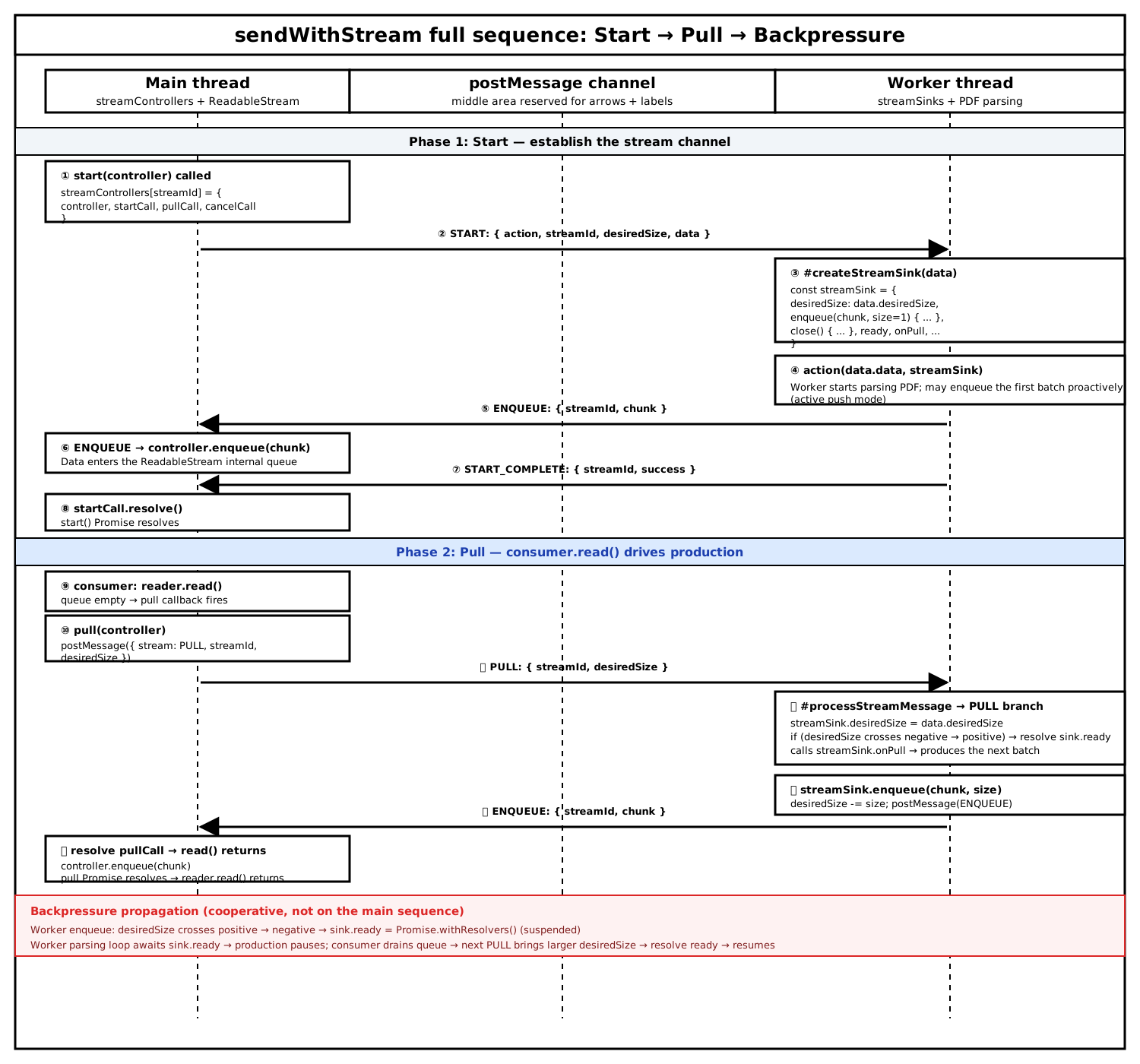
sendWithStream on the Main side returns a standard ReadableStream. On the Worker side, #onMessage receives a message with streamId and dispatches to #createStreamSink, which builds a custom streamSink object — the mirror of the Main-side controller but for the producer role.
The handler registered with on is invoked with (data.data, streamSink). Once it resolves, the Worker posts START_COMPLETE back, letting the Main side's start() Promise settle.
Backpressure in action: every sink.enqueue(chunk, size) on the Worker side decrements desiredSize. When it crosses from positive to non-positive, sink.ready becomes an unresolved Promise. The Worker's parsing loop await sink.ready — not a spin-wait, not a busy loop — just suspends the async function. When the Main side drains its queue and sends the next PULL with a fresh desiredSize, the Worker resolves sink.ready and resumes. Both sides run at the consumer's pace; memory stays bounded.
Summary
PDF.js's MessageHandler layers three communication abstractions over the same postMessage primitive:
Method
Pattern
Use case
Message shape
send
Fire-and-forget
Notifications (ready, close, commonobj)
One-way, no reply
sendWithPromise
Request-response
One-shot async queries (getPage, getMetadata)
callbackId pairs the call with exactly one reply
sendWithStream
Streaming + backpressure
Large continuous data (operatorList, images, fonts)
streamId ties a sequence of PULL/ENQUEUE/CLOSE messages together
The progression is deliberate:
sendWithPromise is send plus a callbackId — it pairs a Promise's resolve/reject with a message round-trip.
sendWithStream is send plus start/pull — the Main side gets a real ReadableStream, while the Worker side gets a custom streamSink. The interfaces are asymmetric, but postMessage messages tagged with a stream field (PULL, ENQUEUE, CLOSE, ERROR, PULL_COMPLETE, START_COMPLETE, CANCEL, CANCEL_COMPLETE) keep them coordinated.
sendWithStream is the article's centerpiece — it is the reason PDF.js can parse and render concurrently with bounded memory. The implementation is a textbook ReadableStream:
start sends START and waits for START_COMPLETE — the Main side's start() Promise settles
pull sends PULL; the Worker's streamSink.onPull produces data and posts ENQUEUE — no read() on Main means no data produced on Worker
Backpressure is Worker-local: sink.enqueue decrements desiredSize; crossing non-positive hangs sink.ready; the Worker parsing loop await ready; the next PULL with a larger desiredSize resolves it
What makes this elegant is that the Worker never blocks the JS thread. It doesn't spin on while (desiredSize <= 0) — it suspends an async function with a Promise. The Main and Worker both process other messages concurrently; backpressure just politely asks the Worker to "take a breather".
And the entire contract is just one number (desiredSize) travelling on each side of a postMessage, plus one Promise whose resolve/reject signals how much the consumer wants right now.