
PDF.js Deep Dive 3: getViewport & render
October 22, 2026 · StreamPDF Team
Introduction
This is the third article in the PDF.js Deep Dive series. In the previous article, we explored the Display layer's getDocument and getPage methods.
In this article, we dive into the getViewport and render methods exposed by the Display layer.
All code snippets in this article are based on PDF.js v6.3.289.
getViewport
For page.getViewport, the call lands on the PDFPageProxy.getViewport method.
/**
 * @param {GetViewportParameters} params - Viewport parameters.
 * @returns {PageViewport} Contains 'width' and 'height' properties
 *   along with transforms required for rendering.
 */
getViewport({
  scale,
  rotation = this.rotate,
  offsetX = 0,
  offsetY = 0,
  dontFlip = false,
} = {}) {
  return new PageViewport({
    viewBox: this.view,
    userUnit: this.userUnit,
    scale,
    rotation,
    offsetX,
    offsetY,
    dontFlip,
  });
}
which instantiates the PageViewport class.
Entering PageViewport
// Source: src/display/page_viewport.js
/**
 * @param {PageViewportParameters}
 */
constructor({
  viewBox,
  userUnit,
  scale,
  rotation,
  offsetX = 0,
  offsetY = 0,
  dontFlip = false,
}) {
  this.viewBox = viewBox;
  this.userUnit = userUnit;
  this.scale = scale;
  this.rotation = rotation;
  this.offsetX = offsetX;
  this.offsetY = offsetY;

  scale *= userUnit; // Take the userUnit into account.

  // creating transform to convert pdf coordinate system to the normal
  // canvas like coordinates taking in account scale and rotation
  const centerX = (viewBox[2] + viewBox[0]) / 2;
  const centerY = (viewBox[3] + viewBox[1]) / 2;
  let rotateA, rotateB, rotateC, rotateD;
  // Normalize the rotation, by clamping it to the [0, 360) range.
  rotation %= 360;
  if (rotation < 0) {
    rotation += 360;
  }
  switch (rotation) {
    case 180:
      rotateA = -1;
      rotateB = 0;
      rotateC = 0;
      rotateD = 1;
      break;
    case 90:
      rotateA = 0;
      rotateB = 1;
      rotateC = 1;
      rotateD = 0;
      break;
    case 270:
      rotateA = 0;
      rotateB = -1;
      rotateC = -1;
      rotateD = 0;
      break;
    case 0:
      rotateA = 1;
      rotateB = 0;
      rotateC = 0;
      rotateD = -1;
      break;
    default:
      throw new Error(
        "PageViewport: Invalid rotation, must be a multiple of 90 degrees."
      );
  }

  if (dontFlip) {
    rotateC = -rotateC;
    rotateD = -rotateD;
  }

  let offsetCanvasX, offsetCanvasY;
  let width, height;
  if (rotateA === 0) {
    offsetCanvasX = Math.abs(centerY - viewBox[1]) * scale + offsetX;
    offsetCanvasY = Math.abs(centerX - viewBox[0]) * scale + offsetY;
    width = (viewBox[3] - viewBox[1]) * scale;
    height = (viewBox[2] - viewBox[0]) * scale;
  } else {
    offsetCanvasX = Math.abs(centerX - viewBox[0]) * scale + offsetX;
    offsetCanvasY = Math.abs(centerY - viewBox[1]) * scale + offsetY;
    width = (viewBox[2] - viewBox[0]) * scale;
    height = (viewBox[3] - viewBox[1]) * scale;
  }
  // creating transform for the following operations:
  // translate(-centerX, -centerY), rotate and flip vertically,
  // scale, and translate(offsetCanvasX, offsetCanvasY)
  this.transform = [
    rotateA * scale,
    rotateB * scale,
    rotateC * scale,
    rotateD * scale,
    offsetCanvasX - rotateA * scale * centerX - rotateC * scale * centerY,
    offsetCanvasY - rotateB * scale * centerX - rotateD * scale * centerY,
  ];

  this.width = width;
  this.height = height;
}
It computes the rotation, the scale, the offsets, and the viewport dimensions after flipping — the page's width and height.
Let's zoom in on the PDF point and the CSS px units. In PDF, 72 points equal one inch; in CSS, 96 px equal one inch. That means rendering at 100% size on the web requires scaling PDF points up by 96/72.
PDF's coordinate system has its origin at the bottom-left corner, with the X axis pointing right and the Y axis pointing up. CSS's coordinate system has its origin at the top-left corner, with the X axis pointing right and the Y axis pointing down. So for an unrotated PDF, we need to flip the PDF's Y axis to match the web canvas coordinate system. That's why you see
case 0:
  rotateA = 1;
  rotateB = 0;
  rotateC = 0;
  rotateD = -1;
the rotateD of -1 in there — it exists precisely to flip the Y axis.
Flip demo: get-viewport-demo
render
For page.render, the call lands on the PDFPageProxy.render method.
/**
 * Begins the process of rendering a page to the desired context.
 *
 * @param {RenderParameters} params - Page render parameters.
 * @returns {RenderTask} An object that contains a promise that is
 *   resolved when the page finishes rendering.
 */
render({
  canvasContext,
  canvas = canvasContext.canvas,
  viewport,
  intent = "display",
  annotationMode = AnnotationMode.ENABLE,
  transform = null,
  background = null,
  optionalContentConfigPromise = null,
  annotationCanvasMap = null,
  pageColors = null,
  printAnnotationStorage = null,
  isEditing = false,
  recordImages = false,
  recordOperations = false,
  operationsFilter = null,
}) {
  this._stats?.time("Overall");

  const intentArgs = this._transport.getRenderingIntent(
    intent,
    annotationMode,
    printAnnotationStorage,
    isEditing
  );
  const { renderingIntent, cacheKey } = intentArgs;
  // If there was a pending destroy, cancel it so no cleanup happens during
  // this call to render.
  this.#pendingCleanup = false;

  optionalContentConfigPromise ||=
    this._transport.getOptionalContentConfig(renderingIntent);

  const intentState = this._intentStates.getOrInsertComputed(
    cacheKey,
    makeObj
  );
  // Ensure that a pending `streamReader` cancel timeout is always aborted.
  if (intentState.streamReaderCancelTimeout) {
    clearTimeout(intentState.streamReaderCancelTimeout);
    intentState.streamReaderCancelTimeout = null;
  }

  const intentPrint = !!(renderingIntent & RenderingIntentFlag.PRINT);

  // If there's no displayReadyCapability yet, then the operatorList
  // was never requested before. Make the request and create the promise.
  if (!intentState.displayReadyCapability) {
    intentState.displayReadyCapability = Promise.withResolvers();
    intentState.operatorList = {
      fnArray: [],
      argsArray: [],
      lastChunk: false,
      separateAnnots: null,
    };

    this._stats?.time("Page Request");
    this._pumpOperatorList(intentArgs);
  }

  const recordForDebugger = !!(
    this._pdfBug && globalThis.StepperManager?.enabled
  );
  const shouldRecordOperations =
    !!canvas &&
    !this.recordedBBoxes &&
    (recordOperations || recordForDebugger);
  const shouldRecordImages =
    !!canvas && !this.imageCoordinates && recordImages;

  const complete = error => {
    intentState.renderTasks.delete(internalRenderTask);

    if (shouldRecordOperations) {
      const recordedBBoxes = internalRenderTask.gfx?.dependencyTracker.take();
      if (recordedBBoxes) {
        internalRenderTask.stepper?.setOperatorBBoxes(
          recordedBBoxes,
          internalRenderTask.gfx.dependencyTracker.takeDebugMetadata()
        );

        if (recordOperations) {
          this.recordedBBoxes = recordedBBoxes;
        }
      }
    }

    if (shouldRecordImages && !error) {
      this.imageCoordinates = internalRenderTask.gfx?.imagesTracker.take();
    }

    // Attempt to reduce memory usage during *printing*, by always running
    // cleanup immediately once rendering has finished.
    if (intentPrint) {
      this.#pendingCleanup = true;
    }
    this.#tryCleanup();

    if (error) {
      internalRenderTask.capability.reject(error);

      this._abortOperatorList({
        intentState,
        reason: error instanceof Error ? error : new Error(error),
      });
    } else {
      internalRenderTask.capability.resolve();
    }

    if (this._stats) {
      this._stats.timeEnd("Rendering");
      this._stats.timeEnd("Overall");

      if (globalThis.Stats?.enabled) {
        globalThis.Stats.add(this.pageNumber, this._stats);
      }
    }
  };

  let dependencyTracker = null;
  let bboxTracker = null;
  if (shouldRecordOperations || shouldRecordImages) {
    bboxTracker = new CanvasBBoxTracker(
      canvas,
      intentState.operatorList.length
    );
  }
  if (shouldRecordOperations) {
    dependencyTracker = new CanvasDependencyTracker(
      bboxTracker,
      recordForDebugger
    );
  }

  const internalRenderTask = new InternalRenderTask({
    callback: complete,
    // Only include the required properties, and *not* the entire object.
    params: {
      canvas,
      canvasContext,
      dependencyTracker: dependencyTracker ?? bboxTracker,
      imagesTracker: shouldRecordImages
        ? new CanvasImagesTracker(canvas)
        : null,
      viewport,
      transform,
      background,
    },
    objs: this.objs,
    commonObjs: this.commonObjs,
    annotationCanvasMap,
    operatorList: intentState.operatorList,
    pageIndex: this._pageIndex,
    canvasFactory: this._transport.canvasFactory,
    filterFactory: this._transport.filterFactory,
    useRequestAnimationFrame: !intentPrint,
    pdfBug: this._pdfBug,
    pageColors,
    enableHWA: this._transport.enableHWA,
    operationsFilter,
  });

  (intentState.renderTasks ||= new Set()).add(internalRenderTask);
  const renderTask = internalRenderTask.task;

  Promise.all([
    intentState.displayReadyCapability.promise,
    optionalContentConfigPromise,
  ])
    .then(([transparency, optionalContentConfig]) => {
      if (this.destroyed) {
        complete();
        return;
      }
      this._stats?.time("Rendering");

      if (!(optionalContentConfig.renderingIntent & renderingIntent)) {
        throw new Error(
          "Must use the same `intent`-argument when calling the `PDFPageProxy.render` " +
            "and `PDFDocumentProxy.getOptionalContentConfig` methods."
        );
      }
      internalRenderTask.initializeGraphics({
        transparency,
        optionalContentConfig,
      });
      internalRenderTask.operatorListChanged();
    })
    .catch(complete);

  return renderTask;
}
This is a very complex method — let's break it down into chunks.
Step 1: call getRenderingIntent to compute the rendering intent. There are three intents: any, display, and print.
Step 2: call this._intentStates.getOrInsertComputed to get or insert the computed intent state, keyed by the rendering intent from step 1.
Step 3: fetch the page's operator list.
// If there's no displayReadyCapability yet, then the operatorList
// was never requested before. Make the request and create the promise.
if (!intentState.displayReadyCapability) {
  intentState.displayReadyCapability = Promise.withResolvers();
  intentState.operatorList = {
    fnArray: [],
    argsArray: [],
    lastChunk: false,
    separateAnnots: null,
  };

  this._stats?.time('Page Request');
  this._pumpOperatorList(intentArgs);
}
There is a cache layer here: it checks whether intentState.displayReadyCapability exists. If it doesn't, a promise is created and the page's operator list is requested.
Q: What is intentState.displayReadyCapability? And why must we wait for this promise to resolve before we can actually render anything to the canvas?
A: It is the
{ promise, resolve, reject }returned byPromise.withResolvers(). Itspromiseresolves with the booleantransparency(whether the page contains blend modes, which decides whether rendering needs an alpha canvas).We must wait for it to resolve for two core reasons. First,
transparencyis a required parameter ofinitializeGraphics—CanvasGraphicsneeds to know whether to enable the alpha channel to correctly handle blend modes, and this value can only be determined after the worker has parsed the page's content stream and resources. Second, it is essentially the "page ready" startup signal from the worker: the worker sends theStartRenderPagemessage before runninggetOperatorList, and the Display layer resolves it in_startRenderPage. Until this point theoperatorListis still empty; chunks are only streamed in afterwards via_renderPageChunk, so the render pipeline must wait for this signal before it can start consuming them.Note that it means "page resources are ready, ready to start receiving operator chunks", not "the operator list has been fully delivered" — whether everything has arrived is marked by
intentState.operatorList.lastChunk.Additionally, its existence doubles as a cache marker: as long as it already exists, the operator list for this rendering intent (
cacheKey) has been requested before, so_pumpOperatorListdoesn't need to be called again.
Step 4: instantiate the InternalRenderTask class and add it to the render task queue.
Step 5: wait for intentState.displayReadyCapability to resolve. Then initialize the graphics context with initializeGraphics, and notify that the operator list has changed with operatorListChanged — kicking off the actual rendering logic.
With the overall flow in place, let's analyze the execution logic of each step in detail.
Step 1: getRenderingIntent, computing the rendering intent
Entering PDFPageProxy.render → WorkerTransport.getRenderingIntent
// Source: src/display/api.js
getRenderingIntent(
  intent,
  annotationMode = AnnotationMode.ENABLE,
  printAnnotationStorage = null,
  isEditing = false,
  isOpList = false
) {
  let renderingIntent = RenderingIntentFlag.DISPLAY; // Default value.
  let annotationStorageSerializable = SerializableEmpty;

  switch (intent) {
    case "any":
      renderingIntent = RenderingIntentFlag.ANY;
      break;
    case "display":
      break;
    case "print":
      renderingIntent = RenderingIntentFlag.PRINT;
      break;
    default:
      warn(`getRenderingIntent - invalid intent: ${intent}`);
  }

  const annotationStorage =
    renderingIntent & RenderingIntentFlag.PRINT &&
    printAnnotationStorage instanceof PrintAnnotationStorage
      ? printAnnotationStorage
      : this.annotationStorage;

  switch (annotationMode) {
    case AnnotationMode.DISABLE:
      renderingIntent += RenderingIntentFlag.ANNOTATIONS_DISABLE;
      break;
    case AnnotationMode.ENABLE:
      break;
    case AnnotationMode.ENABLE_FORMS:
      renderingIntent += RenderingIntentFlag.ANNOTATIONS_FORMS;
      break;
    case AnnotationMode.ENABLE_STORAGE:
      renderingIntent += RenderingIntentFlag.ANNOTATIONS_STORAGE;

      annotationStorageSerializable = annotationStorage.serializable;
      break;
    default:
      warn(`getRenderingIntent - invalid annotationMode: ${annotationMode}`);
  }

  if (isEditing) {
    renderingIntent += RenderingIntentFlag.IS_EDITING;
  }
  if (isOpList) {
    renderingIntent += RenderingIntentFlag.OPLIST;
  }

  const { ids: modifiedIds, hash: modifiedIdsHash } =
    annotationStorage.modifiedIds;

  const cacheKeyBuf = [
    renderingIntent,
    annotationStorageSerializable.hash,
    modifiedIdsHash,
  ];

  return {
    renderingIntent,
    cacheKey: cacheKeyBuf.join("_"),
    annotationStorageSerializable,
    modifiedIds,
  };
}
There are three modes: any, display, and print.
- any is for
getOperatorList/getTextContentand other "any" scenarios. - display renders the page.
- print prints the page.
Plus the annotationMode option, which controls whether annotations are rendered. And the isEditing editing mode.
Step 2: this._intentStates.getOrInsertComputed
this._intentStates is a Map that caches data keyed by the rendering intent.
makeObj is a utility function: const makeObj = () => Object.create(null);
getOrInsertComputed is a fairly new function in the JS spec: if the key exists, it returns the corresponding value; if it doesn't, it creates a value via the second-argument callback and returns it. See MDN.
Step 3: fetching the page's operator list
Here we check whether intentState.displayReadyCapability exists. If it does, the data was requested before and there's no need to call _pumpOperatorList again.
Otherwise we call _pumpOperatorList to request the page's operator list.
Entering PDFPageProxy.render → PDFPageProxy._pumpOperatorList
// Source: src/display/api.js
_pumpOperatorList({
  renderingIntent,
  cacheKey,
  annotationStorageSerializable,
  modifiedIds,
}) {
  if (typeof PDFJSDev === "undefined" || PDFJSDev.test("TESTING")) {
    assert(
      Number.isInteger(renderingIntent) && renderingIntent > 0,
      '_pumpOperatorList: Expected valid "renderingIntent" argument.'
    );
  }
  const { map, transfer } = annotationStorageSerializable;

  const readableStream = this._transport.messageHandler.sendWithStream(
    "GetOperatorList",
    {
      pageId: this.#pagesMapper.getPageId(this._pageIndex + 1) - 1,
      pageIndex: this._pageIndex,
      intent: renderingIntent,
      cacheKey,
      annotationStorage: map,
      modifiedIds,
    },
    /* queueingStrategy = */ undefined,
    transfer
  );
  const reader = readableStream.getReader();

  const intentState = this._intentStates.get(cacheKey);
  intentState.streamReader = reader;

  const pump = () => {
    reader.read().then(
      ({ value, done }) => {
        if (done) {
          intentState.streamReader = null;
          return;
        }
        if (this._transport.destroyed) {
          return; // Ignore any pending requests if the worker was terminated.
        }
        this._renderPageChunk(value, intentState);
        pump();
      },
      reason => {
        intentState.streamReader = null;

        if (this._transport.destroyed) {
          return; // Ignore any pending requests if the worker was terminated.
        }
        if (intentState.operatorList) {
          // Mark operator list as complete.
          intentState.operatorList.lastChunk = true;

          for (const internalRenderTask of intentState.renderTasks) {
            internalRenderTask.operatorListChanged();
          }
          this.#tryCleanup();
        }

        if (intentState.displayReadyCapability) {
          intentState.displayReadyCapability.reject(reason);
        } else if (intentState.opListReadCapability) {
          intentState.opListReadCapability.reject(reason);
        } else {
          throw reason;
        }
      }
    );
  };
  pump();
}
Here, through the transport, we send an important streaming event to the worker: GetOperatorList.
Entering PDFPageProxy.render → PDFPageProxy._pumpOperatorList → Worker: on GetOperatorList
handler.on(
  'GetOperatorList',
  function ({ pageId, pageIndex, intent, cacheKey, annotationStorage, modifiedIds }, sink) {
    pdfManager.getPage(pageId).then(function (page) {
      const task = new WorkerTask(`GetOperatorList: page ${pageIndex}`);
      startWorkerTask(task);

      // NOTE: Keep this condition in sync with the `info` helper function.
      const start = verbosity >= VerbosityLevel.INFOS ? Date.now() : 0;

      // Pre compile the pdf page and fetch the fonts/images.
      page
        .getOperatorList({
          handler,
          sink,
          task,
          intent,
          cacheKey,
          annotationStorage,
          modifiedIds,
          pageIndex,
        })
        .then(
          opListInfo => {
            if (start) {
              info(`${task.name}; time=${Date.now() - start}ms, len=${opListInfo.length}`);
            }
            sink.close();
          },
          reason => {
            if (task.terminated) {
              return; // ignoring errors from the terminated thread
            }
            sink.error(reason);
          },
        )
        .finally(() => {
          finishWorkerTask(task);
        });
    });
  },
);
It calls pdfManager.getPage to get the Page instance. This call points to NetworkPDFManager.getPage, which in turn points to BasePdfManager.getPage.
Entering PDFPageProxy.render → PDFPageProxy._pumpOperatorList → Worker: on GetOperatorList → NetworkPDFManager.getPage (parent BasePdfManager.getPage)
getPage(pageIndex) {
  return this.pdfDocument.getPage(pageIndex);
}
which calls this.pdfDocument.getPage.
Let's first see where this.pdfDocument comes from.
Entering PDFPageProxy.render → PDFPageProxy._pumpOperatorList → Worker: on GetOperatorList → NetworkPDFManager.constructor
this.pdfDocument = new PDFDocument(this, this.streamManager.getStream());instantiating PDFDocument.
Entering PDFPageProxy.render → PDFPageProxy._pumpOperatorList → Worker: on GetOperatorList → NetworkPDFManager.constructor → PDFDocument.constructor
constructor(pdfManager, stream) {
  if (typeof PDFJSDev === "undefined" || PDFJSDev.test("TESTING")) {
    assert(
      stream instanceof BaseStream,
      'PDFDocument: Invalid "stream" argument.'
    );
  }
  if (stream.length <= 0) {
    throw new InvalidPDFException(
      "The PDF file is empty, i.e. its size is zero bytes."
    );
  }

  this.pdfManager = pdfManager;
  this.stream = stream;
  this.xref = new XRef(stream, pdfManager);

  const idCounters = {
    font: 0,
  };
  this._globalIdFactory = class {
    static getDocId() {
      return `g_${pdfManager.docId}`;
    }

    static createFontId() {
      return `f${++idCounters.font}`;
    }

    static createObjId() {
      unreachable("Abstract method `createObjId` called.");
    }

    static getPageObjId() {
      unreachable("Abstract method `getPageObjId` called.");
    }
  };
}
Here, an XRef instance is created to parse the PDF file's XRef table.
Q: What is the XRef table?
A: The XRef (Cross-Reference) table is the PDF file's "object directory". Every entity inside a PDF — pages, fonts, images, content streams, etc. — is a numbered object (e.g.
3 0 obj). The XRef table records the byte offset of each object within the file.For example:
xref
0 5
0000000000 65535 f
0000000010 00000 n
0000000053 00000 n
0000000102 00000 n
0000000173 00000 n
The first line,
0 5, means the next 5 entries list the objects starting from object 0. Each entry is exactly 20 bytes: the first 10 digits are the byte offset, the middle 5 digits are the generation number, and the last one isn(in-use) orf(free/deleted).When the parser gets an object reference (say
2 0 R, meaning "reference object 2"), it looks up the XRef table and computes the object's location in the file directly, instead of scanning the file from the start like XML/JSON. This is also the key to PDF's incremental updates (append-only): after each append-only modification, you only need to append a new XRef section and point thestartxrefpointer at the end of the file to the latest one.In pdf.js, the
XRefclass parses this table, maintains the{object number → offset}mapping, and resolves the actual content of objects (when it hits an indirect reference like2 0 R, it recursively parses until it gets the real value).
This is one of the optimization points in StreamPDF: the XRef table is pre-parsed on the server side. We won't expand on it here — a dedicated article will introduce it in detail later.
We won't go deeper for now — back to rendering. A later article will explore PDF.js's lexical and syntactic parsing of PDF documents.
Now that PDFDocument is initialized, let's return to the getPage method.
Entering PDFPageProxy.render → PDFPageProxy._pumpOperatorList → Worker: on GetOperatorList → NetworkPDFManager.getPage → PDFDocument.getPage
getPage(pageIndex) {
  const cachedPromise = this.#pagePromises.get(pageIndex);
  if (cachedPromise) {
    return cachedPromise;
  }
  const { catalog, linearization, xfaFactory } = this;

  let promise;
  if (xfaFactory) {
    promise = Promise.resolve([Dict.empty, null]);
  } else if (linearization?.pageFirst === pageIndex) {
    promise = this.#getLinearizationPage(pageIndex);
  } else {
    promise = catalog.getPageDict(pageIndex);
  }
  promise = promise.then(
    ([pageDict, ref]) =>
      new Page({
        pdfManager: this.pdfManager,
        xref: this.xref,
        pageIndex,
        pageDict,
        ref,
        globalIdFactory: this._globalIdFactory,
        fontCache: catalog.fontCache,
        builtInCMapCache: catalog.builtInCMapCache,
        standardFontDataCache: catalog.standardFontDataCache,
        globalColorSpaceCache: catalog.globalColorSpaceCache,
        globalImageCache: catalog.globalImageCache,
        systemFontCache: catalog.systemFontCache,
        nonBlendModesSet: catalog.nonBlendModesSet,
        xfaFactory,
      })
  );

  this.#pagePromises.set(pageIndex, promise);
  return promise;
}
It reads the catalog, checks linearization, and creates the page.
Q: What is the catalog? A: The Catalog is the PDF file's "root dictionary", sitting at the top of the object graph. The
/Rootentry in the trailer at the end of the file points to it — it's the entry point of the entire PDF. It holds references to all other top-level structures: most importantly/Pages(the root of the page tree), plus/Names(named objects),/Outlines(bookmarks),/AcroForm(forms),/Metadata(XMP metadata), and more.In pdf.js, the
Catalogclass wraps this root dictionary and provides caches shared across pages — the font cache (fontCache), the global color space cache (globalColorSpaceCache), the image cache (globalImageCache), the built-in CMap cache (builtInCMapCache), etc. These caches are reused across pages to avoid re-parsing the same font definitions or color spaces — which is why thePageconstructor above takes that long list ofcatalog.fontCache,catalog.globalColorSpaceCache, and so on.
Q: What is linearization? A: Linearization is a "fast web view" optimization provided by the PDF specification.
A normal PDF is parsed like this: jump to the end of the file and read
startxref→ read the trailer → find the main XRef section from the trailer → only then can objects be located. That means you need the tail of the file before you can start working.A linearized PDF additionally places a
Linearizeddictionary at the beginning of the file (at object 1), which records:
N— total page countP— the index of the first page (default 0)O— the object number of the first pageT— the offset of the main XRef section in the fileH— the hint arrays, telling the reader which pages live where in the fileWith just a few hundred bytes from the start of the file, the parser can use this dictionary to skip the main XRef and jump straight to the first page's data to start rendering, without waiting for the whole file to download. The effect is dramatic on large files (tens-of-MB scanned documents).
In pdf.js, the
PDFDocument.linearizationgetter tries to parse the beginning of the file; if it finds thisLinearizeddictionary, it returns an object with fields likenumPages,pageFirst, andobjectNumberFirst. ThegetPagelogic above is: if the PDF is linearized and the requested page is the first page, take the#getLinearizationPagefast path and uselinearization.objectNumberFirstto get the first page's dictionary directly; otherwise fall back to the standard catalog lookup. But linearization depends heavily on the tool that produced the file — most PDFs have never been linearized.
We've now touched some real PDF format specifications.
This returns the Page instance — let's stay restrained and not dig deeper.
Back to PDFPageProxy.render → PDFPageProxy._pumpOperatorList → Worker: on GetOperatorList
Continuing:
// Pre compile the pdf page and fetch the fonts/images.
page
  .getOperatorList({
    handler,
    sink,
    task,
    intent,
    cacheKey,
    annotationStorage,
    modifiedIds,
    pageIndex,
  })
  .then(
    opListInfo => {
      if (start) {
        info(`${task.name}; time=${Date.now() - start}ms, len=${opListInfo.length}`);
      }
      sink.close();
    },
    reason => {
      if (task.terminated) {
        return; // ignoring errors from the terminated thread
      }
      sink.error(reason);
    },
  )
  .finally(() => {
    finishWorkerTask(task);
  });
It calls the Page.getOperatorList method to get the page's rendering operators.
Let's take a quick look at the implementation of Page.getOperatorList.
Entering PDFPageProxy.render → PDFPageProxy._pumpOperatorList → Worker: on GetOperatorList → Page.getOperatorList
// Source: src/core/document.js
async getOperatorList({
  handler,
  sink,
  task,
  intent,
  cacheKey,
  pageIndex = this.pageIndex,
  annotationStorage = null,
  modifiedIds = null,
}) {
  const contentStreamPromise = this.getContentStream();
  const resourcesPromise = this.loadResources(RESOURCES_KEYS_OPERATOR_LIST);
  // ...

  const pageListPromise = Promise.all([
    contentStreamPromise,
    resourcesPromise,
  ]).then(async ([contentStream]) => {
    const resources = await this.#getMergedResources(
      contentStream.dict,
      RESOURCES_KEYS_OPERATOR_LIST
    );
    const opList = new OperatorList(intent, sink);
    handler.send("StartRenderPage", {
      transparency: partialEvaluator.hasBlendModes(
        resources,
        this.nonBlendModesSet
      ),
      pageIndex,
      cacheKey,
    });

    await partialEvaluator.getOperatorList({
      stream: contentStream,
      task,
      resources,
      operatorList: opList,
    });
    return opList;
  });
  // ...
A lot of logic is omitted — but did you spot the key handler.send("StartRenderPage")? This event corresponds to the intentState.displayReadyCapability we saw earlier.
The main thread's StartRenderPage event listener:
Entering PDFPageProxy.render → PDFPageProxy._pumpOperatorList → Worker: on GetOperatorList → Page.getOperatorList → Main: on StartRenderPage
messageHandler.on('StartRenderPage', data => {
  if (this.destroyed) {
    return; // Ignore any pending requests if the worker was terminated.
  }

  const page = this.#pageCache.get(data.pageIndex);
  page._startRenderPage(data.transparency, data.cacheKey);
});
which calls page._startRenderPage.
/**
 * @private
 */
_startRenderPage(transparency, cacheKey) {
  const intentState = this._intentStates.get(cacheKey);
  if (!intentState) {
    return; // Rendering was cancelled.
  }
  this._stats?.timeEnd("Page Request");

  // TODO Refactor RenderPageRequest to separate rendering
  // and operator list logic
  intentState.displayReadyCapability?.resolve(transparency);
}
This method resolves the intentState.displayReadyCapability promise.
OK, let's return to the _pumpOperatorList method.
Back to PDFPageProxy.render → PDFPageProxy._pumpOperatorList
Continuing with the streaming data: through the sink, data keeps flowing back to the reader on the main thread.
intentState.streamReader = reader;

const pump = () => {
  reader.read().then(
    ({ value, done }) => {
      if (done) {
        intentState.streamReader = null;
        return;
      }
      if (this._transport.destroyed) {
        return; // Ignore any pending requests if the worker was terminated.
      }
      this._renderPageChunk(value, intentState);
      pump();
    },
    reason => {
      intentState.streamReader = null;

      if (this._transport.destroyed) {
        return; // Ignore any pending requests if the worker was terminated.
      }
      if (intentState.operatorList) {
        // Mark operator list as complete.
        intentState.operatorList.lastChunk = true;

        for (const internalRenderTask of intentState.renderTasks) {
          internalRenderTask.operatorListChanged();
        }
        this.#tryCleanup();
      }

      if (intentState.displayReadyCapability) {
        intentState.displayReadyCapability.reject(reason);
      } else if (intentState.opListReadCapability) {
        intentState.opListReadCapability.reject(reason);
      } else {
        throw reason;
      }
    },
  );
};
pump();
Every time the worker pushes a chunk into the stream, it's consumed here, which calls this._renderPageChunk(value, intentState);
Entering PDFPageProxy.render → PDFPageProxy._pumpOperatorList → PDFPageProxy._renderPageChunk
_renderPageChunk(operatorListChunk, intentState) {
  // Add the new chunk to the current operator list.
  for (let i = 0, ii = operatorListChunk.length; i < ii; i++) {
    intentState.operatorList.fnArray.push(operatorListChunk.fnArray[i]);
    intentState.operatorList.argsArray.push(operatorListChunk.argsArray[i]);
  }
  intentState.operatorList.lastChunk = operatorListChunk.lastChunk;
  intentState.operatorList.separateAnnots = operatorListChunk.separateAnnots;

  // Notify all the rendering tasks there are more operators to be consumed.
  for (const internalRenderTask of intentState.renderTasks) {
    internalRenderTask.operatorListChanged();
  }

  if (operatorListChunk.lastChunk) {
    this.#tryCleanup();
  }
}
After pre-processing the data, it calls internalRenderTask.operatorListChanged() to notify the render tasks that new operators have arrived.
Step 4: the render tasks have new operators
Entering PDFPageProxy.render → PDFPageProxy._pumpOperatorList → PDFPageProxy._renderPageChunk → internalRenderTask.operatorListChanged
operatorListChanged() {
  if (!this.graphicsReady) {
    this.graphicsReadyCallback ||= this._continueBound;
    return;
  }
  this.gfx.dependencyTracker?.growOperationsCount(
    this.operatorList.fnArray.length
  );
  this.stepper?.updateOperatorList(this.operatorList);

  if (this.running) {
    return;
  }
  this._continue();
}
which goes to _continue.
Entering PDFPageProxy.render → PDFPageProxy._pumpOperatorList → PDFPageProxy._renderPageChunk → internalRenderTask.operatorListChanged → internalRenderTask._continue
_continue() {
  this.running = true;
  if (this.cancelled) {
    return;
  }
  if (this.task.onContinue) {
    this.task.onContinue(this._scheduleNextBound);
  } else {
    this._scheduleNext();
  }
}
which goes to _scheduleNext.
Entering PDFPageProxy.render → PDFPageProxy._pumpOperatorList → PDFPageProxy._renderPageChunk → internalRenderTask.operatorListChanged → internalRenderTask._continue → internalRenderTask._scheduleNext
_scheduleNext() {
  if (this._useRequestAnimationFrame) {
    this.#rAF = window.requestAnimationFrame(() => {
      this.#rAF = null;
      this._nextBound().catch(this._cancelBound);
    });
  } else {
    Promise.resolve().then(this._nextBound).catch(this._cancelBound);
  }
}
Via window.requestAnimationFrame, it schedules the _nextBound method.
Entering PDFPageProxy.render → PDFPageProxy._pumpOperatorList → PDFPageProxy._renderPageChunk → internalRenderTask.operatorListChanged → internalRenderTask._continue → internalRenderTask._scheduleNext → internalRenderTask._nextBound
In the constructor, this._nextBound = this._next.bind(this);
which goes to the _next method.
Entering PDFPageProxy.render → PDFPageProxy._pumpOperatorList → PDFPageProxy._renderPageChunk → internalRenderTask.operatorListChanged → internalRenderTask._continue → internalRenderTask._scheduleNext → internalRenderTask._nextBound → internalRenderTask._next
async _next() {
  if (this.cancelled) {
    return;
  }
  this.operatorListIdx = this.gfx.executeOperatorList(
    this.operatorList,
    this.operatorListIdx,
    this._continueBound,
    this.stepper,
    this._operationsFilter
  );
  if (this.operatorListIdx === this.operatorList.argsArray.length) {
    this.running = false;
    if (this.operatorList.lastChunk) {
      this.gfx.endDrawing();
      InternalRenderTask.#canvasInUse.delete(this._canvas);
      this.callback();
    }
  }
}
It calls this.gfx.executeOperatorList — the operator list is now actually executed.
Step 5: initializeGraphics & operatorListChanged
Once intentState.displayReadyCapability.promise is ready, the graphics context is initialized.
Entering initializeGraphics
// Source: src/display/api.js (InternalRenderTask)
initializeGraphics({ transparency = false, optionalContentConfig }) {
  if (this.cancelled) {
    return;
  }
  if (this._canvas) {
    if (InternalRenderTask.#canvasInUse.has(this._canvas)) {
      throw new Error(
        "Cannot use the same canvas during multiple render() operations. " +
          "Use different canvas or ensure previous operations were " +
          "cancelled or completed."
      );
    }
    InternalRenderTask.#canvasInUse.add(this._canvas);
  }

  if (this._pdfBug && globalThis.StepperManager?.enabled) {
    this.stepper = globalThis.StepperManager.create(this._pageIndex);
    this.stepper.init(this.operatorList);
    this.stepper.nextBreakPoint = this.stepper.getNextBreakPoint();
  }
  const {
    viewport,
    transform,
    background,
    dependencyTracker,
    imagesTracker,
  } = this.params;

  // When printing in Firefox, we get a specific context in mozPrintCallback
  // which cannot be created from the canvas itself.
  const canvasContext =
    this._canvasContext ||
    this._canvas.getContext("2d", {
      alpha: false,
      willReadFrequently: !this._enableHWA,
    });

  this.gfx = new CanvasGraphics(
    canvasContext,
    this.commonObjs,
    this.objs,
    this.canvasFactory,
    this.filterFactory,
    { optionalContentConfig },
    this.annotationCanvasMap,
    this.pageColors,
    dependencyTracker,
    imagesTracker
  );
  this.gfx.beginDrawing({
    transform,
    viewport,
    transparency,
    background,
  });
  this.operatorListIdx = 0;
  this.graphicsReady = true;
  this.graphicsReadyCallback?.();
}
By setting this.graphicsReady = true, the internalRenderTask.operatorListChanged method is allowed to proceed.
It then immediately triggers operatorListChanged once more, starting execution of the operator list.
operatorListChanged() {
  if (!this.graphicsReady) {
    this.graphicsReadyCallback ||= this._continueBound;
    return;
  }
  this.gfx.dependencyTracker?.growOperationsCount(
    this.operatorList.fnArray.length
  );
  this.stepper?.updateOperatorList(this.operatorList);

  if (this.running) {
    return;
  }
  this._continue();
}
Summary
In this article, we explored the Display layer's getViewport and render methods.
The core of getViewport is building an affine transform matrix: converting PDF's coordinate system (origin at the bottom-left, unit = point) into canvas's coordinate system (origin at the top-left, unit = px), while handling rotation, scale, and dontFlip.
render is a rendering pipeline spanning the main thread and the worker:
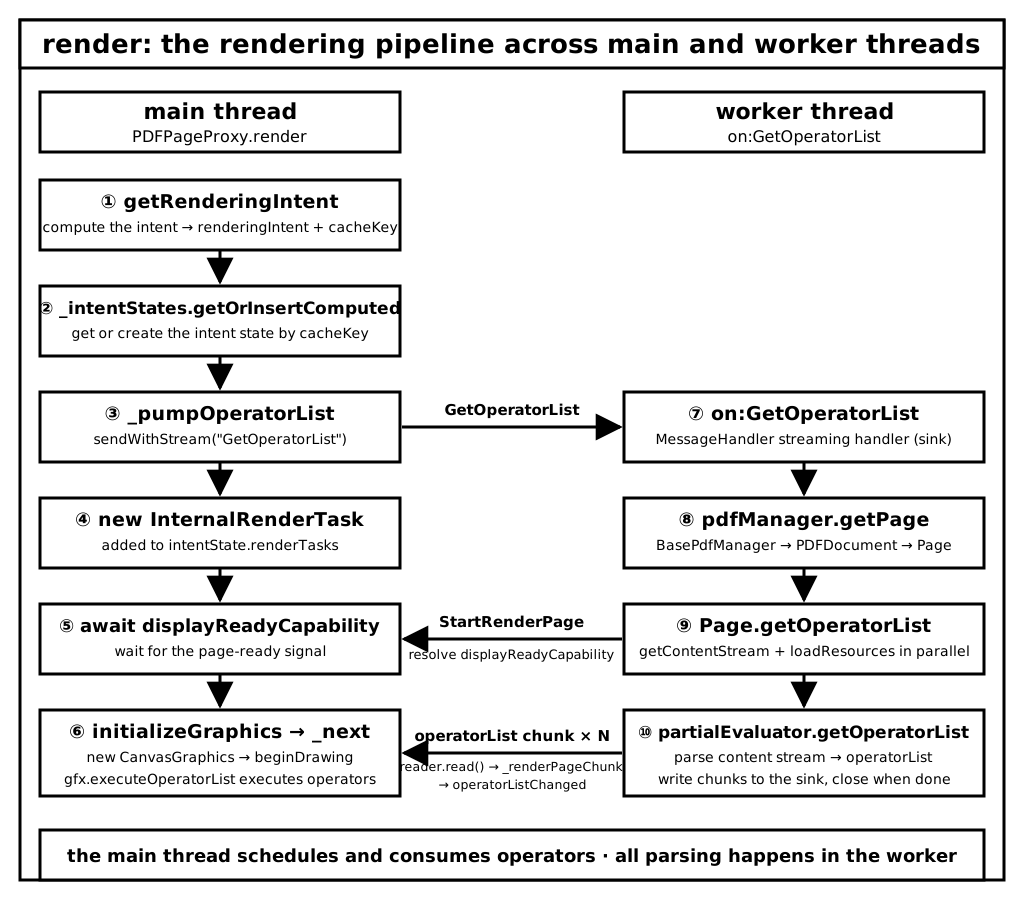
Text version:
Main thread (PDFPageProxy.render)
  |-- getRenderingIntent            compute the intent, build the cache key
  |-- _intentStates.getOrInsert...  get or create the intent state by cache key
  |-- _pumpOperatorList             send the streaming GetOperatorList request to the worker
  |     `-- reader.read() loop consumes chunks, hands each to _renderPageChunk
  |-- new InternalRenderTask        create the render task, add it to renderTasks
  `-- await displayReadyCapability
        `-- initializeGraphics      create CanvasGraphics, beginDrawing
              `-- operatorListChanged -> _next -> gfx.executeOperatorList

Worker thread (on:GetOperatorList)
  |-- pdfManager.getPage            locate the Page
  `-- Page.getOperatorList
        |-- handler.send("StartRenderPage")    resolves displayReadyCapability
        `-- partialEvaluator.getOperatorList   parses operators, streams them back via sink
Understanding this pipeline means understanding the skeleton of PDF.js rendering: the main thread only schedules and consumes operators; the real parsing work all happens in the worker.
At this point, after these three articles, the rendering architecture of PDF.js is clear. Starting from the next article, we'll dive into some of the details to round out the depth.
Happy reading!
Next up: MessageHandler — a deep dive into the core mechanism of message communication.