
PDF.js 深入浅出 3: getViewport & render
2026年10月22日 · StreamPDF Team
前言
这是 PDF.js 深入浅出系列的第三篇,在上一篇中,我们探索了 Display 层的 getDocument 和 getPage 方法.
本篇中, 我们深入探索 Display 层暴露出来的 getViewport 和 render 方法.
本系列分析基于 PDF.js v6.3.289 源码.
getViewport
对于 page.getViewport, 调用到 PDFPageProxy.getViewport 方法.
/**
 * @param {GetViewportParameters} params - Viewport parameters.
 * @returns {PageViewport} Contains 'width' and 'height' properties
 *   along with transforms required for rendering.
 */
getViewport({
  scale,
  rotation = this.rotate,
  offsetX = 0,
  offsetY = 0,
  dontFlip = false,
} = {}) {
  return new PageViewport({
    viewBox: this.view,
    userUnit: this.userUnit,
    scale,
    rotation,
    offsetX,
    offsetY,
    dontFlip,
  });
}
实例化 PageViewport 类.
进入 PageViewport
// Source: src/display/page_viewport.js
/**
 * @param {PageViewportParameters}
 */
constructor({
  viewBox,
  userUnit,
  scale,
  rotation,
  offsetX = 0,
  offsetY = 0,
  dontFlip = false,
}) {
  this.viewBox = viewBox;
  this.userUnit = userUnit;
  this.scale = scale;
  this.rotation = rotation;
  this.offsetX = offsetX;
  this.offsetY = offsetY;

  scale *= userUnit; // Take the userUnit into account.

  // creating transform to convert pdf coordinate system to the normal
  // canvas like coordinates taking in account scale and rotation
  const centerX = (viewBox[2] + viewBox[0]) / 2;
  const centerY = (viewBox[3] + viewBox[1]) / 2;
  let rotateA, rotateB, rotateC, rotateD;
  // Normalize the rotation, by clamping it to the [0, 360) range.
  rotation %= 360;
  if (rotation < 0) {
    rotation += 360;
  }
  switch (rotation) {
    case 180:
      rotateA = -1;
      rotateB = 0;
      rotateC = 0;
      rotateD = 1;
      break;
    case 90:
      rotateA = 0;
      rotateB = 1;
      rotateC = 1;
      rotateD = 0;
      break;
    case 270:
      rotateA = 0;
      rotateB = -1;
      rotateC = -1;
      rotateD = 0;
      break;
    case 0:
      rotateA = 1;
      rotateB = 0;
      rotateC = 0;
      rotateD = -1;
      break;
    default:
      throw new Error(
        "PageViewport: Invalid rotation, must be a multiple of 90 degrees."
      );
  }

  if (dontFlip) {
    rotateC = -rotateC;
    rotateD = -rotateD;
  }

  let offsetCanvasX, offsetCanvasY;
  let width, height;
  if (rotateA === 0) {
    offsetCanvasX = Math.abs(centerY - viewBox[1]) * scale + offsetX;
    offsetCanvasY = Math.abs(centerX - viewBox[0]) * scale + offsetY;
    width = (viewBox[3] - viewBox[1]) * scale;
    height = (viewBox[2] - viewBox[0]) * scale;
  } else {
    offsetCanvasX = Math.abs(centerX - viewBox[0]) * scale + offsetX;
    offsetCanvasY = Math.abs(centerY - viewBox[1]) * scale + offsetY;
    width = (viewBox[2] - viewBox[0]) * scale;
    height = (viewBox[3] - viewBox[1]) * scale;
  }
  // creating transform for the following operations:
  // translate(-centerX, -centerY), rotate and flip vertically,
  // scale, and translate(offsetCanvasX, offsetCanvasY)
  this.transform = [
    rotateA * scale,
    rotateB * scale,
    rotateC * scale,
    rotateD * scale,
    offsetCanvasX - rotateA * scale * centerX - rotateC * scale * centerY,
    offsetCanvasY - rotateB * scale * centerX - rotateD * scale * centerY,
  ];

  this.width = width;
  this.height = height;
}
计算, 旋转度, 缩放, 偏移量, 是否翻转后的视口, 页面宽高.
着重说一下 PDF 的点和 CSS 的 PX 单位. 在 PDF 中, 72 点等于一英寸, 在 CSS 中, 96PX 等于一英寸, 也就是在 web 中的 100% 宽高需要将 PDF 的点放大 96/72 倍.
PDF 的坐标系是左下角为原点, 向右为 X 轴, 向上为 Y 轴. 而 CSS 的坐标系是左上角为原点, 向右为 X 轴, 向下为 Y 轴. 所以在 PDF 不旋转的情况下, 我们需要将 PDF 的 Y 轴坐标翻转以符合 web canvas 的坐标系. 所以你会看到
case 0:
  rotateA = 1;
  rotateB = 0;
  rotateC = 0;
  rotateD = -1;
中的 rotateD 是 -1, 就是为了翻转 Y 轴.
flip demo: get-viewport-demo
render
对于 page.render, 调用到 PDFPageProxy.render 方法.
/**
 * Begins the process of rendering a page to the desired context.
 *
 * @param {RenderParameters} params - Page render parameters.
 * @returns {RenderTask} An object that contains a promise that is
 *   resolved when the page finishes rendering.
 */
render({
  canvasContext,
  canvas = canvasContext.canvas,
  viewport,
  intent = "display",
  annotationMode = AnnotationMode.ENABLE,
  transform = null,
  background = null,
  optionalContentConfigPromise = null,
  annotationCanvasMap = null,
  pageColors = null,
  printAnnotationStorage = null,
  isEditing = false,
  recordImages = false,
  recordOperations = false,
  operationsFilter = null,
}) {
  this._stats?.time("Overall");

  const intentArgs = this._transport.getRenderingIntent(
    intent,
    annotationMode,
    printAnnotationStorage,
    isEditing
  );
  const { renderingIntent, cacheKey } = intentArgs;
  // If there was a pending destroy, cancel it so no cleanup happens during
  // this call to render.
  this.#pendingCleanup = false;

  optionalContentConfigPromise ||=
    this._transport.getOptionalContentConfig(renderingIntent);

  const intentState = this._intentStates.getOrInsertComputed(
    cacheKey,
    makeObj
  );
  // Ensure that a pending `streamReader` cancel timeout is always aborted.
  if (intentState.streamReaderCancelTimeout) {
    clearTimeout(intentState.streamReaderCancelTimeout);
    intentState.streamReaderCancelTimeout = null;
  }

  const intentPrint = !!(renderingIntent & RenderingIntentFlag.PRINT);

  // If there's no displayReadyCapability yet, then the operatorList
  // was never requested before. Make the request and create the promise.
  if (!intentState.displayReadyCapability) {
    intentState.displayReadyCapability = Promise.withResolvers();
    intentState.operatorList = {
      fnArray: [],
      argsArray: [],
      lastChunk: false,
      separateAnnots: null,
    };

    this._stats?.time("Page Request");
    this._pumpOperatorList(intentArgs);
  }

  const recordForDebugger = !!(
    this._pdfBug && globalThis.StepperManager?.enabled
  );
  const shouldRecordOperations =
    !!canvas &&
    !this.recordedBBoxes &&
    (recordOperations || recordForDebugger);
  const shouldRecordImages =
    !!canvas && !this.imageCoordinates && recordImages;

  const complete = error => {
    intentState.renderTasks.delete(internalRenderTask);

    if (shouldRecordOperations) {
      const recordedBBoxes = internalRenderTask.gfx?.dependencyTracker.take();
      if (recordedBBoxes) {
        internalRenderTask.stepper?.setOperatorBBoxes(
          recordedBBoxes,
          internalRenderTask.gfx.dependencyTracker.takeDebugMetadata()
        );

        if (recordOperations) {
          this.recordedBBoxes = recordedBBoxes;
        }
      }
    }

    if (shouldRecordImages && !error) {
      this.imageCoordinates = internalRenderTask.gfx?.imagesTracker.take();
    }

    // Attempt to reduce memory usage during *printing*, by always running
    // cleanup immediately once rendering has finished.
    if (intentPrint) {
      this.#pendingCleanup = true;
    }
    this.#tryCleanup();

    if (error) {
      internalRenderTask.capability.reject(error);

      this._abortOperatorList({
        intentState,
        reason: error instanceof Error ? error : new Error(error),
      });
    } else {
      internalRenderTask.capability.resolve();
    }

    if (this._stats) {
      this._stats.timeEnd("Rendering");
      this._stats.timeEnd("Overall");

      if (globalThis.Stats?.enabled) {
        globalThis.Stats.add(this.pageNumber, this._stats);
      }
    }
  };

  let dependencyTracker = null;
  let bboxTracker = null;
  if (shouldRecordOperations || shouldRecordImages) {
    bboxTracker = new CanvasBBoxTracker(
      canvas,
      intentState.operatorList.length
    );
  }
  if (shouldRecordOperations) {
    dependencyTracker = new CanvasDependencyTracker(
      bboxTracker,
      recordForDebugger
    );
  }

  const internalRenderTask = new InternalRenderTask({
    callback: complete,
    // Only include the required properties, and *not* the entire object.
    params: {
      canvas,
      canvasContext,
      dependencyTracker: dependencyTracker ?? bboxTracker,
      imagesTracker: shouldRecordImages
        ? new CanvasImagesTracker(canvas)
        : null,
      viewport,
      transform,
      background,
    },
    objs: this.objs,
    commonObjs: this.commonObjs,
    annotationCanvasMap,
    operatorList: intentState.operatorList,
    pageIndex: this._pageIndex,
    canvasFactory: this._transport.canvasFactory,
    filterFactory: this._transport.filterFactory,
    useRequestAnimationFrame: !intentPrint,
    pdfBug: this._pdfBug,
    pageColors,
    enableHWA: this._transport.enableHWA,
    operationsFilter,
  });

  (intentState.renderTasks ||= new Set()).add(internalRenderTask);
  const renderTask = internalRenderTask.task;

  Promise.all([
    intentState.displayReadyCapability.promise,
    optionalContentConfigPromise,
  ])
    .then(([transparency, optionalContentConfig]) => {
      if (this.destroyed) {
        complete();
        return;
      }
      this._stats?.time("Rendering");

      if (!(optionalContentConfig.renderingIntent & renderingIntent)) {
        throw new Error(
          "Must use the same `intent`-argument when calling the `PDFPageProxy.render` " +
            "and `PDFDocumentProxy.getOptionalContentConfig` methods."
        );
      }
      internalRenderTask.initializeGraphics({
        transparency,
        optionalContentConfig,
      });
      internalRenderTask.operatorListChanged();
    })
    .catch(complete);

  return renderTask;
}
这是一个非常复杂的方法, 让我们分块进行分析
第一步: 调用 getRenderingIntent 方法, 获取渲染意图. 有 any, display, print 三种意图.
第二步: 调用 this._intentStates.getOrInsertComputed 方法, 基于第一步的渲染意图, 获取或插入计算后的渲染状态.
第三步: 获取 Page 的渲染操作列表.
// If there's no displayReadyCapability yet, then the operatorList
// was never requested before. Make the request and create the promise.
if (!intentState.displayReadyCapability) {
  intentState.displayReadyCapability = Promise.withResolvers();
  intentState.operatorList = {
    fnArray: [],
    argsArray: [],
    lastChunk: false,
    separateAnnots: null,
  };

  this._stats?.time('Page Request');
  this._pumpOperatorList(intentArgs);
}
这里会有一层缓存, 判断 intentState.displayReadyCapability 是否存在. 如果不存在, 则创建一个 Promise, 并请求 Page 的渲染操作列表.
Q: intentState.displayReadyCapability 是什么? 为什么等这个 Promise resolve 之后才能向 canvas 上真正渲染内容?
A: 它是
Promise.withResolvers()返回的{ promise, resolve, reject },其promise解析出布尔transparency(该页是否含 blend mode,决定渲染时是否需要 alpha canvas)。之所以必须等它 resolve 之后才能真正渲染,核心原因有二。其一,
transparency是initializeGraphics的必要参数——CanvasGraphics 初始化时需要知道是否启用 alpha 通道来正确处理混合模式,而这个值只有 Worker 解析完 content stream 与 resources 后才能确定。其二,它本质上是 Worker 发来的「Page 已就绪」启动信号:Worker 在执行getOperatorList之前发出StartRenderPage消息,Display 层在_startRenderPage中 resolve 它。在此之前 operatorList 还是空的,分块数据要等 resolve 之后才由_renderPageChunk陆续送达,渲染流水线必须等这个信号到达后才能开始消费 operatorList。需要注意的是,它表示的是「Page 资源已就绪,可以开始接收渲染操作列表」,而不是「渲染操作列表已经填充完毕」——operatorList 是否收完由
intentState.operatorList.lastChunk标记。此外,它是否存在还兼作一层缓存标记:只要它已存在,就说明该渲染意图(
cacheKey)的 operatorList 之前已经请求过,无需重复调用_pumpOperatorList。
第四步: 实例化 InternalRenderTask 类, 并添加到渲染任务队列中.
第五步: 等待 intentState.displayReadyCapability 解析完成. 之后, 初始化渲染视图 initializeGraphics, 并通知渲染操作列表已改变 operatorListChanged. 正式执行渲染逻辑.
有了一个大致的流程之后, 让我们来详细分析每一个步骤的执行逻辑
第一步: getRenderingIntent 获取渲染意图
进入 PDFPageProxy.render -> WorkerTransport.getRenderingIntent
// Source: src/display/api.js
getRenderingIntent(
  intent,
  annotationMode = AnnotationMode.ENABLE,
  printAnnotationStorage = null,
  isEditing = false,
  isOpList = false
) {
  let renderingIntent = RenderingIntentFlag.DISPLAY; // Default value.
  let annotationStorageSerializable = SerializableEmpty;

  switch (intent) {
    case "any":
      renderingIntent = RenderingIntentFlag.ANY;
      break;
    case "display":
      break;
    case "print":
      renderingIntent = RenderingIntentFlag.PRINT;
      break;
    default:
      warn(`getRenderingIntent - invalid intent: ${intent}`);
  }

  const annotationStorage =
    renderingIntent & RenderingIntentFlag.PRINT &&
    printAnnotationStorage instanceof PrintAnnotationStorage
      ? printAnnotationStorage
      : this.annotationStorage;

  switch (annotationMode) {
    case AnnotationMode.DISABLE:
      renderingIntent += RenderingIntentFlag.ANNOTATIONS_DISABLE;
      break;
    case AnnotationMode.ENABLE:
      break;
    case AnnotationMode.ENABLE_FORMS:
      renderingIntent += RenderingIntentFlag.ANNOTATIONS_FORMS;
      break;
    case AnnotationMode.ENABLE_STORAGE:
      renderingIntent += RenderingIntentFlag.ANNOTATIONS_STORAGE;

      annotationStorageSerializable = annotationStorage.serializable;
      break;
    default:
      warn(`getRenderingIntent - invalid annotationMode: ${annotationMode}`);
  }

  if (isEditing) {
    renderingIntent += RenderingIntentFlag.IS_EDITING;
  }
  if (isOpList) {
    renderingIntent += RenderingIntentFlag.OPLIST;
  }

  const { ids: modifiedIds, hash: modifiedIdsHash } =
    annotationStorage.modifiedIds;

  const cacheKeyBuf = [
    renderingIntent,
    annotationStorageSerializable.hash,
    modifiedIdsHash,
  ];

  return {
    renderingIntent,
    cacheKey: cacheKeyBuf.join("_"),
    annotationStorageSerializable,
    modifiedIds,
  };
}
有三种模式: any, display, print.
- any 用于
getOperatorList/getTextContent等"任意"场景. - display 用来渲染页面.
- print 用来打印页面.
以及 annotationMode 模式, 用来控制是否渲染注释. 还有 isEditing 编辑模式.
第二步: this._intentStates.getOrInsertComputed
this._intentStates 是一个 Map, 基于渲染意图的 key 缓存数据.
makeObj 是一个工具函数, const makeObj = () => Object.create(null);
getOrInsertComputed 是一个 js 规范里面比较新的函数, 如果 key 存在, 则返回对应的 value. 如果不存在, 则通过第二个参数 callback 创建一个 value 并返回, 详见 MDN.
第三步: 获取 Page 的渲染操作列表.
这里判断 intentState.displayReadyCapability 是否存在. 如果存在, 说明数据之前已经请求过, 无需重复调用 _pumpOperatorList.
否则调用 _pumpOperatorList , 请求 Page 的渲染操作列表.
进入 PDFPageProxy.render -> PDFPageProxy._pumpOperatorList
// Source: src/display/api.js
_pumpOperatorList({
  renderingIntent,
  cacheKey,
  annotationStorageSerializable,
  modifiedIds,
}) {
  if (typeof PDFJSDev === "undefined" || PDFJSDev.test("TESTING")) {
    assert(
      Number.isInteger(renderingIntent) && renderingIntent > 0,
      '_pumpOperatorList: Expected valid "renderingIntent" argument.'
    );
  }
  const { map, transfer } = annotationStorageSerializable;

  const readableStream = this._transport.messageHandler.sendWithStream(
    "GetOperatorList",
    {
      pageId: this.#pagesMapper.getPageId(this._pageIndex + 1) - 1,
      pageIndex: this._pageIndex,
      intent: renderingIntent,
      cacheKey,
      annotationStorage: map,
      modifiedIds,
    },
    /* queueingStrategy = */ undefined,
    transfer
  );
  const reader = readableStream.getReader();

  const intentState = this._intentStates.get(cacheKey);
  intentState.streamReader = reader;

  const pump = () => {
    reader.read().then(
      ({ value, done }) => {
        if (done) {
          intentState.streamReader = null;
          return;
        }
        if (this._transport.destroyed) {
          return; // Ignore any pending requests if the worker was terminated.
        }
        this._renderPageChunk(value, intentState);
        pump();
      },
      reason => {
        intentState.streamReader = null;

        if (this._transport.destroyed) {
          return; // Ignore any pending requests if the worker was terminated.
        }
        if (intentState.operatorList) {
          // Mark operator list as complete.
          intentState.operatorList.lastChunk = true;

          for (const internalRenderTask of intentState.renderTasks) {
            internalRenderTask.operatorListChanged();
          }
          this.#tryCleanup();
        }

        if (intentState.displayReadyCapability) {
          intentState.displayReadyCapability.reject(reason);
        } else if (intentState.opListReadCapability) {
          intentState.opListReadCapability.reject(reason);
        } else {
          throw reason;
        }
      }
    );
  };
  pump();
}
在这里通过 transport 向 Worker 发出了重要的一个流式事件, 即 GetOperatorList.
进入 PDFPageProxy.render -> PDFPageProxy._pumpOperatorList -> Worker: on:GetOperatorList
handler.on(
  'GetOperatorList',
  function ({ pageId, pageIndex, intent, cacheKey, annotationStorage, modifiedIds }, sink) {
    pdfManager.getPage(pageId).then(function (page) {
      const task = new WorkerTask(`GetOperatorList: page ${pageIndex}`);
      startWorkerTask(task);

      // NOTE: Keep this condition in sync with the `info` helper function.
      const start = verbosity >= VerbosityLevel.INFOS ? Date.now() : 0;

      // Pre compile the pdf page and fetch the fonts/images.
      page
        .getOperatorList({
          handler,
          sink,
          task,
          intent,
          cacheKey,
          annotationStorage,
          modifiedIds,
          pageIndex,
        })
        .then(
          opListInfo => {
            if (start) {
              info(`${task.name}; time=${Date.now() - start}ms, len=${opListInfo.length}`);
            }
            sink.close();
          },
          reason => {
            if (task.terminated) {
              return; // ignoring errors from the terminated thread
            }
            sink.error(reason);
          },
        )
        .finally(() => {
          finishWorkerTask(task);
        });
    });
  },
);
调用 pdfManager.getPage 获取 Page 实例, 这里的调用指向 NetworkPDFManager.getPage, 又指向了 BasePdfManager.getPage
进入 PDFPageProxy.render -> PDFPageProxy._pumpOperatorList -> Worker: on:GetOperatorList -> NetworkPDFManager.getPage Parent BasePdfManager.getPage
getPage(pageIndex) {
  return this.pdfDocument.getPage(pageIndex);
}
调用 this.pdfDocument.getPage
让我们先看一下 this.pdfDocument 是如何来的
进入 PDFPageProxy.render -> PDFPageProxy._pumpOperatorList -> Worker: on:GetOperatorList -> NetworkPDFManager.constructor
this.pdfDocument = new PDFDocument(this, this.streamManager.getStream());实例化 PDFDocument
进入 PDFPageProxy.render -> PDFPageProxy._pumpOperatorList -> Worker: on:GetOperatorList -> NetworkPDFManager.constructor -> PDFDocument.constructor
constructor(pdfManager, stream) {
  if (typeof PDFJSDev === "undefined" || PDFJSDev.test("TESTING")) {
    assert(
      stream instanceof BaseStream,
      'PDFDocument: Invalid "stream" argument.'
    );
  }
  if (stream.length <= 0) {
    throw new InvalidPDFException(
      "The PDF file is empty, i.e. its size is zero bytes."
    );
  }

  this.pdfManager = pdfManager;
  this.stream = stream;
  this.xref = new XRef(stream, pdfManager);

  const idCounters = {
    font: 0,
  };
  this._globalIdFactory = class {
    static getDocId() {
      return `g_${pdfManager.docId}`;
    }

    static createFontId() {
      return `f${++idCounters.font}`;
    }

    static createObjId() {
      unreachable("Abstract method `createObjId` called.");
    }

    static getPageObjId() {
      unreachable("Abstract method `getPageObjId` called.");
    }
  };
}
在这里, 实例化 XRef 实例, 用于解析 PDF 文件的 XRef 表.
Q: 什么是 XRef 表?
A: XRef (Cross-Reference) 表是 PDF 文件的"对象目录". PDF 文件内部的每个实体——页面、字体、图片、内容流等——都是一个带编号的对象 (例如
3 0 obj). XRef 表记录了每一个对象在文件中的字节偏移位置.举个例子:
xref
0 5
0000000000 65535 f
0000000010 00000 n
0000000053 00000 n
0000000102 00000 n
0000000173 00000 n
第一行
0 5表示接下来列出从对象 0 开始的 5 个对象. 每条记录固定 20 字节: 前 10 位是字节偏移, 中间 5 位是版本号, 最后一位是n(in-use) 或f(free/已删除).解析器拿到一个对象编号 (比如
2 0 R, 意思是"引用对象 2") 时, 直接查 XRef 表就能算出它在文件里的位置, 不必像 XML/JSON 那样从头扫到尾. 这也是 PDF 支持增量更新 (append-only) 的关键——每次追加修改后, 只需要追加一个新的 XRef 段, 并把文件末尾的startxref指针指向最新的那个即可.在 pdf.js 里,
XRef类就是用来解析这张表、维护{对象编号 → 偏移位置}映射关系, 并负责解析对象的实际内容 (遇到间接引用2 0 R时会递归解析直到拿到真实值).
这是 StreamPDF 中的一个优化点, 由服务端前置解析 Xref 表, 这里不展开, 后面会有一篇单独的文章详细介绍.
我们目前不再深入, 继续走渲染, 后面会有深入文章探索 PDF.js 对于 PDF 文档的词法解析和语法解析.
当 PDFDocument 初始化完成之后, 让我们回到 getPage 方法中
进入 PDFPageProxy.render -> PDFPageProxy._pumpOperatorList -> Worker: on:GetOperatorList -> NetworkPDFManager.getPage -> PDFDocument.getPage
getPage(pageIndex) {
  const cachedPromise = this.#pagePromises.get(pageIndex);
  if (cachedPromise) {
    return cachedPromise;
  }
  const { catalog, linearization, xfaFactory } = this;

  let promise;
  if (xfaFactory) {
    promise = Promise.resolve([Dict.empty, null]);
  } else if (linearization?.pageFirst === pageIndex) {
    promise = this.#getLinearizationPage(pageIndex);
  } else {
    promise = catalog.getPageDict(pageIndex);
  }
  promise = promise.then(
    ([pageDict, ref]) =>
      new Page({
        pdfManager: this.pdfManager,
        xref: this.xref,
        pageIndex,
        pageDict,
        ref,
        globalIdFactory: this._globalIdFactory,
        fontCache: catalog.fontCache,
        builtInCMapCache: catalog.builtInCMapCache,
        standardFontDataCache: catalog.standardFontDataCache,
        globalColorSpaceCache: catalog.globalColorSpaceCache,
        globalImageCache: catalog.globalImageCache,
        systemFontCache: catalog.systemFontCache,
        nonBlendModesSet: catalog.nonBlendModesSet,
        xfaFactory,
      })
  );

  this.#pagePromises.set(pageIndex, promise);
  return promise;
}
做了 catalog 的获取, 线性化的判断, 以及页面的创建.
Q: 什么是 catalog? A: Catalog (目录对象) 是 PDF 文件的"根节点字典", 位于对象图的顶端. 文件尾部的 trailer 中有一个
/Root条目指向它, 相当于整个 PDF 的入口. 它包含了指向其他所有顶层结构的引用, 最核心的是/Pages(页面树的根节点), 还有/Names(命名对象),/Outlines(书签),/AcroForm(表单),/Metadata(XMP 元数据) 等.在 pdf.js 中,
Catalog类封装了这棵根字典, 提供了跨页共享的缓存——字体缓存 (fontCache), 全局颜色空间缓存 (globalColorSpaceCache), 图片缓存 (globalImageCache), 内置 CMap 缓存 (builtInCMapCache) 等. 这些缓存会在多页之间复用, 避免重复解析相同的字体定义或颜色空间, 这就是为什么上面Page的构造函数里会把catalog.fontCache,catalog.globalColorSpaceCache等一长串传进来.
Q: 什么是 线性化(linearization)? A: 线性化 (Linearization) 是 PDF 规范提供的一项"快速 Web 视图"优化.
普通 PDF 的解析流程是: 先跳到文件末尾读
startxref→ 再读 trailer → 再从 trailer 找到主 XRef 段 → 才能定位对象. 这意味着你必须先拿到文件尾部的数据才能开始工作.线性化 PDF 在文件开头 (对象 1 的位置) 额外放置了一个
Linearized字典, 里面记录了:
N— 总页数P— 首页的索引 (默认 0)O— 首页对象的编号T— 主 XRef 段在文件中的偏移H— 提示数组, 告诉浏览器哪些页在文件哪个位置解析器只需下载文件开头的几百字节, 就能通过这个字典跳过主 XRef, 直接定位到首页的数据开始渲染, 而不用等整个文件下载完. 这在大文件 (几十 MB 的扫描件) 上效果非常明显.
在 pdf.js 里,
PDFDocument.linearizationgetter 会尝试解析文件开头, 如果发现这个Linearized字典就返回一个包含numPages,pageFirst,objectNumberFirst等字段的对象. 上面getPage的逻辑就是: 如果是线性化 PDF 且当前请求的是首页, 就走#getLinearizationPage的快速路径, 直接用linearization.objectNumberFirst拿到首页面字典; 否则才用标准方式去 catalog 里查. 但是线性化非常依赖生成文件的工具, 大部分的文件都没有经过线性化处理
我们已经有一些触及到 PDF 格式的技术规范了.
这里返回了 Page 的实例, 让我们保持一下克制, 先不深入.
回到 PDFPageProxy.render -> PDFPageProxy._pumpOperatorList -> Worker: on:GetOperatorList
继续执行
// Pre compile the pdf page and fetch the fonts/images.
page
  .getOperatorList({
    handler,
    sink,
    task,
    intent,
    cacheKey,
    annotationStorage,
    modifiedIds,
    pageIndex,
  })
  .then(
    opListInfo => {
      if (start) {
        info(`${task.name}; time=${Date.now() - start}ms, len=${opListInfo.length}`);
      }
      sink.close();
    },
    reason => {
      if (task.terminated) {
        return; // ignoring errors from the terminated thread
      }
      sink.error(reason);
    },
  )
  .finally(() => {
    finishWorkerTask(task);
  });
调用了 Page.getOperatorList 方法, 来获取页面的渲染操作算子.
让我们简单看一下 Page.getOperatorList 方法的实现.
进入 PDFPageProxy.render -> PDFPageProxy._pumpOperatorList -> Worker: on:GetOperatorList -> Page.getOperatorList
// Source: src/core/document.js
async getOperatorList({
  handler,
  sink,
  task,
  intent,
  cacheKey,
  pageIndex = this.pageIndex,
  annotationStorage = null,
  modifiedIds = null,
}) {
  const contentStreamPromise = this.getContentStream();
  const resourcesPromise = this.loadResources(RESOURCES_KEYS_OPERATOR_LIST);
  // ...

  const pageListPromise = Promise.all([
    contentStreamPromise,
    resourcesPromise,
  ]).then(async ([contentStream]) => {
    const resources = await this.#getMergedResources(
      contentStream.dict,
      RESOURCES_KEYS_OPERATOR_LIST
    );
    const opList = new OperatorList(intent, sink);
    handler.send("StartRenderPage", {
      transparency: partialEvaluator.hasBlendModes(
        resources,
        this.nonBlendModesSet
      ),
      pageIndex,
      cacheKey,
    });

    await partialEvaluator.getOperatorList({
      stream: contentStream,
      task,
      resources,
      operatorList: opList,
    });
    return opList;
  });
  // ...
省略了很多逻辑, 看到关键的 handler.send("StartRenderPage") 了吗, 这个事件对应着前面的 intentState.displayReadyCapability
主进程的 StartRenderPage 事件监听函数
进入 PDFPageProxy.render -> PDFPageProxy._pumpOperatorList -> Worker: on:GetOperatorList -> Page.getOperatorList -> Main: on:StartRenderPage
messageHandler.on('StartRenderPage', data => {
  if (this.destroyed) {
    return; // Ignore any pending requests if the worker was terminated.
  }

  const page = this.#pageCache.get(data.pageIndex);
  page._startRenderPage(data.transparency, data.cacheKey);
});
调用了 page._startRenderPage
/**
 * @private
 */
_startRenderPage(transparency, cacheKey) {
  const intentState = this._intentStates.get(cacheKey);
  if (!intentState) {
    return; // Rendering was cancelled.
  }
  this._stats?.timeEnd("Page Request");

  // TODO Refactor RenderPageRequest to separate rendering
  // and operator list logic
  intentState.displayReadyCapability?.resolve(transparency);
}
这个方法 resolve 了 intentState.displayReadyCapability 这个 Promise.
好了, 让我们回到 _pumpOperatorList 方法.
回到 PDFPageProxy.render -> PDFPageProxy._pumpOperatorList
继续流式数据的处理, 通过 sink, 将数据源源不断的返给 main 进程的 reader
intentState.streamReader = reader;

const pump = () => {
  reader.read().then(
    ({ value, done }) => {
      if (done) {
        intentState.streamReader = null;
        return;
      }
      if (this._transport.destroyed) {
        return; // Ignore any pending requests if the worker was terminated.
      }
      this._renderPageChunk(value, intentState);
      pump();
    },
    reason => {
      intentState.streamReader = null;

      if (this._transport.destroyed) {
        return; // Ignore any pending requests if the worker was terminated.
      }
      if (intentState.operatorList) {
        // Mark operator list as complete.
        intentState.operatorList.lastChunk = true;

        for (const internalRenderTask of intentState.renderTasks) {
          internalRenderTask.operatorListChanged();
        }
        this.#tryCleanup();
      }

      if (intentState.displayReadyCapability) {
        intentState.displayReadyCapability.reject(reason);
      } else if (intentState.opListReadCapability) {
        intentState.opListReadCapability.reject(reason);
      } else {
        throw reason;
      }
    },
  );
};
pump();
在 Worker 每一次将 chunk 推到流里面之后, 会被这里进行消费, 调用 this._renderPageChunk(value, intentState);
进入 PDFPageProxy.render -> PDFPageProxy._pumpOperatorList -> PDFPageProxy._renderPageChunk
_renderPageChunk(operatorListChunk, intentState) {
  // Add the new chunk to the current operator list.
  for (let i = 0, ii = operatorListChunk.length; i < ii; i++) {
    intentState.operatorList.fnArray.push(operatorListChunk.fnArray[i]);
    intentState.operatorList.argsArray.push(operatorListChunk.argsArray[i]);
  }
  intentState.operatorList.lastChunk = operatorListChunk.lastChunk;
  intentState.operatorList.separateAnnots = operatorListChunk.separateAnnots;

  // Notify all the rendering tasks there are more operators to be consumed.
  for (const internalRenderTask of intentState.renderTasks) {
    internalRenderTask.operatorListChanged();
  }

  if (operatorListChunk.lastChunk) {
    this.#tryCleanup();
  }
}
对数据进行预处理之后, 调用 internalRenderTask.operatorListChanged() 方法, 通知渲染任务有新的操作算子了.
第四步: 渲染任务有新的操作算子了
进入 PDFPageProxy.render -> PDFPageProxy._pumpOperatorList -> PDFPageProxy._renderPageChunk -> InternalRenderTask.operatorListChanged
operatorListChanged() {
  if (!this.graphicsReady) {
    this.graphicsReadyCallback ||= this._continueBound;
    return;
  }
  this.gfx.dependencyTracker?.growOperationsCount(
    this.operatorList.fnArray.length
  );
  this.stepper?.updateOperatorList(this.operatorList);

  if (this.running) {
    return;
  }
  this._continue();
}
走向 _continue
进入 PDFPageProxy.render -> PDFPageProxy._pumpOperatorList -> PDFPageProxy._renderPageChunk -> internalRenderTask.operatorListChanged -> internalRenderTask._continue
_continue() {
  this.running = true;
  if (this.cancelled) {
    return;
  }
  if (this.task.onContinue) {
    this.task.onContinue(this._scheduleNextBound);
  } else {
    this._scheduleNext();
  }
}
走向 _scheduleNext
进入 PDFPageProxy.render -> PDFPageProxy._pumpOperatorList -> PDFPageProxy._renderPageChunk -> internalRenderTask.operatorListChanged -> internalRenderTask._continue -> internalRenderTask._scheduleNext
_scheduleNext() {
  if (this._useRequestAnimationFrame) {
    this.#rAF = window.requestAnimationFrame(() => {
      this.#rAF = null;
      this._nextBound().catch(this._cancelBound);
    });
  } else {
    Promise.resolve().then(this._nextBound).catch(this._cancelBound);
  }
}
通过 window.requestAnimationFrame, 调度到 _nextBound 方法
进入 PDFPageProxy.render -> PDFPageProxy._pumpOperatorList -> PDFPageProxy._renderPageChunk -> internalRenderTask.operatorListChanged -> internalRenderTask._continue -> internalRenderTask._scheduleNext -> internalRenderTask._nextBound
在 constructor 中, this._nextBound = this._next.bind(this);
走向 _next 方法,
进入 PDFPageProxy.render -> PDFPageProxy._pumpOperatorList -> PDFPageProxy._renderPageChunk -> internalRenderTask.operatorListChanged -> internalRenderTask._continue -> internalRenderTask._scheduleNext -> internalRenderTask._nextBound -> internalRenderTask._next
async _next() {
  if (this.cancelled) {
    return;
  }
  this.operatorListIdx = this.gfx.executeOperatorList(
    this.operatorList,
    this.operatorListIdx,
    this._continueBound,
    this.stepper,
    this._operationsFilter
  );
  if (this.operatorListIdx === this.operatorList.argsArray.length) {
    this.running = false;
    if (this.operatorList.lastChunk) {
      this.gfx.endDrawing();
      InternalRenderTask.#canvasInUse.delete(this._canvas);
      this.callback();
    }
  }
}
调用 this.gfx.executeOperatorList, 正式执行算子列表.
第五步: initializeGraphics & operatorListChanged
在 intentState.displayReadyCapability.promise 准备就绪之后, 开始初始化图形上下文
进入 initializeGraphics
// Source: src/display/api.js (InternalRenderTask)
initializeGraphics({ transparency = false, optionalContentConfig }) {
  if (this.cancelled) {
    return;
  }
  if (this._canvas) {
    if (InternalRenderTask.#canvasInUse.has(this._canvas)) {
      throw new Error(
        "Cannot use the same canvas during multiple render() operations. " +
          "Use different canvas or ensure previous operations were " +
          "cancelled or completed."
      );
    }
    InternalRenderTask.#canvasInUse.add(this._canvas);
  }

  if (this._pdfBug && globalThis.StepperManager?.enabled) {
    this.stepper = globalThis.StepperManager.create(this._pageIndex);
    this.stepper.init(this.operatorList);
    this.stepper.nextBreakPoint = this.stepper.getNextBreakPoint();
  }
  const {
    viewport,
    transform,
    background,
    dependencyTracker,
    imagesTracker,
  } = this.params;

  // When printing in Firefox, we get a specific context in mozPrintCallback
  // which cannot be created from the canvas itself.
  const canvasContext =
    this._canvasContext ||
    this._canvas.getContext("2d", {
      alpha: false,
      willReadFrequently: !this._enableHWA,
    });

  this.gfx = new CanvasGraphics(
    canvasContext,
    this.commonObjs,
    this.objs,
    this.canvasFactory,
    this.filterFactory,
    { optionalContentConfig },
    this.annotationCanvasMap,
    this.pageColors,
    dependencyTracker,
    imagesTracker
  );
  this.gfx.beginDrawing({
    transform,
    viewport,
    transparency,
    background,
  });
  this.operatorListIdx = 0;
  this.graphicsReady = true;
  this.graphicsReadyCallback?.();
}
通过打标 this.graphicsReady = true, 让 internalRenderTask.operatorListChanged 方法得以继续执行.
之后立即触发一次 operatorListChanged 方法, 开始执行算子列表. 该方法的代码前文中 Step 4 已完整展示过, 此处不再重复。
总结
本篇我们探索了 Display 层的 getViewport 和 render 两个方法.
getViewport 的核心是构造一个仿射变换矩阵: 把 PDF 的坐标系 (左下角为原点, 单位为点) 转换为 canvas 的坐标系 (左上角为原点, 单位为 px), 同时处理旋转, 缩放与 dontFlip.
render 则是一条横跨主线程与 Worker 的渲染流水线:
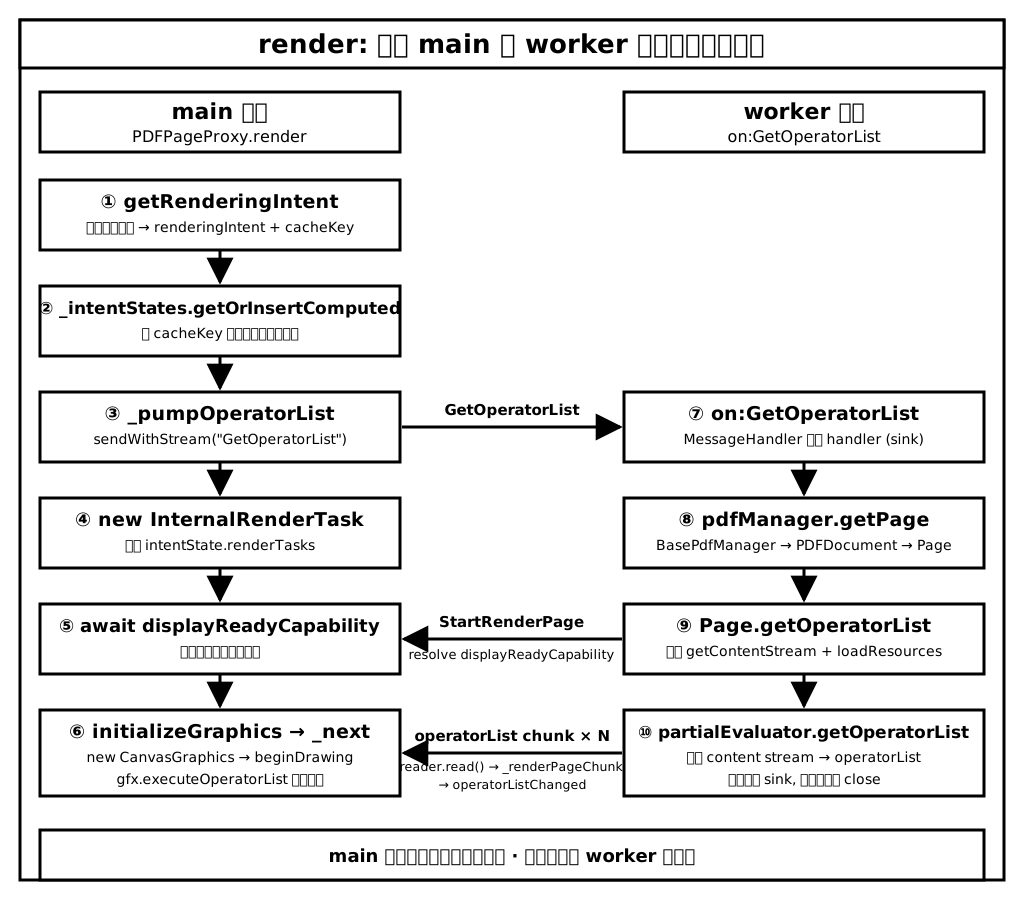
文字版:
Main 线程 (PDFPageProxy.render)
  |-- getRenderingIntent            计算渲染意图, 生成缓存 key
  |-- _intentStates.getOrInsert...  基于缓存 key 获取或创建渲染状态
  |-- _pumpOperatorList             向 Worker 发起 GetOperatorList 流式请求
  |     `-- reader.read() 循环消费 chunk, 每次交给 _renderPageChunk
  |-- new InternalRenderTask        创建渲染任务, 挂入 renderTasks
  `-- await displayReadyCapability
        `-- initializeGraphics      创建 CanvasGraphics, beginDrawing
              `-- operatorListChanged -> _next -> gfx.executeOperatorList

Worker 线程 (on:GetOperatorList)
  |-- pdfManager.getPage            定位 Page
  `-- Page.getOperatorList
        |-- handler.send("StartRenderPage")    resolve displayReadyCapability
        `-- partialEvaluator.getOperatorList   解析出算子, 经 sink 分块回传
理解了这条流水线, 也就理解了 PDF.js 渲染的骨架: 主线程只负责调度与消费算子, 真正的解析工作都在 Worker 中完成.
至此, 通过这三篇文章, PDF.js 的渲染架构已经清晰, 从下一篇开始, 将深入探索一些细节, 补全深度.
Happy reading!
下一篇预告: MessageHandler: 消息通讯的核心机制解读