
PDF.js Deep Dive 5: PDFFetchStream and PDFWorkerStream
October 25, 2026 · StreamPDF Team
Introduction
This is the fifth article in our PDF.js series, digging into the PDFFetchStream class and the PDFWorkerStream class.
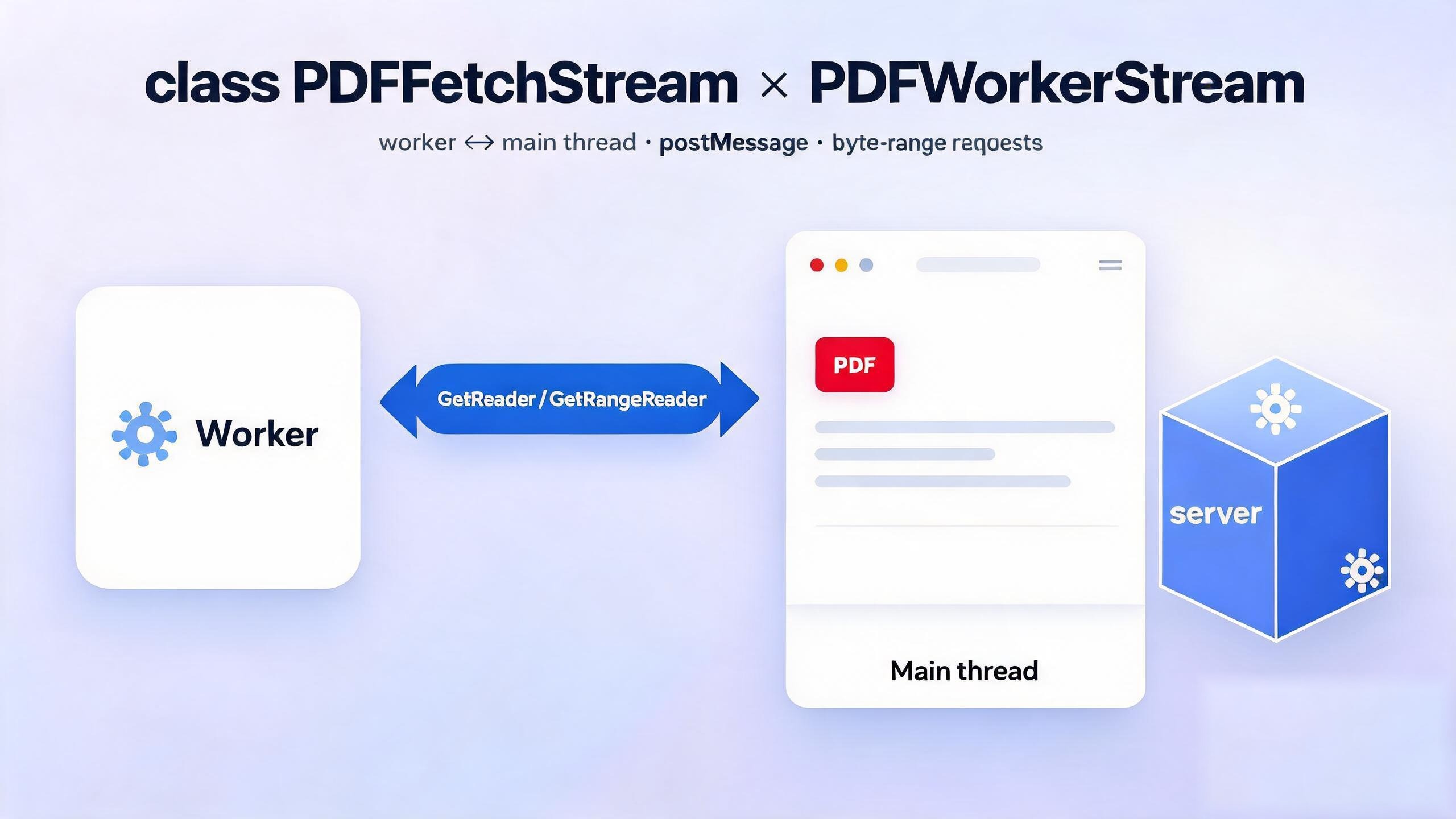
PDFFetchStreamlives on the main thread; every network request goes out through it.PDFWorkerStreamlives on the worker thread; it requests data through messages and does the actual parsing.
Together these two classes fetch and parse a PDF's binary data over the network.
All code in this article is based on PDF.js v6.3.289.
The article answers three questions:
- Why does PDF.js sometimes cancel a
200request right after issuing it? - Who triggers a Range request, and why does it have to cross both the worker and the main thread?
- Why is Range only possible when
Content-Encodingisidentity?
Let's start with the PDFFetchStream class.
The PDFFetchStream class
PDFFetchStream requests a PDF's bytes over the network — both the full request and Range requests, implemented by PDFFetchStreamReader and PDFFetchStreamRangeReader respectively.
PDFFetchStream is instantiated by getDocument, as covered in the second article of this series.
Entering PDFFetchStream.constructor
class PDFFetchStream extends BasePDFStream {
  _responseOrigin = null;

  constructor(source) {
    super(source, PDFFetchStreamReader, PDFFetchStreamRangeReader);
    const { httpHeaders, url } = source;

    assert(/https?:/.test(url.protocol), 'PDFFetchStream only supports http(s):// URLs.');
    this.headers = createHeaders(/* isHttp = */ true, httpHeaders);
  }
}
The class itself is trivial: it calls the parent constructor and hands it PDFFetchStreamReader and PDFFetchStreamRangeReader.
In the parent, BasePDFStream:
Entering PDFFetchStream.constructor -> BasePDFStream.constructor
constructor(source, PDFStreamReader, PDFStreamRangeReader) {
  if (
    (typeof PDFJSDev === "undefined" || PDFJSDev.test("TESTING")) &&
    this.constructor === BasePDFStream
  ) {
    unreachable("Cannot initialize BasePDFStream.");
  }
  this._source = source;

  this.#PDFStreamReader = PDFStreamReader;
  this.#PDFStreamRangeReader = PDFStreamRangeReader;
}
It stores source, PDFStreamReader and PDFStreamRangeReader.
The getFullReader method
As we saw in the getPdfManager part of the second article, getFullReader is what gets called:
getFullReader() {
  assert(
    !this._fullReader,
    "BasePDFStream.getFullReader can only be called once."
  );
  return (this._fullReader = new this.#PDFStreamReader(this));
}
That instantiates this.#PDFStreamReader, which points to the PDFFetchStreamReader class.
The getRangeReader method
getRangeReader(begin, end) {
  if (end <= this._progressiveDataLength) {
    return null;
  }
  const reader = new this.#PDFStreamRangeReader(this, begin, end);
  this._rangeReaders.add(reader);
  return reader;
}
It instantiates this.#PDFStreamRangeReader, which points to the PDFFetchStreamRangeReader class.
The reader is also added to the this._rangeReaders set, so that this.cancelAllRequests can cancel every outstanding Range request.
The cancelAllRequests method
cancelAllRequests(reason) {
  this._fullReader?.cancel(reason);

  // Always create a copy of the rangeReaders.
  for (const reader of new Set(this._rangeReaders)) {
    reader.cancel(reason);
  }
}
Cancels all requests, both the full request and every Range request.
The PDFFetchStreamReader class
Entering PDFFetchStreamReader.constructor
constructor(stream) {
  super(stream);
  const {
    disableRange,
    disableStream,
    rangeChunkSize,
    url,
    withCredentials,
  } = stream._source;

  this._isStreamingSupported = !disableStream;
  // Always create a copy of the headers.
  const headers = new Headers(stream.headers);

  fetchUrl(url, headers, withCredentials, this._abortController)
    .then(response => {
      stream._responseOrigin = getResponseOrigin(response.url);

      ensureResponseStatus(response.status, url);
      this._reader = response.body.getReader();

      const responseHeaders = response.headers;

      const { contentLength, isRangeSupported } =
        validateRangeRequestCapabilities({
          responseHeaders,
          isHttp: true,
          rangeChunkSize,
          disableRange,
        });
      this._contentLength = contentLength;
      this._isRangeSupported = isRangeSupported;

      this._filename = extractFilenameFromHeader(responseHeaders);

      // We need to stop reading when range is supported and streaming is
      // disabled.
      if (!this._isStreamingSupported && this._isRangeSupported) {
        this.cancel(new AbortException("Streaming is disabled."));
      }

      this._headersCapability.resolve();
    })
    .catch(this._headersCapability.reject);
}
The constructor calls fetchUrl:
Entering PDFFetchStreamReader.constructor -> fetchUrl(...)
function fetchUrl(url, headers, withCredentials, abortController) {
  return fetch(url, {
    method: 'GET',
    headers,
    signal: abortController.signal,
    mode: 'cors',
    credentials: withCredentials ? 'include' : 'same-origin',
    redirect: 'follow',
  });
}
which calls the browser's fetch to get the data.
Note that fetch does not wait for the whole body before it resolves.
This is the key to how PDF.js loads files over the network. The promise returned by fetch() resolves as soon as the response headers arrive, not when the entire body has been downloaded. The body is exposed as a ReadableStream on response.body and can be read chunk by chunk.
That means:
- PDF.js can read
Content-Length,Accept-Rangesand other key metadata while the download has barely started, without waiting for the whole file; response.body.getReader()lets it parse while downloading — progressive rendering. Parsing can start on the first page's bytes because the parser fetches the xref at the tail of the file with a Range request up front instead of waiting for the download to reach it sequentially;- If the server supports byte ranges, PDF.js can cut the full stream and switch to
Rangeheaders, requesting only the byte ranges it needs and cutting time-to-first-page even further.
This is why DevTools sometimes shows a
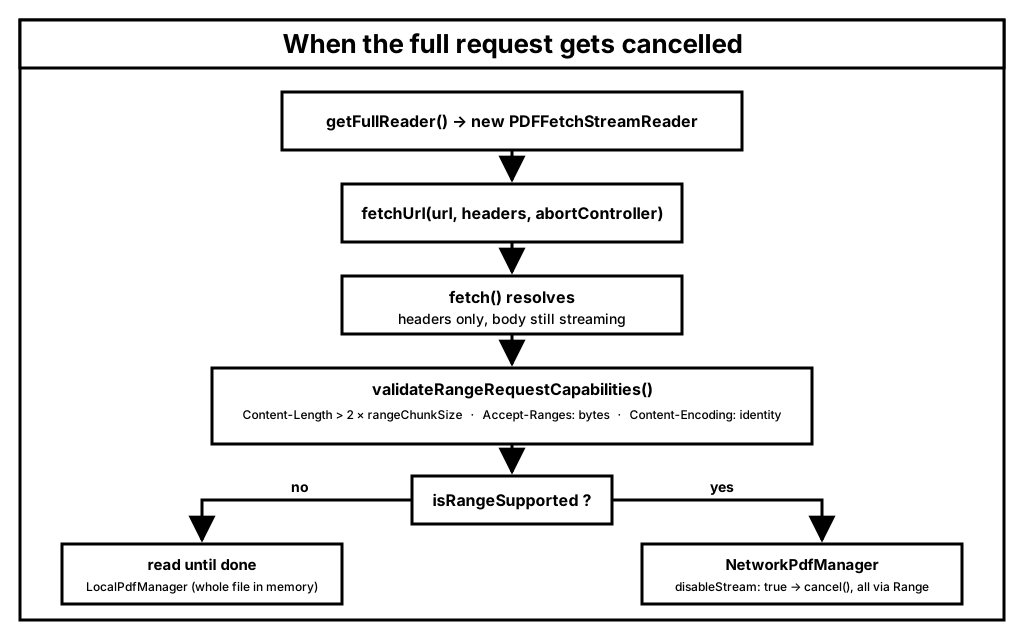
200 (canceled)with only response headers and no body: PDF.js cancels the full request as soon as it has the headers and asks for the byte ranges it needs instead.
There is one common misunderstanding here: the full stream is not always cancelled. Whether it is depends on disableStream (default false):
| Mode | disableStream | Full stream | What Range is for |
|---|---|---|---|
| Streaming (default) | false | Downloads to the end, feeding ChunkedStream | Fills gaps the parser outran (e.g. xref at the tail) |
| Streaming disabled | true | cancel()ed right after the headers | Carries all the data — the 200 (canceled) case |
Without this property, the "instant open" experience PDF.js is known for would not be possible.
A minimal demo
The snippet below reproduces what PDF.js does: it starts a full GET, cancels it as soon as the headers arrive, and then switches to Range requests.
const PDF_URL = 'https://assets.streampdf.com/PDF32000_2008.pdf'; // 22.5 MB, supports Range

async function demo() {
  const controller = new AbortController();

  // 1. Start the full request: once headers arrive, fetch resolves
  const response = await fetch(PDF_URL, { signal: controller.signal });
  console.log('status:', response.status); // 200, body may still be streaming
  const fileSize = Number(response.headers.get('Content-Length'));
  console.log('content-length:', fileSize);

  // 2. Grab the streaming reader for the body
  const reader = response.body.getReader();

  // 3. Read just one chunk, mimicking a parser that finds out it still
  //    needs the xref at the tail of the file
  const { value } = await reader.read();
  console.log('bytes actually read:', value.byteLength);

  // 4. Cancel
  await reader.cancel(); // closes the stream, the browser drops the connection
  controller.abort(); // belt and braces: put the signal into aborted state

  // 5. Switch to a Range request for the last 1 KB
  const rangeResp = await fetch(PDF_URL, {
    headers: { Range: `bytes=${fileSize - 1024}-${fileSize - 1}` },
  });
  console.log('range status:', rangeResp.status); // 206 Partial Content
}
Live demo (with logs and a DevTools walkthrough): fetch-abort-demo
The two cancellation calls are not the same thing:
reader.cancel()closes the data stream. Thefetchpromise has long since resolved, so nothing rejects; the browser simply stops receiving the remaining bytes and closes the connection.controller.abort()aborts the whole request. If thefetchpromise has not resolved yet (headers have not arrived), it rejects withAbortError.
As an aside, PDF.js calls both, in that order: this._reader?.cancel(reason) followed immediately by this._abortController.abort(). Both are needed because cancel() can fire before _reader has been assigned (headers not yet received); in that window abort() is the only way out.
Watching it in DevTools
Open the Network panel and load a large PDF that supports Range with disableStream: true. You will see two entries:
| Request | Status | Size | What it is |
|---|---|---|---|
demo.pdf | 200 + (canceled) | stops after a few dozen KB | full request, cancelled right after headers |
demo.pdf | 206 Partial Content | exactly the size of the requested chunk | the byte ranges requested afterwards |
The first one is exactly the "200 with no response data" behaviour described above — the response body was still streaming when reader.cancel() closed the connection.
Back in the PDF.js source, the trigger for that cancellation is these lines in the PDFFetchStreamReader constructor:
// We need to stop reading when range is supported and streaming is
// disabled.
if (!this._isStreamingSupported && this._isRangeSupported) {
  this.cancel(new AbortException('Streaming is disabled.'));
}
When disableStream: true and the server supports Range, PDF.js abandons the full stream as soon as it has the headers, and every subsequent byte comes from PDFFetchStreamRangeReader. The whole decision looks like this:
Notes: if you want a deeper look at
fetchand the underlyingReadableStream, see the fourth article in this series.
The validateRangeRequestCapabilities function
Back to PDFFetchStreamReader.constructor -> fetchUrl(...).then -> validateRangeRequestCapabilities
function validateRangeRequestCapabilities({
  responseHeaders,
  isHttp,
  rangeChunkSize,
  disableRange,
}) {
  if (typeof PDFJSDev === 'undefined' || PDFJSDev.test('TESTING')) {
    assert(
      Number.isInteger(rangeChunkSize) && rangeChunkSize > 0,
      'rangeChunkSize must be an integer larger than zero.',
    );
  }
  const rv = {
    contentLength: 0,
    isRangeSupported: false,
  };

  const length = parseInt(responseHeaders.get('Content-Length'), 10);
  if (!Number.isInteger(length)) {
    return rv;
  }
  rv.contentLength = length;

  if (length <= 2 * rangeChunkSize) {
    // The file size is smaller than the size of two chunks, so it does not
    // make any sense to abort the request and retry with a range request.
    return rv;
  }
  if (disableRange || !isHttp) {
    return rv;
  }
  if (responseHeaders.get('Accept-Ranges') !== 'bytes') {
    return rv;
  }

  const contentEncoding = responseHeaders.get('Content-Encoding') || 'identity';
  if (contentEncoding === 'identity') {
    rv.isRangeSupported = true;
  }
  return rv;
}
This function puts the file through four gates before Range is used:
- The file must be larger than two chunks (
length <= 2 * rangeChunkSizebails out, since cancelling and retrying would bring no benefit); - Range must not be disabled (
disableRange), and the resource must be http(s) (isHttp); - The server must return
Accept-Ranges: bytes; - The response must not be transfer-compressed, i.e.
Content-Encodingmust beidentity.
The fourth gate looks redundant at first glance — the server already returned Accept-Ranges: bytes, so why check Content-Encoding again?
const contentEncoding = responseHeaders.get('Content-Encoding') || 'identity';
if (contentEncoding === 'identity') {
  rv.isRangeSupported = true;
}
Because Range offsets are relative to the bytes as transferred, while PDF parsing needs offsets relative to the original file.
A PDF's cross-reference table (xref) stores the absolute byte offset of every object, and startxref at the end of the file points at the xref table. PDF.js issues Range requests using exactly those offsets — for example reading the last 1024 bytes to locate startxref:
fetch(url, {
  headers: { Range: `bytes=${fileSize - 1024}-${fileSize - 1}` },
});
That only works under two assumptions: fileSize equals the real PDF size, and Range: bytes=N-M returns bytes N through M of the file. As soon as the response carries Content-Encoding: gzip (or br, deflate), both assumptions break:
Content-Lengthbecomes the compressed size.validateRangeRequestCapabilitiesstores it ascontentLength, so every later offset calculation based on it (likefileSize - 1024) is off.- Range slices the compressed stream.
bytes=1000-2000returns bytes 1000–2000 of the gzip stream, not bytes 1000–2000 of the PDF. gzip is a streaming format: a middle slice has no dictionary or header, cannot be decompressed on its own, and is useless. - The browser "helps" in a way that hurts.
fetchdecompresses the body transparently when it negotiated compression, soresponse.bodyyields original bytes whileContent-Length/Content-Rangestill describe compressed sizes. The two sides no longer agree.
So only with Content-Encoding: identity (no transfer compression) do transferred bytes equal file bytes, Content-Length become trustworthy, and Range offsets mean anything.
As an aside: PDFs are already compressed internally with FlateDecode and friends, so adding gzip on top rarely pays off — which is why PDFs usually are not served with transfer compression in the first place, and this branch passes in the overwhelming majority of cases.
Even though PDFs are already FlateDecode-compressed internally, they still contain lots of plain strings (legacy xref tables, metadata, etc.), so compression can pay off in certain special cases. But in Range mode compression cannot be used at all (this is settled by the spec — see https://github.com/whatwg/fetch/issues/747). To handle that, StreamPDF inspects the PDF structure in the cloud to decide whether compression applies, and operates on the raw binary stream — split -> reassemble -> compress -> decompress — bringing PDFs of all shapes to the same loading speed, instead of relying on users to do special handling for a fast load.
The PDFFetchStreamRangeReader class
Next up, the PDFFetchStreamRangeReader class.
It is instantiated by PDFFetchStream.getRangeReader Parent BasePDFStream.getRangeReader.
Entering PDFFetchStreamRangeReader.constructor
constructor(stream, begin, end) {
  super(stream, begin, end);
  const { url, withCredentials } = stream._source;

  // Always create a copy of the headers.
  const headers = new Headers(stream.headers);
  headers.append("Range", `bytes=${begin}-${end - 1}`);

  fetchUrl(url, headers, withCredentials, this._abortController)
    .then(response => {
      const responseOrigin = getResponseOrigin(response.url);

      ensureResponseOrigin(responseOrigin, stream._responseOrigin);
      ensureResponseStatus(response.status, url);
      this._reader = response.body.getReader();

      this._readCapability.resolve();
    })
    .catch(this._readCapability.reject);
}
This sends the Range request through fetchUrl and grabs a reader for the response body.
The read method
async read() {
  await this._readCapability.promise;
  const { value, done } = await this._reader.read();
  if (done) {
    return { value, done };
  }
  return { value: getArrayBuffer(value), done: false };
}
read keeps pulling data from the reader until done is true.
Section summary
PDFFetchStream is the main-thread class and does the real I/O, while PDFWorkerStream on the worker thread triggers the Range requests and parses the responses.
Let's move on to the worker's point of view.
The PDFWorkerStream class
This class is instantiated by getPdfManager. See the second article of this series for details.
class PDFWorkerStream extends BasePDFStream {
  constructor(source) {
    super(source, PDFWorkerStreamReader, PDFWorkerStreamRangeReader);
  }
}
It is perfectly symmetrical to PDFFetchStream — same parent, same "just hand over two Reader classes" constructor. The difference is that its source has no url, only a msgHandler: it never issues network requests itself, it packages requests into messages and lets the main thread send them.
It extends BasePDFStream:
constructor(source, PDFStreamReader, PDFStreamRangeReader) {
  if (
    (typeof PDFJSDev === "undefined" || PDFJSDev.test("TESTING")) &&
    this.constructor === BasePDFStream
  ) {
    unreachable("Cannot initialize BasePDFStream.");
  }
  this._source = source;

  this.#PDFStreamReader = PDFStreamReader;
  this.#PDFStreamRangeReader = PDFStreamRangeReader;
}
Exactly what we saw in the PDFFetchStream section: it stores source, PDFStreamReader and PDFStreamRangeReader. The only difference is that the two Reader classes passed in are now PDFWorkerStreamReader and PDFWorkerStreamRangeReader — the template stays the same, the implementations filling it differ.
The getFullReader method
getFullReader() {
  assert(
    !this._fullReader,
    "BasePDFStream.getFullReader can only be called once."
  );
  return (this._fullReader = new this.#PDFStreamReader(this));
}
In the getPdfManager part of the second article you can see the worker side calling it right after new PDFWorkerStream(...) inside getPdfManager:
const pdfStream = new PDFWorkerStream({ msgHandler: handler }),
  fullReader = pdfStream.getFullReader();
It instantiates this.#PDFStreamReader, which points to the PDFWorkerStreamReader class.
The getRangeReader method
getRangeReader(begin, end) {
  if (end <= this._progressiveDataLength) {
    return null;
  }
  const reader = new this.#PDFStreamRangeReader(this, begin, end);
  this._rangeReaders.add(reader);
  return reader;
}
It instantiates this.#PDFStreamRangeReader, which points to the PDFWorkerStreamRangeReader class, and adds the reader to the this._rangeReaders set so that this.cancelAllRequests can cancel every Range request.
The dedup check at the top, end <= this._progressiveDataLength, is worth a note: _progressiveDataLength comes from _fullReader?._loaded, and the worker-side PDFWorkerStreamReader never maintains _loaded, so on the worker this check never hits — it is only the uniform entry point of the BasePDFStream template method. The real dedup happens on the main thread: once the GetRangeReader message arrives, the main thread's PDFFetchStream.getRangeReader runs the very same check, and when it hits it closes the stream directly without issuing a duplicate request.
The cancelAllRequests method
cancelAllRequests(reason) {
  this._fullReader?.cancel(reason);

  // Always create a copy of the rangeReaders.
  for (const reader of new Set(this._rangeReaders)) {
    reader.cancel(reason);
  }
}
Cancels all requests, both the full request and every Range request.
On the worker side, reader.cancel(reason) cancels the ReadableStream obtained from msgHandler.sendWithStream(...). The cancellation signal travels back to the main thread along the message channel and ultimately triggers cancel on the main thread's PDFFetchStreamReader / PDFFetchStreamRangeReader, where reader.cancel() + abortController.abort() actually stop the network request — the worker never touches the network directly.
The PDFWorkerStreamReader class
Entering PDFWorkerStreamReader.constructor
class PDFWorkerStreamReader extends BasePDFStreamReader {
  _reader = null;

  constructor(stream) {
    super(stream);
    const { msgHandler } = stream._source;

    const readableStream = msgHandler.sendWithStream('GetReader');
    this._reader = readableStream.getReader();

    msgHandler.sendWithPromise('ReaderHeadersReady').then(data => {
      this._contentLength = data.contentLength;
      this._isStreamingSupported = data.isStreamingSupported;
      this._isRangeSupported = data.isRangeSupported;

      this._headersCapability.resolve();
    }, this._headersCapability.reject);
  }
}
In PDFWorkerStreamReader.constructor, sendWithStream sends the GetReader message and grabs a reader for the response stream. At the same time, sendWithPromise sends the ReaderHeadersReady message to fetch the response metadata.
-
sendWithStream('GetReader')sends a message to the main thread viamsgHandler. Its handler is registered in thesetupMessageHandlermethod of theWorkerTransportclass — see the WorkerTransport part of the second article. In that handler,this.#networkStream.getFullReader()is called, which points to thePDFFetchStream.getFullReadermethod covered in this article. -
sendWithPromise('ReaderHeadersReady')sends a message to the main thread viamsgHandler. Its handler is likewise registered inWorkerTransport.setupMessageHandler— again, see the second article. The handler waits for the asyncgetFullReaderfrom theGetReadermessage to settle, then returns the three fieldsisStreamingSupported, isRangeSupported, contentLength.
The class extends BasePDFStreamReader.
Entering PDFWorkerStreamReader.constructor -> BasePDFStreamReader.constructor
constructor(stream) {
  if (
    (typeof PDFJSDev === "undefined" || PDFJSDev.test("TESTING")) &&
    this.constructor === BasePDFStreamReader
  ) {
    unreachable("Cannot initialize BasePDFStreamReader.");
  }
  this._stream = stream;
}
Not much happens here: the abstract BasePDFStreamReader class provides the shared interface, and its constructor just stores stream, which the read method then uses.
The read method
async read() {
  const { value, done } = await this._reader.read();
  if (done) {
    return { value: undefined, done: true };
  }
  // `value` is wrapped into Uint8Array, we need to
  // unwrap it to ArrayBuffer for further processing.
  return { value: value.buffer, done: false };
}
It reads chunk by chunk from the _reader obtained in the constructor (the reader of the GetReader message stream), returning { value: undefined, done: true } when exhausted and otherwise handing the data up. Compared to the main thread's PDFFetchStreamReader.read: there is no _loaded accumulation and no onProgress callback here — progress is only tracked on the main-thread side that actually sends the requests.
read() contains an easy-to-miss detail:
The main side sends sink.enqueue(new Uint8Array(value), 1, [value]) — wrapping the buffer in a Uint8Array so it can be transferred with zero copies; on the worker side the wrapper has to be unwrapped again via value.buffer to get back the ArrayBuffer the upper layers expect.
The cancel method
cancel(reason) {
  this._reader.cancel(reason);
}
Cancels the GetReader message stream. As described in the cancelAllRequests section: the cancellation signal cascades back to the main thread along the message channel, and it is the main thread's PDFFetchStreamReader.cancel that actually stops the underlying fetch.
Section summary
PDFWorkerStreamReader is the worker-side full reader: data comes from the GetReader message stream, metadata from the ReaderHeadersReady message, and it never touches the network itself. read unwraps the Uint8Array transferred over as a Transferable back into an ArrayBuffer, and cancel cascades back to the main thread along the message channel.
Next comes its symmetrical Range counterpart.
The PDFWorkerStreamRangeReader class
This class is instantiated by PDFWorkerStream.getRangeReader Parent BasePDFStream.getRangeReader.
Entering PDFWorkerStreamRangeReader.constructor
class PDFWorkerStreamRangeReader extends BasePDFStreamRangeReader {
  _reader = null;

  constructor(stream, begin, end) {
    super(stream, begin, end);
    const { msgHandler } = stream._source;

    const readableStream = msgHandler.sendWithStream('GetRangeReader', {
      begin,
      end,
    });
    this._reader = readableStream.getReader();
  }
}
Same shape as PDFWorkerStreamReader.constructor, except the message is now GetRangeReader and carries the two parameters begin / end. They go into the message untouched, and the main thread turns them into the Range: bytes=begin-end-1 request header (see the earlier PDFFetchStreamRangeReader section).
Note there is no ReaderHeadersReady handshake here: the metadata was already fetched during the full-reader phase, and the Range reader only fetches data.
The class extends BasePDFStreamRangeReader.
Entering PDFWorkerStreamRangeReader.constructor -> BasePDFStreamRangeReader.constructor
constructor(stream, begin, end) {
  if (
    (typeof PDFJSDev === "undefined" || PDFJSDev.test("TESTING")) &&
    this.constructor === BasePDFStreamRangeReader
  ) {
    unreachable("Cannot initialize BasePDFStreamRangeReader.");
  }
  this._stream = stream;
}
Like BasePDFStreamReader, it only stores stream. The parent does not keep begin / end — once the subclass has packed them into the message in its constructor, they are no longer needed.
The read method
async read() {
  const { value, done } = await this._reader.read();
  if (done) {
    return { value: undefined, done: true };
  }
  return { value: value.buffer, done: false };
}
Exactly the same as PDFWorkerStreamReader.read: read chunk by chunk from the reader of the GetRangeReader message stream, and unwrap the transferred Uint8Array back into an ArrayBuffer.
The cancel method
cancel(reason) {
  this._reader.cancel(reason);
}
The message stream's onCancel cascades to the main thread's sink.onCancel, which cancels the PDFFetchStreamRangeReader and aborts the corresponding fetch. The whole cancellation only needs to be triggered once, at the top.
Section summary
PDFWorkerStreamRangeReader is perfectly symmetrical to the full reader: begin / end go into the GetRangeReader message, and both data and cancellation travel the same message channel. At this point, all three worker-side classes (PDFWorkerStream and its two readers) are nothing more than "message senders and receivers" — the real network I/O always stays on the main thread.
So how do the two threads coordinate? Let's zoom out and see how getPdfManager splits the responsibilities between the two sides.
Between the main thread and the worker
After getPdfManager creates the PDFWorkerStream and obtains fullReader, it does two things in parallel.
The first waits for the headers to decide which pdfManager to use:
Entering getPdfManager -> fullReader.headersReady.then
fullReader.headersReady
  .then(() => {
    if (!fullReader.isRangeSupported) {
      return;
    }
    pdfManagerArgs.source = pdfStream;
    pdfManagerArgs.length = fullReader.contentLength;
    // We don't need auto-fetch when streaming is enabled.
    pdfManagerArgs.disableAutoFetch ||= fullReader.isStreamingSupported;

    newPdfManager = new NetworkPdfManager(pdfManagerArgs);
    // There may be a chance that `newPdfManager` is not initialized for
    // the first few iterations of the `readData` code. Be sure to send
    // all cached chunks, if any, to chunked_stream via pdf_manager.
    for (const chunk of cachedChunks) {
      newPdfManager.sendProgressiveData(chunk);
    }
    cachedChunks = null;

    resolve(newPdfManager);
    cancelXHRs = null;
  })
  .catch(reason => {
    reject(reason);
    cancelXHRs = null;
  });
When the headers arrive and Range is supported, it creates a NetworkPdfManager and replays the chunks cached in cachedChunks into it — because before the headers arrived, the readData loop below may already have read a few chunks.
The line disableAutoFetch ||= fullReader.isStreamingSupported deserves its own sentence: when streaming is enabled, auto-fetch is switched off so Range requests do not prefetch every chunk of the file, duplicating what the full stream is already downloading.
The second is a readData() loop that keeps feeding bytes from the full stream into the pdfManager:
Entering getPdfManager -> readData()
async function readData() {
  let loaded = 0;

  while (true) {
    const { value, done } = await fullReader.read();
    ensureNotTerminated();

    if (done) {
      break;
    }
    loaded += value.byteLength;

    if (!fullReader.isStreamingSupported) {
      handler.send('DocProgress', {
        loaded,
        total: fullReader.contentLength,
      });
    }

    if (newPdfManager) {
      newPdfManager.sendProgressiveData(value);
    } else {
      cachedChunks.push(value);
    }
  }

  if (!newPdfManager) {
    pdfManagerArgs.source = arrayBuffersToBytes(cachedChunks);
    cachedChunks = null;

    newPdfManager = new LocalPdfManager(pdfManagerArgs);
    resolve(newPdfManager);
  }
  cancelXHRs = null;
}valueis theArrayBufferunwrapped byPDFWorkerStreamReader.read. IfnewPdfManageralready exists it is fed straight in viasendProgressiveData; if not (headers not yet arrived), it is buffered incachedChunksand replayed in thethenabove.- When
isStreamingSupportedisfalse, the loop also reports download progress to the main thread viaDocProgress— with streaming off, the full stream is cut, so progress can only be counted here.
So in streaming mode (the default), the full stream is not wasted once Range kicks in: it keeps draining the body's bytes into ChunkedStream, and Range requests only fill in the parts the parser outran. Both sides fill the same byte array. This also explains why _progressiveDataLength is _fullReader?._loaded — the number of bytes already received is exactly what decides whether a range still needs to be requested.
With disableStream: true, on the other hand, the full reader was already cancel()ed when the headers arrived, so readData() gets done on its very first read() and exits; every byte then comes from Range requests.
If the headers say Range is not supported, newPdfManager is never created, the loop reads until done, and LocalPdfManager takes over with all the cached chunks joined into one buffer.
There is one last safety net, registered right after fullReader and before headersReady:
cancelXHRs = reason => pdfStream.cancelAllRequests(reason);Before NetworkPdfManager exists (say, the user closes the document immediately), it cancels the full reader and every range reader in one shot — the very logic expanded in the PDFWorkerStream.cancelAllRequests section above. Whether the promise resolves or rejects, it is set back to null, handing cancellation duty over to the pdfManager.
The full Range request path
Back in the getPdfManager part of the second article, if Range is supported the document is handled by NetworkPdfManager inside the worker.
The whole Range path crosses both the worker and the main thread. Here is the overview first:
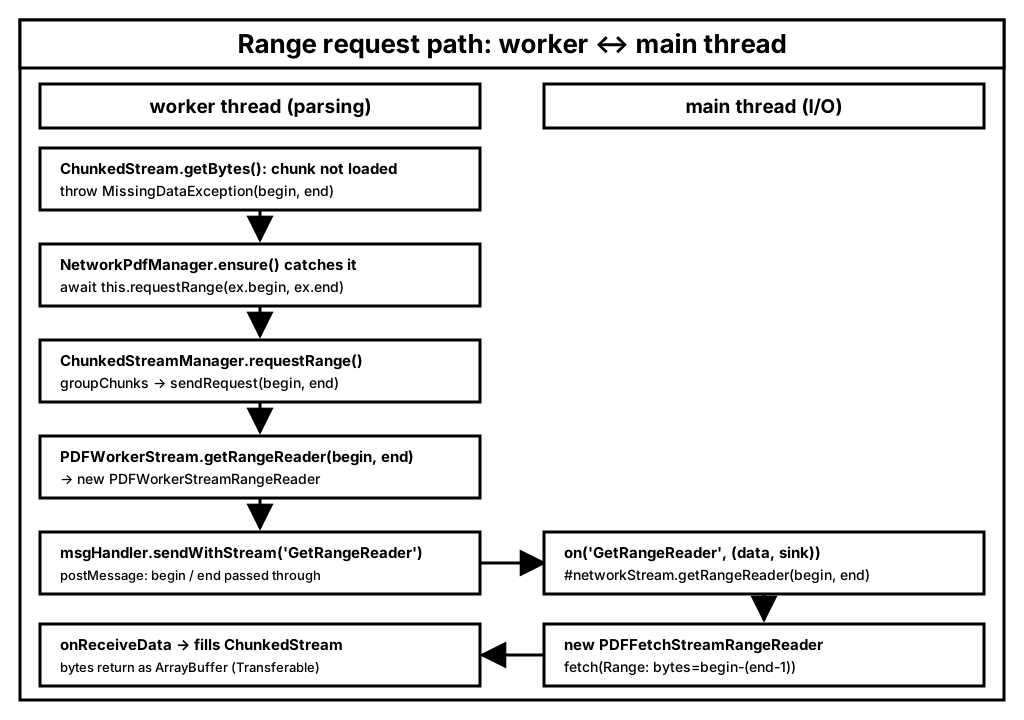
NetworkPdfManager uses ChunkedStreamManager internally, and the two classes split the work like this:
ChunkedStreamdecides, chunk by chunk, whether data has been loaded, and throwsMissingDataExceptionwhen it has not;ChunkedStreamManagerturns the missing chunks into Range requests.
As the previous section showed, getPdfManager passes the PDFWorkerStream instance as source to NetworkPdfManager, which hands it on to ChunkedStreamManager — that is where pdfStream on this path comes from.
As soon as parsing touches a chunk that has not been loaded, MissingDataException bubbles up to NetworkPdfManager.ensure, which fires the request:
For example: when the parser takes over a fresh document, the first thing it reads is the startxref and xref table at the tail of the file. Say the file is 22.5 MB and the full stream has only downloaded the first few hundred KB — the chunks for the last 64 KB are all missing, so ChunkedStream throws MissingDataException(begin, end). ensure catches it, requests that range, and once the data arrives re-runs the read that just failed.
Entering NetworkPdfManager.ensure
async ensure(obj, prop, args) {
  try {
    const value = obj[prop];
    if (typeof value === 'function') {
      return await value.apply(obj, args);
    }
    return value;
  } catch (ex) {
    if (!(ex instanceof MissingDataException)) {
      throw ex;
    }
    await this.requestRange(ex.begin, ex.end);
    return this.ensure(obj, prop, args);
  }
}
So NetworkPdfManager does not request anything "by default"; it requests on demand, only when parsing actually reaches bytes that have not been downloaded. requestRange forwards straight to ChunkedStreamManager:
Entering NetworkPdfManager.ensure -> requestRange(...)
requestRange(begin, end) {
  return this.streamManager.requestRange(begin, end);
}ChunkedStreamManager.requestRange uses groupChunks to merge the missing chunks into as few contiguous ranges as possible and then calls sendRequest(begin, end) for each. At this point begin / end are already chunk-aligned byte offsets (begin = beginChunk * chunkSize) — exactly the range that ends up in the HTTP Range header:
Entering NetworkPdfManager.ensure -> requestRange(...) -> ChunkedStreamManager.sendRequest
async sendRequest(begin, end) {
  const rangeReader = this.pdfStream.getRangeReader(begin, end);
  let chunks = [];

  while (true) {
    const { value, done } = await rangeReader.read();

    if (this.#aborted) {
      chunks = null;
      return; // Ignoring any data after abort.
    }
    if (done) {
      break;
    }
    chunks.push(value);
  }

  if (chunks.length === 0 && this.disableAutoFetch) {
    // The range request wasn't dispatched, see the "GetRangeReader" handler
    // in the `src/display/api.js` file.
    return;
  }
  const data = arrayBuffersToBytes(chunks);
  chunks = null;
  this.onReceiveData({ chunk: data.buffer, begin });
}
The pdfStream on the first line is the PDFWorkerStream. It does not override getRangeReader, so the call goes through the BasePDFStream.getRangeReader expanded above, instantiating PDFWorkerStreamRangeReader and packaging begin / end into a GetRangeReader message to the main thread.
The message reaches the main thread and is handled by the callback registered in WorkerTransport.setupMessageHandler:
Entering the main thread on:GetRangeReader
messageHandler.on('GetRangeReader', (data, sink) => {
  assert(this.#networkStream, 'GetRangeReader - no `BasePDFStream` instance available.');
  const rangeReader = this.#networkStream.getRangeReader(data.begin, data.end);

  // When streaming is enabled, it's possible that the data requested here
  // has already been fetched via the `#fullReader` implementation.
  // However, given that the PDF data is loaded asynchronously on the
  // main-thread and then sent via `postMessage` to the worker-thread,
  // it may not have been available during parsing (hence the attempt to
  // use range requests here).
  //
  // To avoid wasting time and resources here, we'll thus *not* dispatch
  // range requests if the data was already loaded but has not been sent to
  // the worker-thread yet (which will happen via the `#fullReader`).
  if (!rangeReader) {
    sink.close();
    return;
  }

  sink.onPull = () => {
    rangeReader
      .read()
      .then(function ({ value, done }) {
        if (done) {
          sink.close();
          return;
        }
        assert(value instanceof ArrayBuffer, 'GetRangeReader - expected an ArrayBuffer.');
        sink.enqueue(new Uint8Array(value), 1, [value]);
      })
      .catch(reason => {
        sink.error(reason);
      });
  };

  sink.onCancel = reason => {
    rangeReader.cancel(reason);

    sink.ready.catch(readyReason => {
      if (this.destroyed) {
        return; // Ignore any pending requests if the worker was terminated.
      }
      throw readyReason;
    });
  };
});
Start with the if (!rangeReader) branch.
getRangeReader returns null when end <= this._progressiveDataLength — meaning the range has in fact already been received through the full stream, the main thread just has not postMessaged it to the worker yet, so parsing on the worker side still thinks the data is missing. In that case the main thread simply calls sink.close() and does not issue a Range request.
On the worker side this corresponds to the chunks.length === 0 && this.disableAutoFetch branch in sendRequest above: receiving done with zero chunks means the Range request was never dispatched, and that data will arrive via the full stream, so it returns immediately instead of spinning through a pointless retry.
Meanwhile this.#networkStream in this.#networkStream.getRangeReader(data.begin, data.end) is the PDFFetchStream instance created on the main thread. PDFFetchStream also does not override getRangeReader, so the call again ends up in the very same BasePDFStream.getRangeReader as on the worker side — and what gets instantiated in the end is the star of the earlier PDFFetchStreamRangeReader section. At this point the whole path, from the worker's MissingDataException to the actual Range request on the main thread, is complete.
Summary
Looking at the two streams covered in this article side by side, BasePDFStream is a template, and each implementation only fills in two Reader classes:
| Where | Stream | Full reader | Range reader |
|---|---|---|---|
| main thread | PDFFetchStream | PDFFetchStreamReader (fetch) | PDFFetchStreamRangeReader (Range) |
| worker | PDFWorkerStream | PDFWorkerStreamReader (postMessage) | PDFWorkerStreamRangeReader (postMessage) |
A few design points worth remembering:
-
Reader classes are injected through the constructor.
getFullReader/getRangeReader/cancelAllRequestsall live inBasePDFStream, and subclasses only pick which readers to use, so the layer above (ChunkedStreamManager) never needs to know whether bytes come fromfetchor from a message channel. -
The worker only sends and receives messages; network I/O stays on the main thread. The three worker-side classes have no idea
url,headersorwithCredentialseven exist; data, metadata and cancellation signals all travel the message channel. This fully decouples the parsing layer from the transport layer, and is exactly why PDF.js can supportfetch,Blob, Nodefsand many other data sources at the same time. -
When
fetchresolves shapes the whole design. Headers arrive first, soContent-Length/Accept-Rangesare available before the first byte is read, and the decision to switch to Range can be made without waiting for the download to finish. -
Range has four gates (
validateRangeRequestCapabilities): the file must be larger than two chunks, Range must not be disabled and the resource must be http(s), the server must returnAccept-Ranges: bytes, andContent-Encodingmust beidentity. The last one is the easiest to overlook and decides whether offsets can be trusted. -
Cutting the full stream is a deliberate trade-off. With
disableStream: trueplus Range support, the full reader is cancelled immediately — that is the200 (canceled)in DevTools with headers but no body. Under the default configuration the full stream is never cut; the full stream and the Range requests fill the same byte array together. -
Range requests are on demand, and the dedup check can only live on the main thread.
MissingDataExceptionis thrown only when parsing actually reaches a gap, caught byNetworkPdfManager.ensure, and turned into a chunk-aligned Range request; ranges already covered by the full stream returnnulland have their message stream closed without a duplicate request — because only the main thread holds both pieces of information: the full stream's real download progress_loaded, and the pending Range offsets. -
Cancellation cascades both ways.
AbortControlleraborts the fetch,ReadableStream.cancel()closes the data stream, the message stream'sonCancelcarries the worker-side cancellation back to the main thread, andcancelAllRequestscovers the window where the manager does not exist yet.
Next up we will dig into ChunkedStream and ChunkedStreamManager to see how these chunk-by-chunk responses are stitched into a contiguous byte stream that supports random access.