
PDF.js Source Walkthrough: TextLayer
October 27, 2026 · StreamPDF Team
Introduction
This article is the text-side sequel to the PDF.js rendering loop. CanvasGraphics has painted glyphs into pixels, but the canvas itself does not know which pixels form a character, much less provide native text selection, copying, or semantic structure.
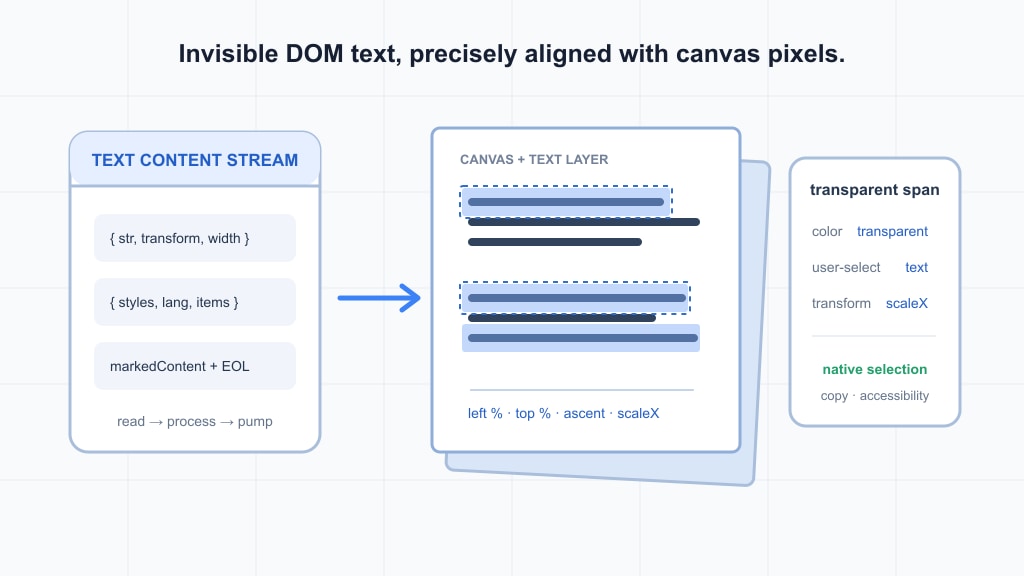
src/display/text_layer.js takes over a second data stream: PDFPageProxy.streamTextContent() or getTextContent() delivers worker-evaluated text items to the main thread, and TextLayer turns those items into transparent DOM overlaid on the canvas. Users select DOM text while seeing canvas glyphs; the two must share the same positions, directions, font sizes, and widths.
This article dissects the entire 564-line file: the streaming pump, coordinate transforms, marked-content containers, transparent spans, horizontal scaling, rotation updates, cancellation, and global measurement caches. One boundary must stay clear: this file provides the aligned structure needed by search and accessibility, but it does not implement searching, matching, or highlighting. TextLayerImages is also only an optional right-click image-placeholder capability, not part of text positioning.
Module Overview
TextLayer sits between text data and the browser's native text capabilities:
PDF text operators
  -> worker-side text items and styles
  -> streamTextContent(): ReadableStream
  -> getTextContent(): one aggregated TextContent
  -> TextLayer.render()
  -> transparent spans + markedContent containers + br
  -> native selection/copy and external accessibility consumers
Although the file exports only one class, its internals divide into six responsibilities:
| Area | Key members | Responsibility |
|---|---|---|
| Input normalization | Constructor | Accept a ReadableStream, or wrap one-shot TextContent as a single-chunk stream |
| Lifecycle | render / update / cancel | Stream rendering, scale and rotation updates for existing DOM, and read cancellation |
| Structure generation | #processItems / #appendText | Marked-content container stack, text spans, and EOL |
| Geometric layout | #appendText / #layout | Baseline and ascent positioning, percentage coordinates, rotation, and horizontal scaling |
| Browser measurement | #getCtx / #getAscent / #ensureMinFontSizeComputed | Font widths, ascent, and minimum-font-size detection |
| Public outputs | textDivs / textContentItemsStr | Live arrays corresponding to input items for external consumers |
Instance state also separates cleanly by lifecycle: #reader and #capability manage the stream; #container and #rootContainer manage the DOM; #transform, #pageWidth, and #pageHeight manage page coordinates; #scale and #rotation record the laid-out viewport; #styleCache aggregates font styles; #layoutTextParams reuses layout parameters; and #textDivProperties uses a WeakMap to retain geometry needed by later updates.
Five static members share browser resources across instances:
static #ascentCache = new Map();
static #canvasContexts = new Map();
static #canvasCtxFonts = new WeakMap();
static #minFontSize = null;
static #pendingTextLayers = new Set();
They cache font ascent, DOM canvas 2D contexts partitioned by language, each context's current font, the browser minimum font size, and TextLayer instances that have not finished. Later sections show why these resources cannot be cleared arbitrarily, and why this code insists on a DOM canvas.
Method-Level Source Blocks and Analysis
Data Entry: streamTextContent and getTextContent
streamTextContent does not directly return a whole-page object; it establishes a stream through MessageHandler.sendWithStream:
streamTextContent({
  includeMarkedContent = false,
  disableNormalization = false,
} = {}) {
  const TEXT_CONTENT_CHUNK_SIZE = 100;

  return this._transport.messageHandler.sendWithStream(
    "GetTextContent",
    {
      pageId: this.#pagesMapper.getPageId(this._pageIndex + 1) - 1,
      pageIndex: this._pageIndex,
      includeMarkedContent: includeMarkedContent === true,
      disableNormalization: disableNormalization === true,
    },
    {
      highWaterMark: TEXT_CONTENT_CHUNK_SIZE,
      size(textContent) {
        return textContent.items.length;
      },
    }
  );
}
highWaterMark: 100 together with size means queued backpressure is measured in items, not that every chunk contains exactly 100 items. includeMarkedContent controls whether structural markers enter items; disableNormalization controls worker-side text normalization.
getTextContent aggregates the same stream rather than implementing a second extraction path:
async getTextContent(params = {}) {
  if (this._transport._htmlForXfa) {
    return this.getXfa().then(xfa => XfaText.textContent(xfa));
  }
  const readableStream = this.streamTextContent(params);
  const textContent = {
    items: [], styles: Object.create(null), lang: null,
  };

  for await (const value of readableStream) {
    textContent.lang ??= value.lang;
    Object.assign(textContent.styles, value.styles);
    textContent.items.push(...value.items);
  }
  return textContent;
}
On the normal PDF path, it consumes the stream and returns { items, styles, lang }; XFA is a separate branch. lang ??= takes the first non-nullish language value, while styles merge in chunk order. This is exactly the aggregation strategy used by TextLayer.render.
Each ordinary text item supplies str, dir, transform, width, height, fontName, and hasEOL; styles[fontName] supplies fontFamily, vertical, and fallback ascent / descent. Structural items have no str; their type marks the beginning or end of marked content.
Constructor: Normalize Input and Establish Page Coordinates
Two constants limit DOM count and specify the font-probing size:
const MAX_TEXT_DIVS_TO_RENDER = 100000;
const DEFAULT_FONT_SIZE = 30;
The constructor first normalizes both input forms into a ReadableStream, then records geometry and viewport state:
constructor({ textContentSource, images, container, viewport }) {
  if (textContentSource instanceof ReadableStream) {
    this.#textContentSource = textContentSource;
  } else if (typeof textContentSource === "object") {
    this.#textContentSource = new ReadableStream({
      start(controller) {
        controller.enqueue(textContentSource);
        controller.close();
      },
    });
  } else {
    throw new Error('No "textContentSource" parameter specified.');
  }
  this.#container = this.#rootContainer = container;
  this.#imagesHandler = images;
  this.#scale = viewport.scale * OutputScale.pixelRatio;
  this.#rotation = viewport.rotation;
  const { pageWidth, pageHeight, pageX, pageY } = viewport.rawDims;
  this.#transform = [1, 0, 0, -1, -pageX, pageY + pageHeight];
  this.#pageWidth = pageWidth;
  this.#pageHeight = pageHeight;
  // Minimum-font setup, setLayerDimensions, and capability cleanup follow.
}
The actual source also guards the object-wrapping branch with a GENERIC build condition and initializes #layoutTextParams to { div: null, properties: null, ctx: null } for reuse across items. Thus streamTextContent() can render chunk by chunk, while await getTextContent() also works as one-shot input; the latter merely enqueues once and closes in start, so the downstream pump does not need a second processing path.
#scale is viewport.scale * devicePixelRatio, where OutputScale.pixelRatio reads globalThis.devicePixelRatio || 1. It serves canvas font measurement; #rotation records whether an existing text layer needs a rotation update.
#transform is the key to positioning. PageViewport.rawDims comes directly from the unscaled viewBox = [xMin, yMin, xMax, yMax]:
get rawDims() {
  const dims = this.viewBox;
  return shadow(this, "rawDims", {
    pageWidth: dims[2] - dims[0],
    pageHeight: dims[3] - dims[1],
    pageX: dims[0],
    pageY: dims[1],
  });
}
TextLayer's own matrix therefore maps PDF page point (x, y) to (x - pageX, pageY + pageHeight - y): subtract the page origin, then convert PDF's upward y-axis to the DOM's downward y-axis. It contains no viewport scale, rotation, or offset; outer dimensions and CSS state handle those, so applying them here too would be incorrect.
This is also why TextLayer does not directly adopt viewport.transform. PageViewport.transform combines scale, 90-degree rotation, y-flipping, and offsets for canvas use; text spans instead record percentage positions in unscaled page coordinates, while outer layers apply common scaling and rotation. The paths differ, but the final page geometry agrees.
setLayerDimensions(container, viewport) establishes the initial container dimensions. It also uses rawDims rather than hard-coded pixel dimensions:
function setLayerDimensions(div, viewport, mustFlip = false, mustRotate = true) {
  if (viewport instanceof PageViewport) {
    const { pageWidth, pageHeight } = viewport.rawDims;
    const { style } = div;
    const widthStr = `round(down, var(--total-scale-factor) * ${pageWidth}px, var(--scale-round-x))`;
    const heightStr = `round(down, var(--total-scale-factor) * ${pageHeight}px, var(--scale-round-y))`;
    style.width = widthStr;
    style.height = heightStr;
  }
  if (mustRotate) {
    div.setAttribute('data-main-rotation', viewport.rotation);
  }
}
The mustFlip branch that swaps width and height is omitted above; TextLayer uses the default mustFlip = false. Outer CSS supplies --total-scale-factor and the rounding granularity, while data-main-rotation exposes page rotation to the style system.
The constructor also performs three final tasks: detect and write --min-font-size; attach a finally to the capability that removes the instance from #pendingTextLayers and releases #layoutTextParams and #styleCache after success or failure; and expose read-only pageWidth / pageHeight in TESTING builds. The empty catch on the promise derived from finally only avoids unhandled-rejection noise; it does not turn the original promise returned by render() into a success.
The static fontFamilyMap is another lazily initialized public entry point:
static get fontFamilyMap() {
  const { isWindows, isFirefox } = FeatureTest.platform;
  return shadow(this, "fontFamilyMap", new Map([
    ["sans-serif", `${isWindows && isFirefox ? "Calibri, " : ""}sans-serif`],
    ["monospace", `${isWindows && isFirefox ? "Lucida Console, " : ""}monospace`],
  ]));
}
shadow writes the computed value back to the static property, so the map is created only once. On Windows Firefox, the two generic families receive specific fallback prefixes as a compatibility measure for bug 1922063; other environments keep the original family.
The CSS Contract: Transparent Does Not Mean Absent
TextLayer writes inline geometric variables, while web/text_layer_builder.css supplies transparency and the final transforms:
.textLayer {
  position: absolute;
  inset: 0;
  line-height: 1;
  transform-origin: 0 0;
}
.textLayer :is(span, br) {
  color: transparent;
  position: absolute;
  white-space: pre;
  transform-origin: 0% 0%;
  user-select: text;
}
.textLayer > :not(.markedContent),
.textLayer .markedContent span:not(.markedContent) {
  --font-height: 0;
  font-size: calc(var(--text-scale-factor) * var(--font-height));
  --scale-x: 1;
  --rotate: 0deg;
  transform: rotate(var(--rotate)) scaleX(var(--scale-x)) scale(var(--min-font-size-inv));
}
.textLayer .markedContent {
  display: contents;
}
The four custom properties have distinct jobs:
--font-heightis the length of the item matrix's second column, in unscaled page px; CSS multiplies it by--text-scale-factorto obtain the actual font size.--scale-xcorrects the difference between the DOM font's natural width and the PDF item's target width, defaulting to 1.--rotatestores the text baseline angle, defaulting to 0; the transform origin is the span's top-left corner, which is the computed ascent positioning point.--min-font-sizeworks with its inverse variable: first enlarge the font to bypass the browser minimum, then usescale(1 / minFontSize)to return to the target visual size.
color: transparent makes glyphs invisible, while user-select: text and real text nodes keep selection and copying operational; ::selection shows only the selection background and does not repaint transparent text visibly. Marked-content containers use display: contents, preserving semantic DOM nesting without generating additional layout boxes.
render: Recursively Pump Streaming Chunks
render() is the main lifecycle entry point:
render() {
  if (this.#imagesHandler) {
    this.#container.append(this.#imagesHandler.render());
  }
  const pump = () => {
    this.#reader.read().then(({ value, done }) => {
      if (done) {
        this.#capability.resolve();
        return;
      }
      this.#lang ??= value.lang;
      Object.assign(this.#styleCache, value.styles);
      this.#processItems(value.items);
      pump();
    }, this.#capability.reject);
  };
  this.#reader = this.#textContentSource.getReader();
  TextLayer.#pendingTextLayers.add(this);
  pump();
  return this.#capability.promise;
}
The next read starts only after the current read() completes, so there are neither concurrent reads nor a growing synchronous recursion stack; Promise callbacks place each pump in a fresh microtask. Items are processed as soon as a chunk arrives, rather than waiting for the entire page's text extraction to finish.
#lang and #styleCache merge exactly as they do in getTextContent. The capability resolves only at end-of-stream and rejects on read failure. Optional images.render() merely appends an image-placeholder container before the pump starts, supporting right-click extraction from the page canvas; it plays no role in text-item coordinates or layout.
An instance enters global #pendingTextLayers when render is called and leaves it in the finally handler after the capability settles. An instance constructed but never rendered is not tracked by this set.
update: Rotation and Scale Are Independent Paths
An already rendered text layer does not need to rebuild every span when the viewport changes:
update({ viewport, onBefore = null }) {
  const scale = viewport.scale * OutputScale.pixelRatio;
  const rotation = viewport.rotation;
  if (rotation !== this.#rotation) {
    onBefore?.();
    this.#rotation = rotation;
    setLayerDimensions(this.#rootContainer, { rotation });
  }
  if (scale !== this.#scale) {
    onBefore?.();
    this.#scale = scale;
    const params = { div: null, properties: null, ctx: TextLayer.#getCtx(this.#lang) };
    for (const div of this.#textDivs) {
      params.properties = this.#textDivProperties.get(div);
      params.div = div;
      this.#layout(params);
    }
  }
}
The rotation branch updates only #rotation and the root container's data-main-rotation. It deliberately passes the plain object { rotation }, so setLayerDimensions skips its instanceof PageViewport dimension branch; item left, top, and angle values are not recomputed.
The scale branch iterates over all #textDivs, retrieves their properties from the WeakMap, and invokes #layout again. Spans that actually contain text and need width correction are measured again; empty items and items with canvasWidth === 0 skip measurement inside layout. Percentage positions and --font-height remain unchanged, while outer CSS handles the overall size change.
onBefore runs before an actual modification; if both rotation and scale change, it runs once for each branch. A viewer can use this to hide the old layer before users see an intermediate state, but the hide/show policy itself does not belong to TextLayer.
cancel and the Two Public Outputs
Cancellation handles both the upstream stream and the public promise:
cancel() {
  const abortEx = new AbortException("TextLayer task cancelled.");
  this.#reader?.cancel(abortEx).catch(() => {});
  this.#reader = null;
  this.#capability.reject(abortEx);
}
get textDivs() { return this.#textDivs; }
get textContentItemsStr() { return this.#textContentItemsStr; }
reader.cancel(abortEx) propagates cancellation upstream, and the empty catch absorbs only rejection from the cancellation operation itself; the capability then rejects with the same AbortException. The constructor's finally handler still performs pending cleanup. Already appended DOM is not removed node by node here; ownership of the container remains with the caller.
Both getters return internal live arrays, not copies. textContentItemsStr stores str in ordinary text-item order; textDivs also stores one span for every ordinary text item. But entering textDivs does not mean entering the DOM: an empty-string item still has a textDiv and a string entry, yet its span is not appended. Marked-content items enter neither array; they only alter container structure.
#processItems: The Limit and the Marked-Content Container Stack
Every chunk is passed to this method:
#processItems(items) {
  if (this.#disableProcessItems) return;
  this.#layoutTextParams.ctx ??= TextLayer.#getCtx(this.#lang);
  for (const item of items) {
    if (this.#textDivs.length > MAX_TEXT_DIVS_TO_RENDER) {
      warn("Ignoring additional textDivs for performance reasons.");
      this.#disableProcessItems = true;
      return;
    }
    if (item.str === undefined) {
      if (item.type === "beginMarkedContentProps" || item.type === "beginMarkedContent") {
        const parent = this.#container;
        this.#container = document.createElement("span");
        this.#container.classList.add("markedContent");
        if (item.id) this.#container.setAttribute("id", item.id);
        if (item.tag === "Artifact") this.#container.ariaHidden = true;
        parent.append(this.#container);
      } else if (item.type === "endMarkedContent") {
        this.#container = this.#container.parentNode;
      }
      continue;
    }
    this.#textContentItemsStr.push(item.str);
    this.#appendText(item);
  }
}
#container is the top of the container stack. A begin item creates span.markedContent, appends it to the old top, and makes it current; beginMarkedContentProps may carry an id, and tag === "Artifact" sets ariaHidden = true, removing decorative content from the accessibility tree. An end item returns to the parent through parentNode, so subsequent text naturally lands in the correct nested structure.
The count guard runs before every item. Once there are more than roughly 100000 textDivs, current and subsequent items are ignored, and #disableProcessItems prevents later chunks from repeating the warning; render still drains the stream. The source tests > rather than >=, so this is a practical guard around a threshold of 100000, not a mathematical assertion that the count can never exceed 100000.
Empty strings and marked content must be distinguished: the former has str, enters both output arrays, and creates a textDiv; the latter has str === undefined and only manipulates containers. Only the former with str !== "" ultimately appends a text span.
#appendText: From Item Matrix to Span Geometry
The method always begins by creating a span and property record, then placing the span in #textDivs:
const textDiv = document.createElement('span');
const textDivProperties = {
  angle: 0,
  canvasWidth: 0,
  hasText: geom.str !== '',
  hasEOL: geom.hasEOL,
  fontSize: 0,
};
this.#textDivs.push(textDiv);

const tx = Util.transform(this.#transform, geom.transform);
let angle = Math.atan2(tx[1], tx[0]);
const style = this.#styleCache[geom.fontName];
if (style.vertical) angle += Math.PI / 2;
const fontHeight = Math.hypot(tx[2], tx[3]);
const fontAscent = fontHeight * TextLayer.#getAscent(fontFamily, style, this.#lang);
Util.transform(m1, m2) concatenates matrices, so tx applies the page y-flip after the item text matrix. atan2(tx[1], tx[0]) takes the direction of the baseline's first column; vertical fonts add another 90 degrees. Font size is not read only from geom.transform[3]; taking the second column's vector length yields a positive fontHeight even for rotation matrices.
fontFamily normally comes from style.fontFamily; when FontInspector is enabled, style.fontSubstitution can replace it before the fontFamilyMap compatibility mapping. The ascent ratio comes from static measurement or style fallbacks, and multiplying it by fontHeight gives the distance from the baseline to the span's top.
Positioning has separate forms for zero and nonzero angles:
let left, top;
if (angle === 0) {
  left = tx[4];
  top = tx[5] - fontAscent;
} else {
  left = tx[4] + fontAscent * Math.sin(angle);
  top = tx[5] - fontAscent * Math.cos(angle);
}
divStyle.left = `${((100 * left) / this.#pageWidth).toFixed(2)}%`;
divStyle.top = `${((100 * top) / this.#pageHeight).toFixed(2)}%`;
divStyle.setProperty('--font-height', `${fontHeight.toFixed(2)}px`);
divStyle.fontFamily = fontFamily;
textDivProperties.fontSize = fontHeight;
textDiv.setAttribute('role', 'presentation');
textDiv.textContent = geom.str;
textDiv.dir = geom.dir;
tx[4], tx[5] is the baseline origin, not the text box's top-left corner. At zero angle, the code moves upward by one ascent; at other angles, it offsets the same distance along the baseline normal, keeping rotated text aligned with the canvas baseline.
Left and top are normalized by page width and height into percentages with two decimal places, so individual coordinates need not be rewritten when the container resizes with the viewport. role="presentation" prevents screen readers from pausing on every small span; dir preserves ltr, rtl, or the ttb direction possible for vertical text. With FontInspector enabled, dataset.fontName is also written, while a nonzero angle is stored in the property record in degrees.
Horizontal scaling is not applied indiscriminately to every span:
let shouldScaleText = false;
if (geom.str.length > 1) {
  shouldScaleText = true;
} else if (geom.str !== ' ' && geom.transform[0] !== geom.transform[3]) {
  const absScaleX = Math.abs(geom.transform[0]);
  const absScaleY = Math.abs(geom.transform[3]);
  if (
    absScaleX !== absScaleY &&
    Math.max(absScaleX, absScaleY) / Math.min(absScaleX, absScaleY) > 1.5
  ) {
    shouldScaleText = true;
  }
}
if (shouldScaleText) {
  textDivProperties.canvasWidth = style.vertical ? geom.height : geom.width;
}
this.#textDivProperties.set(textDiv, textDivProperties);
this.#layoutTextParams.div = textDiv;
this.#layoutTextParams.properties = textDivProperties;
this.#layout(this.#layoutTextParams);
if (textDivProperties.hasText) this.#container.append(textDiv);
if (textDivProperties.hasEOL) {
  const br = document.createElement('br');
  br.setAttribute('role', 'presentation');
  this.#container.append(br);
}
Multi-character items always receive width correction. Single characters usually skip it because the effect on selection highlighting is small, while avoiding measurement substantially reduces cost and improves scrolling for documents with many one-character spans; the exception is a non-space character whose absolute horizontal and vertical scales differ by a ratio strictly greater than 1.5. Exactly 1.5 does not trigger it, and neither does a single space.
The target width is geom.width, or geom.height for vertical text. WeakMap properties are then saved and layout runs regardless of whether text exists; however, only hasText appends the span to the current marked-content container. hasEOL independently appends a <br> that is also presentational, so an empty item can contribute a line break without contributing a span.
#layout: Use measureText to Compute --scale-x
Only this method writes the width-correction value:
#layout(params) {
  const { div, properties, ctx } = params;
  const { style } = div;
  if (properties.canvasWidth !== 0 && properties.hasText) {
    const { fontFamily } = style;
    const { canvasWidth, fontSize } = properties;
    TextLayer.#ensureCtxFont(ctx, fontSize * this.#scale, fontFamily);
    const { width } = ctx.measureText(div.textContent);
    if (width > 0) {
      style.setProperty("--scale-x", (canvasWidth * this.#scale) / width);
    }
  }
  if (properties.angle !== 0) {
    style.setProperty("--rotate", `${properties.angle}deg`);
  }
}
The measurement canvas uses fontSize * #scale, and the target width is canvasWidth * #scale, placing both at the same effective coordinate scale. CSS scaleX receives target / measured, stretching the browser font's natural advance to the PDF item's width. If the measured width is not greater than 0, the default --scale-x: 1 remains.
Angle assignment and width measurement are independent, so skipping horizontal scaling for a single character does not mean skipping rotation. Calling layout again during a scale update recalculates this ratio; it does not parse the PDF text again.
Static Measurement Caches and cleanup
The shared-resource cleanup entry point is short:
static cleanup() {
  if (this.#pendingTextLayers.size > 0) return;
  this.#ascentCache.clear();
  for (const { canvas } of this.#canvasContexts.values()) canvas.remove();
  this.#canvasContexts.clear();
}
"Waiting for pendingTextLayers" does not mean returning a Promise or blocking; it means cleanup refuses to run while any TextLayer is rendering. The set is global, preventing one document from removing contexts actively used by another page; cleanup must be called again later. WorkerTransport.destroy() calls it during termination, and startCleanup() calls it after cleaning pages, fonts, and other resources.
Cleanup clears ascent values and DOM canvases, but #canvasCtxFonts is a WeakMap, so old context entries become garbage-collectable with their canvases and contexts; #minFontSize describes a browser-environment capability and is not reset here. Per-instance layout parameters and styleCache are released by the capability's finally handler instead.
#getCtx explains why the cache key includes lang and why OffscreenCanvas is not used:
static #getCtx(lang = null) {
  let ctx = this.#canvasContexts.get((lang ||= ""));
  if (!ctx) {
    const canvas = document.createElement("canvas");
    canvas.style.cssText =
      "position:absolute;top:0;left:0;width:0;height:0;display:none;" +
      "letter-spacing:normal;word-spacing:normal";
    canvas.lang = lang;
    document.body.append(canvas);
    ctx = canvas.getContext("2d", { alpha: false, willReadFrequently: true });
    this.#canvasContexts.set(lang, ctx);
    this.#canvasCtxFonts.set(ctx, { size: 0, family: "" });
  }
  return ctx;
}
The actual fonts selected for generic families such as serif and sans-serif depend on locale. In Firefox, <html lang> may come from Fluent while OffscreenCanvas uses the OS locale; if they differ, measured font widths differ and text-layer/canvas alignment breaks. The code therefore creates a hidden DOM canvas with the correct lang and caches it by lang || "", rather than choosing OffscreenCanvas merely because the measurement is offscreen.
willReadFrequently: true is a context-creation option; this code primarily calls measureText and does not paint the page. The hidden canvas fixes letter-spacing and word-spacing to normal so inherited styles cannot distort measurements.
Repeated ctx.font assignments also have a cost, so each context has its own font state:
static #ensureCtxFont(ctx, size, family) {
  const cached = this.#canvasCtxFonts.get(ctx);
  if (size === cached.size && family === cached.family) return;
  ctx.font = `${size}px ${family}`;
  cached.size = size;
  cached.family = family;
}
The font is reset only when size or family changes. This method serves both ordinary width measurement and ascent detection, and its WeakMap key is exactly the context returned by #getCtx.
The minimum font size is likewise detected only once:
static #ensureMinFontSizeComputed() {
  if (this.#minFontSize !== null) return;
  const div = document.createElement("div");
  div.style.opacity = 0;
  div.style.lineHeight = 1;
  div.style.fontSize = "1px";
  div.style.position = "absolute";
  div.textContent = "X";
  document.body.append(div);
  this.#minFontSize = div.getBoundingClientRect().height;
  div.remove();
}
opacity: 0 hides only the visuals; the element still participates in layout. A single-line block with line-height: 1 has a height that reflects the font size actually enforced by the browser. If a requested 1px measures 6px, the static value becomes 6, and CSS then multiplies font size by 6 and the overall transform by 1/6 to bypass minimum-size clamping.
Finally, ascent has three levels of sources:
static #getAscent(fontFamily, style, lang) {
  const cachedAscent = this.#ascentCache.get(fontFamily);
  if (cachedAscent) return cachedAscent;
  const ctx = this.#getCtx(lang);
  ctx.canvas.width = ctx.canvas.height = DEFAULT_FONT_SIZE;
  this.#ensureCtxFont(ctx, DEFAULT_FONT_SIZE, fontFamily);
  const metrics = ctx.measureText("");
  const ascent = metrics.fontBoundingBoxAscent;
  const descent = Math.abs(metrics.fontBoundingBoxDescent);
  ctx.canvas.width = ctx.canvas.height = 0;
  let ratio = 0.8;
  if (ascent) {
    ratio = ascent / (ascent + descent);
  } else {
    if (style.ascent) ratio = style.ascent;
    else if (style.descent) ratio = 1 + style.descent;
  }
  this.#ascentCache.set(fontFamily, ratio);
  return ratio;
}
Browser measureText("") metrics fontBoundingBoxAscent/Descent take priority, using the ratio ascent / (ascent + abs(descent)). The uniform probing size is 30px, and the resulting ratio can be multiplied by any fontHeight; the temporary canvas dimensions are immediately reset to zero.
When the browser supplies no ascent, Firefox/MOZCENTRAL builds warn about enabling dom.textMetrics.fontBoundingBox.enabled. The fallback order is style.ascent first, then 1 + descent using the normally non-positive style.descent, with 0.8 retained when neither is usable. The result is cached by fontFamily in #ascentCache until global cleanup.
A Complete Item Example and Timeline from Stream Data to DOM
This example uses a nonzero viewBox origin to connect the key calculations. Assume a page with viewBox = [36, 36, 648, 756], viewport scale 1.5, userUnit 1, and device pixelRatio 2; a stream chunk contains:
const chunk = {
  lang: 'en-US',
  styles: {
    F1: { fontFamily: 'sans-serif', vertical: false, ascent: 0.8, descent: -0.2 },
  },
  items: [
    {
      str: 'PDF.js',
      dir: 'ltr',
      transform: [12, 0, 0, 12, 72, 690],
      width: 60,
      height: 12,
      fontName: 'F1',
      hasEOL: true,
    },
  ],
};
Construction yields pageWidth = 612, pageHeight = 720, pageX = 36, and pageY = 36, therefore:
TextLayer transform = [1, 0, 0, -1, -36, 756]
scale for measurement = 1.5 * 2 = 3
tx = [12, 0, 0, -12, 36, 66]
angle = atan2(0, 12) = 0
fontHeight = hypot(0, -12) = 12
fontAscent = 12 * 0.8 = 9.6
left = 36; top = 66 - 9.6 = 56.4
left% = 100 * 36 / 612 = 5.88%
top% = 100 * 56.4 / 720 = 7.83%
To isolate the coordinate calculation, this example takes ascent as 0.8; a real run first tries browser metrics. PDF.js has length 6, so horizontal width must be measured. If the hidden canvas measures 108px with 36px sans-serif, the target width is 60 * 3 = 180px, and --scale-x = 180 / 108 = 1.666666.... That measurement is illustrative, not a cross-browser constant.
The resulting key DOM state is equivalent to:
<span
  role="presentation"
  dir="ltr"
  style="left:5.88%;top:7.83%;--font-height:12.00px;
         font-family:sans-serif;--scale-x:1.6666666666666667"
  >PDF.js</span
><br role="presentation" />
The span enters textDivs and the string "PDF.js" enters textContentItemsStr before layout and append occur; the <br> does not enter textDivs. If str becomes an empty string, the arrays still contain corresponding entries and geometry is still calculated, but the span is not appended and hasEOL can still append a br.
The complete timeline compresses into nine steps:
| Step | Data or state change |
|---|---|
| 1 | streamTextContent returns a ReadableStream; with getTextContent, the constructor wraps a single-chunk stream instead |
| 2 | The constructor records rawDims, the y-flip matrix, and scale/rotation, then sets container dimensions and the minimum-font variable |
| 3 | render acquires a reader, joins pendingTextLayers, and starts the first read |
| 4 | A chunk arrives, the first lang is saved, styles merge, and processItems begins |
| 5 | The ordinary item's str and new span enter the two public arrays respectively |
| 6 | appendText computes tx, angle, ascent, percentage position, and target width |
| 7 | layout measures width on the DOM canvas for the corresponding lang and writes --scale-x plus any necessary --rotate |
| 8 | A hasText span is appended, hasEOL appends a br, and pump starts the next read |
| 9 | done resolves the capability; finally leaves pending and releases per-instance measurement scratch state while preserving the DOM and both arrays |
When scale later changes to 2, update changes #scale to 4 and measures 48px sans-serif against the new target width; left, top, and fontHeight still use the page coordinates above. When only rotation changes, update touches only the root container's rotation attribute. Canvas glyph rendering and this text stream are parallel, cooperating paths; alignment comes from shared page geometry, not from the text layer reading canvas pixels.
Design Takeaways
- Streaming is the default path, and a one-shot object is only an adapter. getTextContent aggregates the same stream, and TextLayer wraps that aggregate back into a single-chunk stream, so DOM generation has one pump, one style merge, and one error path.
- Page coordinates are separate from viewport state. Spans retain percentage coordinates under rawDims while outer layers handle scale and rotation; only
--scale-x, which depends on real font measurement, is recalculated when scale changes. - Baseline alignment matters more than drawing a character. The y-flip, fontHeight from the matrix's second column, normal offset for angled text, and ascent ratio together ensure transparent DOM and canvas share a baseline.
- Structural fidelity is decoupled from visual layout. markedContent uses
display: contentsto preserve nesting and Artifact ariaHidden, ordinary spans use presentation to reduce screen-reader fragmentation, and EOL uses a separate br. - Every performance optimization has a correctness exception. The 100000 threshold prevents runaway DOM, single characters usually skip measurement except for the 1.5 ratio case, a WeakMap deduplicates font assignments, and ascent/context caches are shared across pages.
- The measurement environment is part of correctness. A lang-aware DOM canvas rather than OffscreenCanvas keeps generic-family locale consistent with the document; minimum-font probing prevents CSS clamping from silently changing text geometry.
- Global caches need global lifecycle protection. pendingTextLayers makes cleanup defer during any active render; per-instance scratch state and static caches are released by finally and cleanup respectively, without mixing responsibilities.
- TextLayer is a capability foundation, not a feature bundle. Browsers provide selection and copying through transparent DOM, while external consumers build other capabilities from textDivs/textContentItemsStr; search, highlighting, and image right-click behavior should not be folded into this text-geometry core.
Summary
The core of text_layer.js is not "put strings into spans." It translates worker-evaluated text geometry into DOM structures that browsers can natively select, copy, and expose to assistive technology, while keeping those structures in the same page coordinates as Canvas glyphs.
The constructor normalizes the two text sources, render consumes the stream through a recursive Promise pump, processItems maintains structural containers, appendText handles baselines and angles, layout corrects widths, and update/cancel/cleanup cover reuse, cancellation, and shared-resource reclamation. Understanding this chain unlocks the entire text-layer loop.
| Question | TextLayer's answer |
|---|---|
| Where does text come from | A streamTextContent stream or a getTextContent aggregate |
| Why selection and copying work | Real but transparent DOM text nodes sit above the canvas |
| Why glyphs stay aligned | rawDims + y-flip + ascent/angle + measureText/scaleX |
| How scale and rotation are handled | Percentage positioning and outer dimensions; update handles rotation and measurement scale separately |
| How cost is controlled | Streaming pump, textDiv threshold, single-character measurement exception, and layered caches |
| How semantic structure survives | The markedContent container stack, Artifact ariaHidden, dir, and EOL |
This is the other side of rendering separation: Canvas owns visual pixels, while TextLayer owns text geometry and DOM semantics. Neither does the other's job, but together they use the same PDF page model to produce a complete reading experience.
StreamPDF design principle: anything that can be handled ahead of time is absolutely not deferred to parse time; the server solves all performance problems once. The browser only fetches and renders the data it must.
Related articles
- PDF.js Deep Dive from Demo 10: CanvasGraphics and operatorList RenderingOctober 27, 2026
- PDF.js Deep Dive from Demo 9: Network Streams and Range RequestsOctober 27, 2026
- PDF.js Deep Dive from Demo 8: PDFWorker.create and the Real/Fake Worker HandshakeOctober 27, 2026
- PDF.js Deep Dive from Demo 7: WorkerTransport InitializationOctober 27, 2026
- PDF.js Deep Dive from Demo 6: MessageHandler Cross-Thread CommunicationOctober 27, 2026
- PDF.js Deep Dive from Demo 5: renderOctober 27, 2026
- PDF.js Deep Dive from Demo 4: getViewportOctober 27, 2026
- PDF.js Deep Dive from Demo 3: getPageOctober 27, 2026
- PDF.js Deep Dive from Demo 2: getDocumentOctober 27, 2026
- PDF.js Source Walkthrough: font_loaderOctober 27, 2026
- PDF.js Source Walkthrough: obj_bin_transform_displayOctober 27, 2026
- PDF.js Source Walkthrough: PDFObjectsOctober 27, 2026
- PDF.js Source Walkthrough: Network StreamsOctober 27, 2026
- PDF.js Source Walkthrough: internal_evt.jsOctober 27, 2026
- PDF.js Source Walkthrough: math_clamp.jsOctober 27, 2026
- PDF.js Source Walkthrough: css_utils.jsOctober 27, 2026
- PDF.js Source Walkthrough: scripting_utilsOctober 27, 2026
- PDF.js Source Walkthrough: MurmurHash3_64October 27, 2026
- PDF.js Source Walkthrough: obj_bin_transform_utilsOctober 27, 2026
- PDF.js Source Walkthrough: image_utils.jsOctober 27, 2026
- PDF.js Source Walkthrough: BasePDFStreamOctober 27, 2026
- PDF.js Source Walkthrough: Shared UtilitiesOctober 27, 2026
- PDF.js Source Walkthrough: MessageHandlerOctober 27, 2026
- PDF.js Source Walkthrough: apiOctober 27, 2026
- PDF.js Source Walkthrough: fontsOctober 27, 2026
- PDF.js Source Walkthrough: glyphlistOctober 27, 2026
- PDF.js Source Walkthrough: binary_cmapOctober 27, 2026
- PDF.js Source Walkthrough: cmapOctober 27, 2026
- PDF.js Source Walkthrough: encodingsOctober 27, 2026
- PDF.js Source Walkthrough: metricsOctober 27, 2026
- PDF.js Source Walkthrough: standard_fontsOctober 27, 2026
- PDF.js Source Walkthrough: fonts_utilsOctober 27, 2026
- PDF.js Source Walkthrough: default_appearanceOctober 27, 2026
- PDF.js Source Walkthrough: metadata_parserOctober 27, 2026
- PDF.js Source Walkthrough: name_number_treeOctober 27, 2026
- PDF.js Source Walkthrough: struct_treeOctober 27, 2026
- PDF.js Source Walkthrough: catalogOctober 27, 2026
- PDF.js Source Walkthrough: pdf_managerOctober 27, 2026
- PDF.js Source Walkthrough: object_loaderOctober 27, 2026
- PDF.js Source Walkthrough: obj_bin_transform_coreOctober 27, 2026
- PDF.js Source Walkthrough: cryptoOctober 27, 2026
- PDF.js Source Walkthrough: core_utilsOctober 27, 2026
- PDF.js Source Walkthrough: primitivesOctober 27, 2026
- PDF.js Source Walkthrough: worker_streamOctober 27, 2026
- PDF.js Source Walkthrough: ccitt_streamOctober 27, 2026
- PDF.js Source Walkthrough: jpx_streamOctober 27, 2026
- PDF.js Source Walkthrough: jbig2_streamOctober 27, 2026
- PDF.js Source Walkthrough: jpeg_streamOctober 27, 2026
- PDF.js Source Walkthrough: decrypt_streamOctober 27, 2026
- PDF.js Source Walkthrough: brotli_streamOctober 27, 2026
- PDF.js Source Walkthrough: run_length_streamOctober 27, 2026
- PDF.js Source Walkthrough: ascii_hex_streamOctober 27, 2026
- PDF.js Source Walkthrough: ascii_85_streamOctober 27, 2026
- PDF.js Source Walkthrough: lzw_streamOctober 27, 2026
- PDF.js Source Walkthrough: predictor_streamOctober 27, 2026
- PDF.js Source Walkthrough: flate_streamOctober 27, 2026
- PDF.js Source Walkthrough: decode_streamOctober 27, 2026
- PDF.js Source Walkthrough: chunked_streamOctober 27, 2026
- PDF.js Source Walkthrough: streamOctober 27, 2026
- PDF.js Source Walkthrough: base_streamOctober 27, 2026
- PDF.js Deep Dive 11: ParserOctober 26, 2026
- PDF.js Deep Dive 10: XRefOctober 26, 2026
- PDF.js Deep Dive 9: CanvasGraphicsOctober 26, 2026
- PDF.js Deep Dive 8: PDFDocumentOctober 26, 2026
- The AI Era: What Should We Do to Survive? (Reflections on Founding StreamPDF)October 26, 2026
- PDF.js Deep Dive 7: PartialEvaluatorOctober 25, 2026
- PDF.js Deep Dive 6: PDFManager.initDocumentOctober 25, 2026
- PDF.js Deep Dive 5: PDFFetchStream and PDFWorkerStreamOctober 25, 2026
- PDF.js Deep Dive 4: MessageHandlerOctober 22, 2026
- PDF.js Deep Dive 3: getViewport & renderOctober 22, 2026
- PDF.js Deep Dive from Demo 1: Rendering a PDF with a Custom ViewerOctober 19, 2026
- PDF.js Deep Dive 2: getDocument & getPageOctober 19, 2026
- PDF.js Deep Dive 1: The Architecture of PDF.jsOctober 16, 2026